Year recap with AdGuard: highlights of 2022
Summing up the year on the blog has already become our tradition. A kind, warm tradition that allows us to slow down and reflect on the passing year: rejoice in the victories, grieve over the omissions, make plans for the future. We hope that reading our year-end recap post has become part of your holiday routine, too. Pour yourself a cup of cocoa, add some marshmallows, and get comfortable in our improvised DeLorean. We're going back to the past!
And the product of the year is…
AdGuard DNS, which has taken a huge leap in development, can be called the product of the year without exaggeration. On March 16, we announced the launch of the open beta testing of private AdGuard DNS. More to come: it took six betas for the private AdGuard DNS to become a full-fledged service, and then we were finally able to announce the AdGuard DNS 2.0 release. And just a few days later, we made it an open source project.
AdGuard DNS 2.0 combines simplicity of configuration with many useful features that allow you to see and control all requests coming from your devices, customize the blocking to suit you and enjoy the service. With AdGuard DNS 2.0 you can:
- flexibly configure domain blocking via blocklists, filtering log, and custom rules
- view real-time request statistics from all connected devices
- enable and configure Parental control
- quickly set up a private DNS server on your device through AdGuard Ad Blocker or AdGuard VPN
AdGuard DNS now handles more than a million queries per second, and that number is growing every day. Wherever you are in the world, AdGuard DNS will respond quickly, as if the server were near you. This is possible thanks to anycast routing. We have a separate detailed article explaining this technology, which will be of interest to both regular and advanced users.
If you were satisfied with the free public AdGuard DNS server, keep using it because it hasn't gone anywhere. The private AdGuard DNS service also has a free plan that includes 300K queries per month, 5 devices, and 2 servers. To get more, choose paid subscription with the required set of services. And AdGuard VPN subscription holders get a Personal AdGuard DNS subscription as a gift!
We're ahead of the curve again
In late summer, AdGuard released the world's first experimental ad blocking browser extension based on Manifest V3, a new Chrome extension API. We paid a lot of attention to the problems of this Google initiative: commented on the causes of Manifest V3, outlined the chronology of “the apocalypse” arrival and thought about the steps in this crisis, and told how the implementation of the new API threatens extensions.
After more than 10 years of working closely with Google and Apple, we got used to their arbitrariness, and we didn't have high hopes that the developers' discussion with representatives of the tech giant would somehow ease the life of ad blocker creators. We were mostly right: while not completely fruitless, this dialogue hasn't change anything in a major way. But our rich experience gave us the opportunity to start developing an experimental extension based on Manifest V3 right away.
Here's a short video that shows how it works
Despite the limitations of Manifest V3, AdGuard MV3 still protects against ads and tracking quite well:
- blocks requests to trackers proactively
- hides banners, social widgets and other annoying elements
- blocks adverts on video sharing platforms, including YouTube
We continue improving AdGuard MV3 Browser extension. But if you are not satisfied with it, you can always start using AdGuard for Windows, Mac or Android — these products are not subject to browser restrictions!
Ad Filtering Dev Summit
Manifest V3 was also the focal point of the annual Ad Filtering Dev Summit — the place where developers of ad blockers and browsers, filters maintainers, software engineers, and independent specialists gather together to talk about the present and the future of ad blocking. Of course, we couldn't ignore such hot topic as Manifest V3.
This year, AdGuard was not only represented by its Co-founder and CTO Andrey Meshkov as a speaker, but also assumed the role of one of the two sponsors of the event, along with eyeo.
Andrey Meshkov's presentation on ad blocking in Manifest V3
We won't go in depth on the Summit here — and we don't have to. Feel free to read our recap article that will serve you as a guide. Believe us, it's worth it! The Summit served as a platform to many different speakers, and everyone will find something of interest among the presentations.
AdGuard VPN
For AdGuard VPN, the year 2022 started off in style: with a bingo of releases for seven products — AdGuard VPN for Mac, Windows, iOS, Android, and browser extensions for Chrome, Firefox, and Edge.
All AdGuard VPN products except iOS have an updated exceptions section. We called it “Exclusions 2.0”.
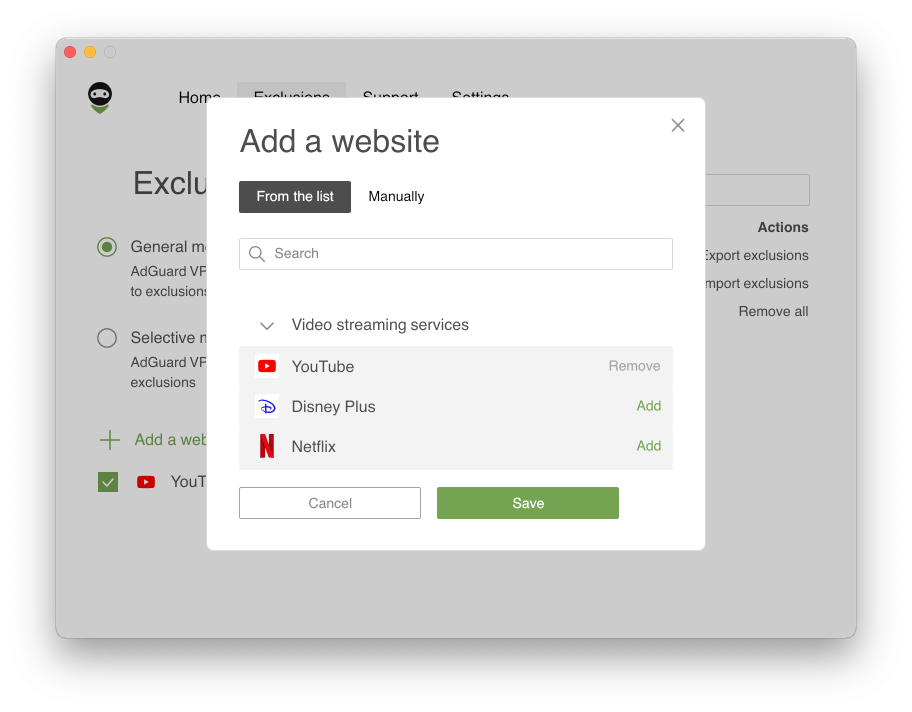
Now you can not only add websites to exclusions but also choose among the lists of popular services divided into eight categories: Social networks, Messengers, Video and Music streaming services, Games, Shopping, Search engines, and Work communication tools.
It also became convenient to configure Exclusion lists:
- added domain and several of its subdomains are grouped within the root, or base domain
- when adding the main domain (
example.com) a mask is added (*.example.com) — previously it had to be added manually, which not everyone knew about
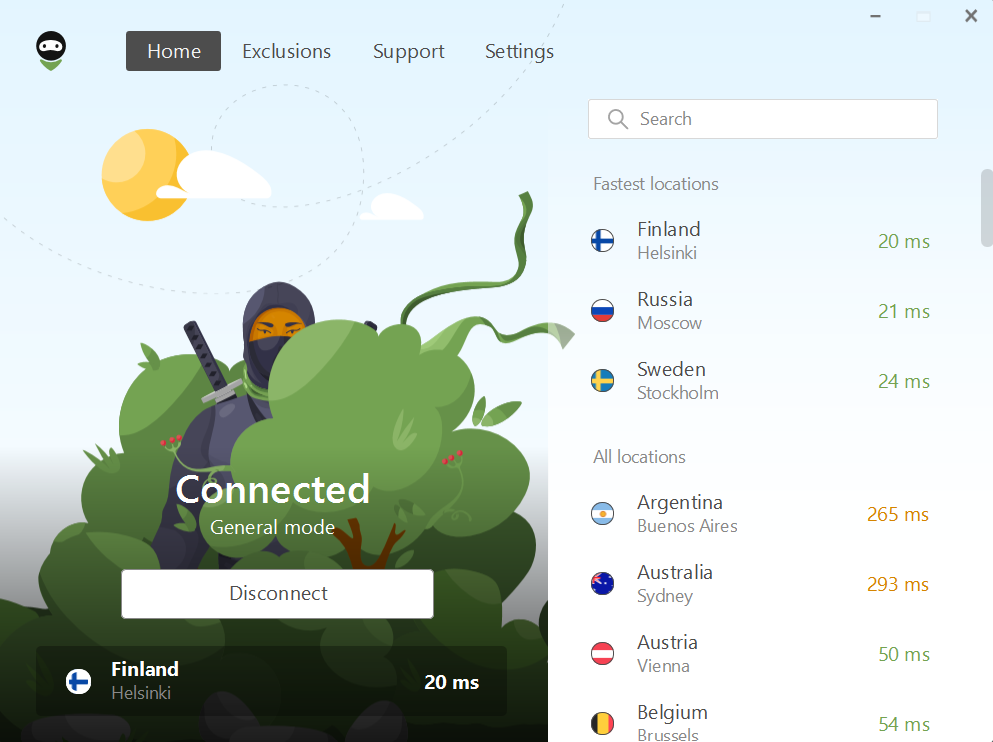
And we also updated the design of the website, apps and extensions, and AdGuard VPN desktop apps managed to get these changes at the end of the year! Tengu is a cutie, isn't he?
What else has changed in AdGuard VPN products over the year
AdGuard VPN for Android: The app is now compatible with Android TV! Simply download AdGuard VPN from Google Play to your smart TV and watch any content of your choice, knowing that your personal data is hidden from your internet provider.
There's also an auto-update feature in the app. If you don't have Google Play installed on your device, AdGuard VPN will keep on updating automatically by connecting to our servers.
Another new notable feature is Auto-protection. With this feature, you don't have to worry anymore whether your connection is secure at the moment. You can enable it for Wi-Fi, mobile networks, or both. Depending on the chosen option, AdGuard VPN will turn on automatically when the device connects to cellular or Wi-Fi networks.
AdGuard VPN for iOS: When you look at the version history it may seem like nothing has happened to the product. However, AdGuard VPN for iOS is one of the most difficult products to develop and requires a lot of effort. The main work we've done this year is hidden “under the hood”: it appeared in improving the app's stability. However, there are some visible changes: custom encrypted DNS servers can now be added to AdGuard VPN and the app can be used in integration with the AdGuard DNS service.
AdGuard VPN for Windows and AdGuard VPN for Mac: There's a reason we combined these two products into one block. The point is that the most tangible changes to both of these products have only recently been introduced in the 2.0 release:
- We’ve added a driver that allows AdGuard to run on ARM-based Windows devices. Whether you have a Windows computer with a 64-bit ARM processor or use virtualization software on your Mac with M1, we’ll automatically detect this and install the right driver.
- The exclusions screen has become more concise. To switch between General and Selective modes, just click Change mode.
- App exclusions are clearer: now you see the tab with the same name instead of the “Split tunneling” tab.
- It is easier to export logs on the Support screen.
- And in Settings, icons and texts are friendlier.
Browser extension: We implemented the ability to add custom DNS servers, improved dark and light themes, and redesigned Exclusions and onboarding.
In addition to all of the above, we implemented the ability to pay with cryptocurrency, added server in Singapore with an Indian IP address, came up with more options for you to get free gigabytes of traffic: through a referral program, for mail confirmation, and for installing AdGuard VPN on another platform. And we've also launched an affiliate program where you can earn money promoting AdGuard products!
AdGuard Ad Blocker
If desktop application developers decided to compete to see who would release the most updates in a year, the AdGuard for Windows team would win. But, as you can imagine, no one arranges such competitions, because it's not about quantity but quality of releases. In this case, all teams are equal.
But since we mentioned AdGuard for Windows, let's first look at what interesting features have appeared in it this year:
Protect from DPI. With this feature, you'll be able to bypass ISP blockers and access the content you want. Read more in this post.
Support for Windows on ARM. We added a driver that allows AdGuard to work on Windows devices with an ARM processor. When installed, AdGuard will automatically recognize your processor and install the right driver — you don't need to do anything.
Filtering encrypted DNS queries. Now AdGuard can filter out encrypted DNS-over-HTTPS requests in addition to regular DNS requests. The function can be found in the Advanced Settings.
Now let's take a look at the track record of AdGuard for Mac. Some of the new features of this product include:
- Export/Import settings feature. MacOS users can now export and import their settings in lists.
- Protect from DPI. It will partially prevent your ISP from detecting the sites you visit, collecting data about you, censoring access to content, or simply eavesdropping on you.
- Improvements to the Filtering log. We've finally added the ability to block or unblock domains directly from the Query Log!
And, of course, we've been updating CoreLibs and DNSLibs more than once throughout the year to make our apps run better and consume less CPU.
“Wait a minute! What about mobile apps?” might ask the attentive reader who hasn't seen a single blog post about AdGuard for Android or AdGuard for iOS all year. Do you think we've abandoned their development? No, it's just that we're preparing something big for you, so we're taking a pause. We can't reveal the veil of secrecy just yet, so we'll just tell you: in spring 2023, everything will change and the dam which was blocking the release path will be broken. Wait for it.
The beginning of a new era for the AdGuard Browser Extension
In the spring of 2022, we released the long-awaited release of AdGuard Browser Extension 4.0, which fundamentally changed the product:
Design update. The overall AdGuard Browser Extension has been redesigned — this can be seen most clearly in the filtering log. The design has been improved not only visually, but also functionally: we switched to responsive (or adaptive) design, whose elements adjust to screen size.
Code refactoring and TSUrlFilter. Refactoring has become sort of a buzzword that implies massive code rewriting, which we did to complicate our lives but make them easier in the long run. Besides, we added support for TSUrlFilter, our new filtering platform that implements AdGuard content-blocking rules.
AdGuard Shows and Explains
Our mission is to protect users from ads, trackers, and identity theft not only through our products, but also through our information. This year we've published a record number of blog articles with in-depth analysis of industry news and various topics related to online privacy.
We did it all with one goal in mind: to let you know which companies are abusing your data and using it for their own gain, and where they have set traps that you might not have noticed.
In 2022, we covered a lot of industry news. Here are some links to interesting articles you may have missed:
If you think your data is safer with big corps, you’re wrong: The story of Lapsus$ hacker group. The hacker group Lapsus$ has been causing quite a stir lately: among the affected companies are NVIDIA, Samsung, Microsoft, and others. We're telling the story of teenage hackers and analyzing how their attacks will affect users.
When less is more: How the oversharing epidemic gave rise to digital identity theft. The tendency to over-share information on the Internet is being exploited by attackers for their own purposes. How do you keep yourself safe?
Google will cough up $392mn for misleading users about geo-tracking. It says all is in the past. Should we believe it?. Google will pay $392 million for deceiving users. Will this force the company to get back on track?
Or dive straight into our in-depth articles recap. If you make it to the end, you’ll be rewarded with a digital hygiene cheat sheet that we have compiled for you!
Another achievement of this year is the release of 11 animated videos, in which we tried to tell in the most simple and interesting way not only about our products, but also about various internet threats against which they protect. All of them are published on our YouTube channel.
Bottom line
We've done a lot of important things during the year: upgraded our existing products, created a new one, prepared the ground for future development... But none of this would be possible without the AdGuard community: our users, volunteers and enthusiasts! Our thanks, hugs, and best wishes go out to you.
We wish you a Happy New Year! May 2023 be only generous with pleasant surprises. And we'll continue to be by your side to keep your online life free of ads, trackers, and dangers.
Love, AdGuard 💚




















































