Network
This article covers AdGuard for Windows, a multifunctional ad blocker that protects your device at the system level. To see how it works, download the AdGuard app
The Network module is dedicated to network filtering, and here you will find additional network-related options. Two of them are enabled by default: Enable traffic filtering and Filter HTTPS. These are important extra precautions to better filter your web space. Most websites are now using HTTPS, and the same applies to advertising. From many websites, like youtube.com, facebook.com, and x.com, it is impossible to remove ads without HTTPS filtering. So keep the Filter HTTPS feature enabled unless you have a strong reason not to.
In this module you can select the checkbox Use AdGuard as an HTTP proxy to use AdGuard as a regular HTTP proxy which will filter all traffic passing through it. You can also enable the Filter websites with EV certificates feature. Extended Validation (EV) SSL Certificates offer a stronger safety guarantee; owners of such websites have to pass a thorough and globally standardized identity verification process defined by EV guidelines. Which is the reason why some users trust websites with such certificates and prefer not to filter them.
At last, there is a section with proxy settings. There you can specify which proxy server AdGuard should use to update filters, get new versions, and so on.
Enable traffic filtering
Traffic filtering is the core mechanism that allows AdGuard to inspect and control the network traffic generated by applications on your computer. When it is enabled, AdGuard intercepts outgoing and incoming connections and checks them against its filtering rules. If a request matches a blocking rule, AdGuard can block it, modify it, or allow it depending on the configuration. In AdGuard for Windows, this interception is implemented through network drivers.
If HTTPS filtering is enabled, AdGuard performs a controlled local TLS interception: it decrypts the traffic using its local certificate, applies filtering rules, and then re-encrypts the traffic before sending it to the browser. The driver simply provides the system-level access needed for AdGuard to intercept these connections.
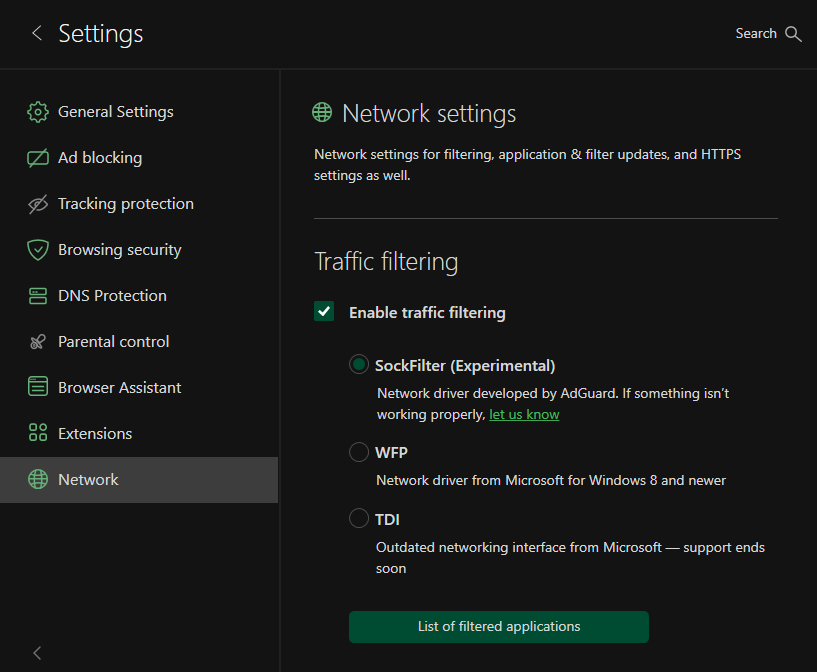
In Network, you can also enable traffic filtering and choose which driver to use: SockFilter, WFP, or TDI.
SockFilter
SockFilter is an experimental, lightweight kernel-mode network driver that works at the socket level (TCP/UDP). Instead of inspecting or modifying packets as they travel through the full Windows networking stack, a sock filter intercepts socket calls (e.g., connect, send, receive, bind) at a higher, more stable abstraction level. This makes it ideal for applications that need to monitor or control network activity without deep packet processing.
SockFilter was first implemented in version 7.22.4, and it is still considered unstable — you may encounter bugs. Once fully tested and implemented, SockFilter has the potential to offer several advantages over other drivers:
- It operates at a higher, socket-level layer: SockFilter works with socket operations rather than raw packets, making it less complex and more stable than WFP’s low-level packet filtering.
- No interference with other network drivers: Because it sits above VPN, firewall, and antivirus WFP filters, it avoids filter-ordering problems and compatibility conflicts common in the WFP stack.
- Greatly reduced risk of NETIO-related BSODs: SockFilter doesn’t run inside the NETIO packet pipeline, so it avoids the typical crash scenarios caused by WFP callouts mishandling buffers, classification results, or packet memory.
When it comes to disadvantages, SockFilter driver sees only socket-level operations and does not capture traffic generated by other kernel drivers or components that bypass the standard Winsock API. From a low-level networking perspective, this can be viewed as a limitation, since the driver cannot access raw packets or inspect non-socket traffic. However, for an ad-blocking application, this behavior is not just acceptable but optimal. All relevant traffic from browsers and user-mode applications goes through standard sockets, and that’s exactly what we need to control. At the same time, ignoring low-level driver traffic removes unnecessary complexity, avoids compatibility issues, and keeps the system stable.
WFP
WFP (Windows Filtering Platform) is a Microsoft networking framework built into Windows that allows software to filter and monitor network packets at different layers of the system networking stack. AdGuard uses WFP to safely hook into the network flow of applications and apply filtering rules before the traffic reaches the browser or the Internet. More information.
While it is a powerful driver, it may present stability risks, such as occasional system crashes (BSOD) and lower Internet speed for some users.
TDI
The TDI driver is also available, but it is outdated and may cause filtering issues in some versions of Google Chrome. A temporary workaround exists, but it’s not a reliable long-term solution.
AdGuard VPN
The last section is dedicated to AdGuard VPN — an ideal tool that provides security and anonymity each time you browse the Internet. You can download it by clicking the Download button or go to the AdGuard VPN website by clicking the Homepage button.
How does AdGuard VPN work? Without going into technical details, we can say that VPN creates a secure encrypted tunnel between the user's computer or mobile device and a remote VPN server. In this way, data privacy is preserved, as well as the anonymity of the user, because a third-party observer sees the IP address of the VPN server and not the actual user's IP.
What AdGuard VPN does:
- hides your real whereabouts and helps you stay anonymous
- changes your IP address to protect your data from tracking
- encrypts your traffic to make it unreadable to third parties
- lets you configure where to use VPN and where not to (exclusions feature)
To get more information about AdGuard VPN, dive into the AdGuard VPN Knowledge Base.