Rozšíření Safari
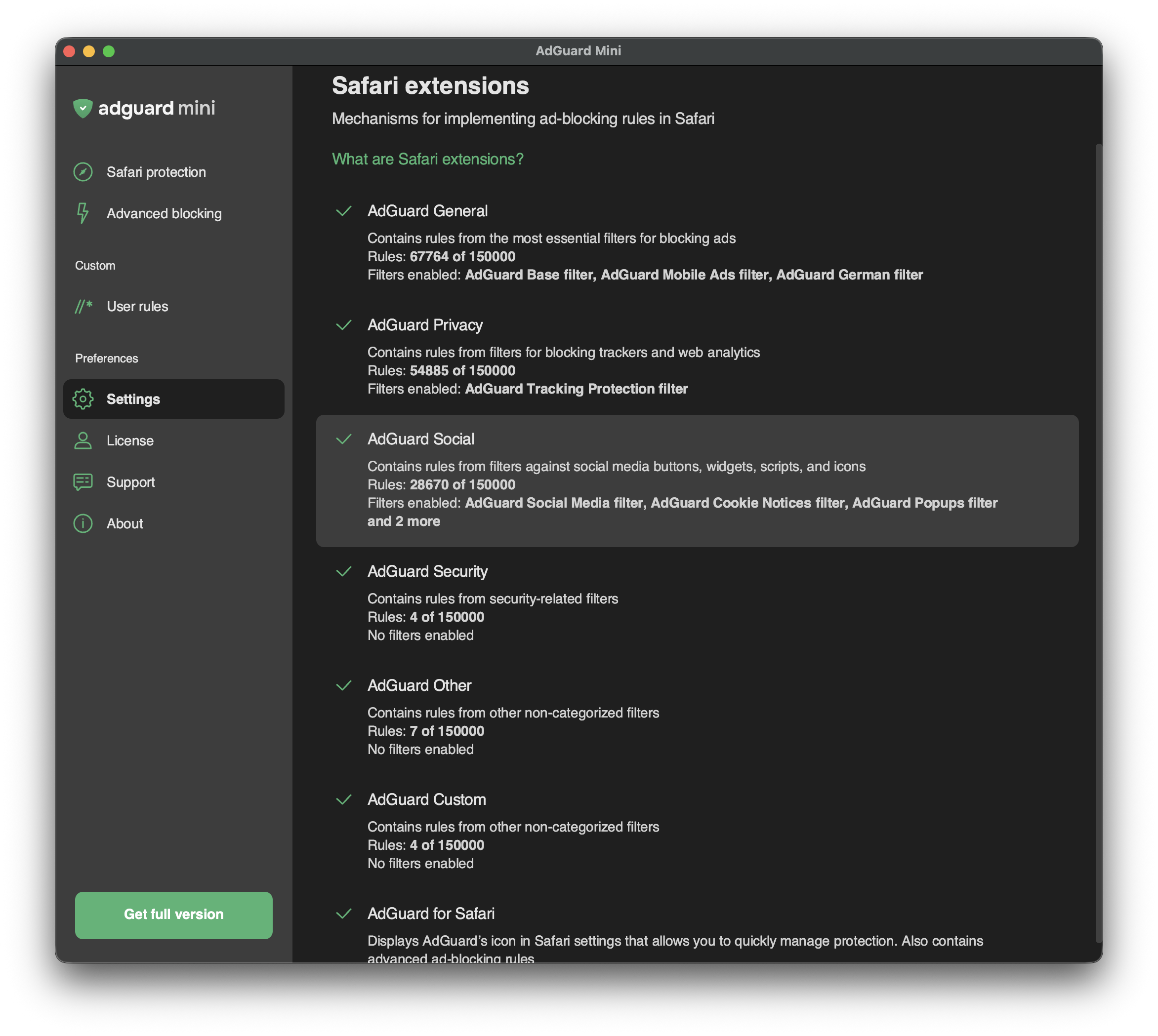
Rozšíření Safari jsou mechanismy, které umožňují implementovat blokátory obsahu — tématické shluky filtrů. Například filtry související se soukromím jsou zahrnuty v blokátoru obsahu pod odpovídajícím názvem — AdGuard Privacy.
Blokátory obsahu byly navrženy ze dvou důvodů: pro strukturování filtrů a pro splnění omezení společnosti Apple.
V roce 2019 společnost Apple omezila blokátory reklam pro Safari tak, že mohou současně používat pouze 50 000 pravidel filtrování. Protože tento počet nestačí k tomu, aby blokátor reklam poskytoval dobrou kvalitu filtrování (samotný AdGuard Base Filter má 30000 pravidel filtrování), rozdělili jsme AdGuard pro Safari do šesti blokátorů obsahu, z nichž každý obsahuje až 50000 pravidel.
V roce 2022 společnost Apple zvýšila limit pravidel filtrování pro každý blokátor obsahu na 150 000 současně aplikovaných pravidel. Pokud jde o AdGuard Mini pro Mac, lze povolit až 900 000 pravidel pro všech šest blokátorů obsahu.
Zatímco limit byl zvýšen, struktura blokátorů obsahu zůstala stejná.
V Rozšířeních pro Safari můžete vidět, které blokátory obsahu jsou povoleny, kolik pravidel každý z nich používá a které filtrování funguje.
Povolené filtry můžete spravovat v Nastavení → Filtry. V Rozšířeních pro Safari můžete vidět pouze seznam povolených filtrů a počet povolených pravidel.
Seznam rozšíření Safari AdGuard Mini
AdGuard – General
AdGuard – General je blokátor obsahu, který kombinuje nejdůležitější filtry pro blokování reklam. Doporučujeme ponechat AdGuard Base Filter vždy zapnutý.
AdGuard – Privacy
Tento blokátor obsahu je hlavním nástrojem proti čítačům a dalším nástrojům webové analytiky. Ve výchozím nastavení je povolen filtr AdGuard ochrana sledování.
AdGuard – Social
AdGuard – Social obsahuje filtry proti tlačítkům, widgetům, skriptům a ikonám sociálních médií. V této části najdete také další filtry obtěžování: filtry proti vyskakovacím oknům, bannerům, upozorněním na soubory cookies a další. Chcete-li je povolit, najděte Widgety sociálních sítí v Nastavení → Filtry.
AdGuard – Security
Tento blokátor obsahu spojuje několik filtrů souvisejících se zabezpečením. Blokování domén s malwarem blokuje domény, které jsou známé šířením malwaru a spywaru. Spam404 vás chrání před podvodníky a internetu. NoCoin Filter List blokuje těžbu kryptoměn v prohlížeči, například Coinhive.
AdGuard – Other
AdGuard – Other obsahuje filtry s různými funkcemi. Má například filtr, který odblokovává reklamy ve vyhledávání a sebepropagaci. V některých případech pomáhá najít přesně to, co hledáte, protože tyto druhy reklam jsou relevantnější a méně vtíravé než jiné.
Nemáme žádné “přijatelné reklamy” placené inzerenty. Místo toho uživatelům poskytujeme možnost vidět reklamy ve vyhledávání a vlastní propagaci webových stránek.
AdGuard – Custom
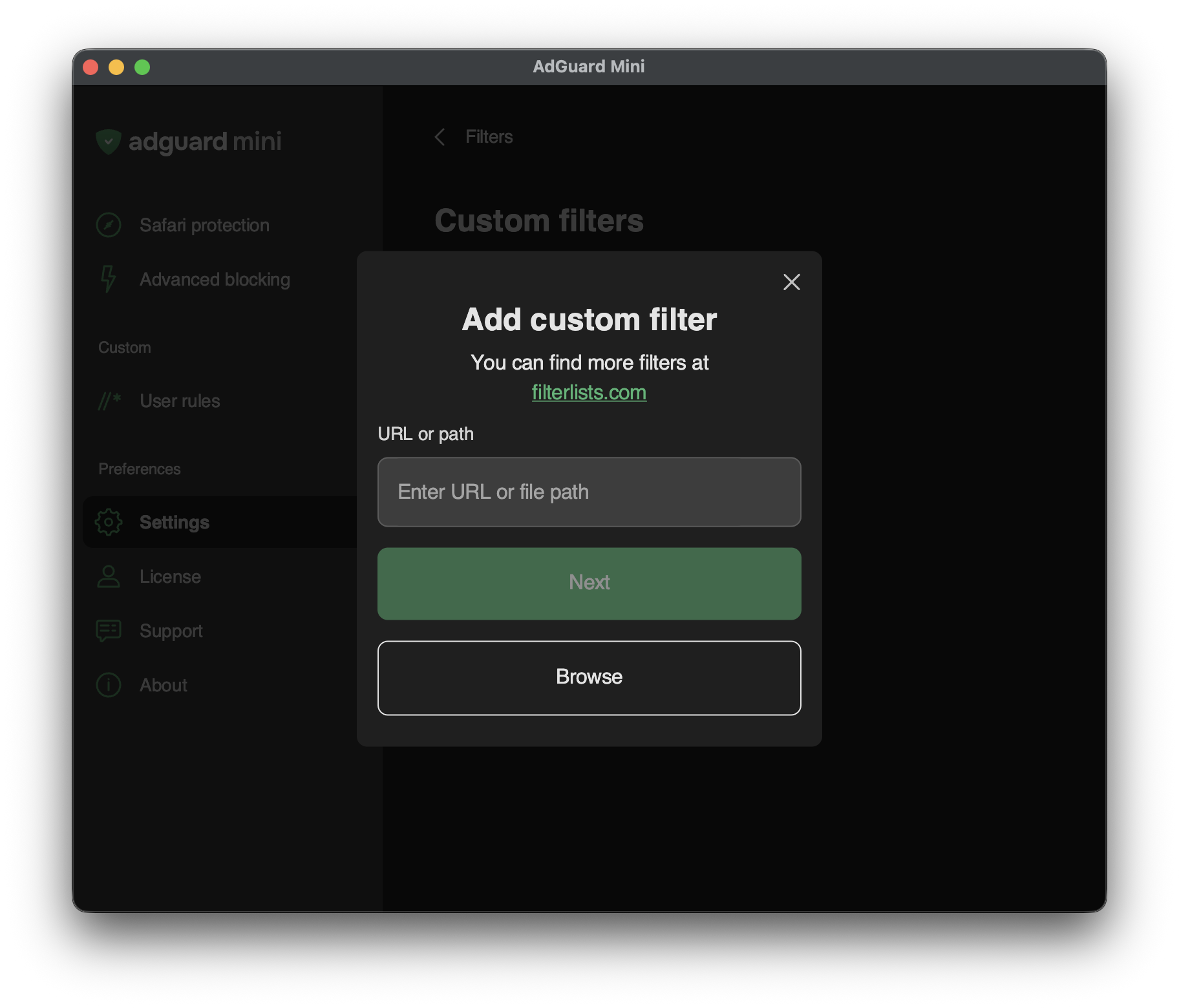
Pokud potřebujete další filtry, můžete je přidat do sekce AdGuard – Custom.
Chcete-li přidat vlastní filtr, přejděte do Nastavení → Filtry → Vlastní filtry a do příslušného pole zadejte URL nebo cestu k lokálnímu souboru. Nové filtry najdete na filterlists.com.