Reflecting on 2024: Progress, growth, and ambition
Yes, it’s that time of the year again — time to reflect on everything we’ve accomplished and why we do it in the first place. AdGuard exists because of you, our users. Our mission has always been to make your online life safer, simpler, and ad-free.
This year, we continued to protect you from intrusive ads, relentless trackers, phishing threats, and greedy corporations. While we may not have checked off every single item on our to-do list, we made significant strides in delivering products, features, and updates.
In this post, we’ll highlight our achievements, big and small, in 2024.
New products
We’re not just improving what we already have — we’re also expanding into new areas where we can bring our privacy expertise. And we continue to bring AdGuard to other platforms so that more users can experience what AdGuard has to offer. This year we launched a privacy-focused email management tool and introduced AdGuard VPN for Linux users.
Keeping your inbox clean
AdGuard Temp Mail graduated from a beta version to a full-fledged temp mail service, helping you maintain privacy and keep spam out of your inbox. Want to get a promo code or test a product without sharing your real email address? AdGuard Temp Mail is a way to go.
By the end of the year, we introduced AdGuard Mail. It’s the next evolutionary step for AdGuard Temp Mail, combining aliases and temporary email addresses into a single service. You can use it for one-time interactions, receiving newsletters, or even sharing it with friends — without revealing your real email address. AdGuard Mail ensures that emails sent to these aliases are forwarded to the right place.

Curious about the tech behind it? Dive into our story on creating a secure HTML email renderer. Be warned, though — it’s a long and detailed tale that will appeal most to those deeply interested in email privacy.
Welcoming Linux users
Linux enjoyers, we heard you. This year, we released AdGuard VPN CLI. The command-line interface (CLI) version of AdGuard VPN is not only available for Linux but also works on macOS, MIPS, and ARM routers.
To simplify navigation through complex and often lengthy commands, we added an autocomplete feature. And for those familiar with other AdGuard VPN products, you’ll be glad to find the beloved Exclusions feature here as well.

Manifest V3 is finally and irreversibly here
In 2019, Google Chrome announced major changes to its browser extensions platform, introducing the “Manifest V3 API.” Since then, we’ve gone through an emotional journey — from initial shock to acceptance (but never despair!). Despite the limitations posed by this new API, we successfully adapted our Ad Blocker to function under these new conditions. In the end, Manifest V3 offers a unified cross-browser platform, which is a good thing.
So, is our MV3 extension effective? Absolutely. Most users won’t notice any operational differences. It continues to block ads and trackers, while seamlessly handling social widgets, banners, and video ads. To address the API’s limitations on the number of filtering rules, we introduced innovative solutions like the AdGuard Quick Fixes filter — it uses dynamic rules to make adjustments in real time without eating into the user’s dynamic rule limit.
Our journey through this transition, along with detailed insights into the MV3 extension, is vividly chronicled in our blog.
While expanding our range of products, we didn’t forget the existing ones. Dive in to learn what new features we have in AdGuard Ad Blocker, AdGuard VPN, and AdGuard DNS.
AdGuard Ad Blocker: What’s new?
There is perfection somewhere, but for now we’re just striving for it. Here is just the short list of improvements in our Ad Blocker:
Differential filter updates: Available in Browser Extension and AdGuard for Mac (more later!), this feature ensures that only the changes in filter lists are downloaded. It saves bandwidth and keeps your protection up-to-date.
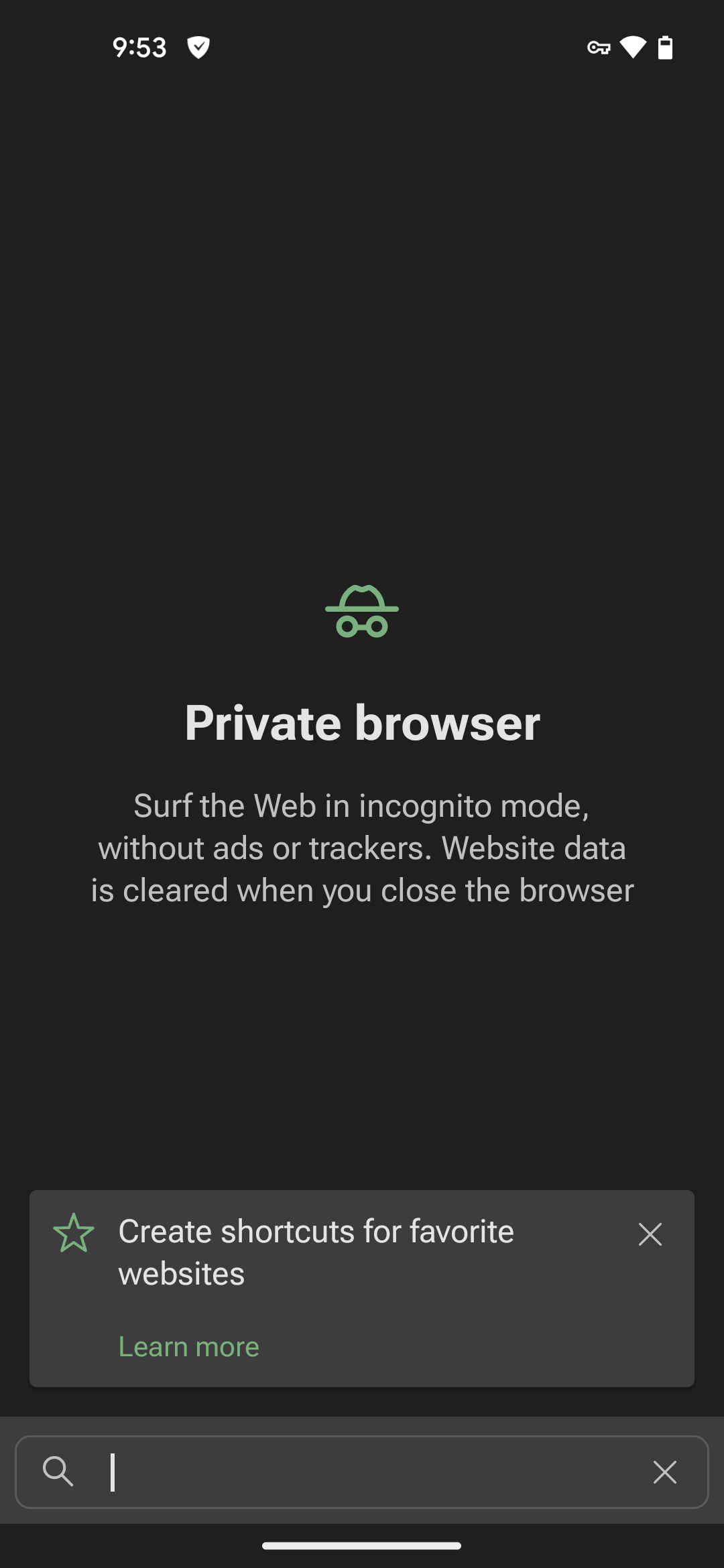
Private browser: A built-in browser in AdGuard for Android blocks ads and trackers, providing a safer alternative to Incognito mode.
Post-quantum cryptography: If a filtered app or browser uses cutting-edge encryption methods, AdGuard now matches their level, ensuring that even a quantum computer can’t decrypt your traffic. Coming soon to AdGuard VPN!
On-the-fly DoH connection filtering: Now we can filter DNS requests in browsers without sending them to an unencrypted server. This feature is currently available in AdGuard for Windows and AdGuard for Android.
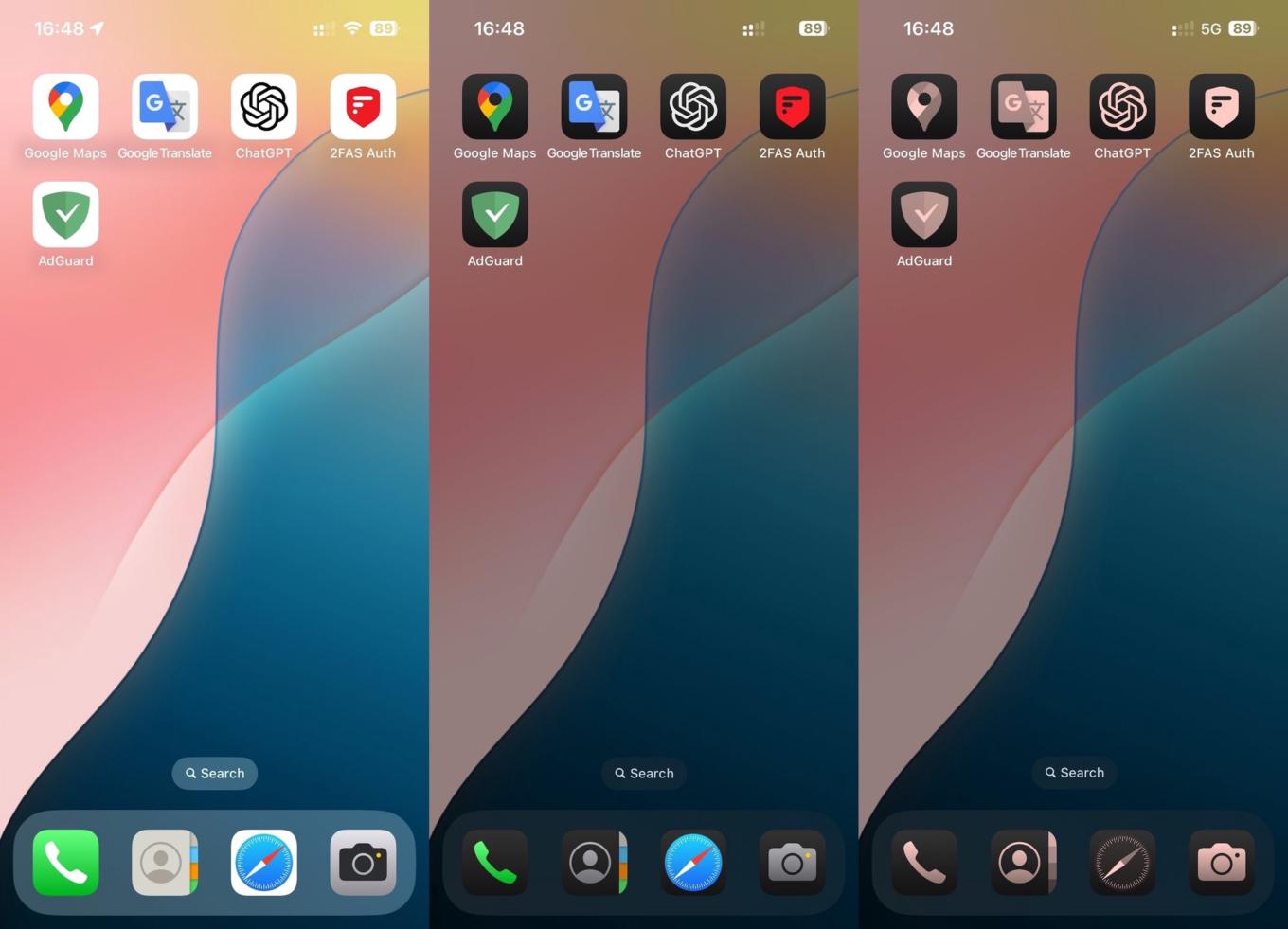
Colorful AdGuard icons on iOS: A small visual delight rather than a technical feature, but worth mentioning. iOS 18 allows for customizable icons, so we’ve added tailored Light, Dark, and Tinted options.
Glow-up for AdGuard VPN
AdGuard VPN has undergone some design and UX changes to make your digital journeys more pleasing. Just to name a few:
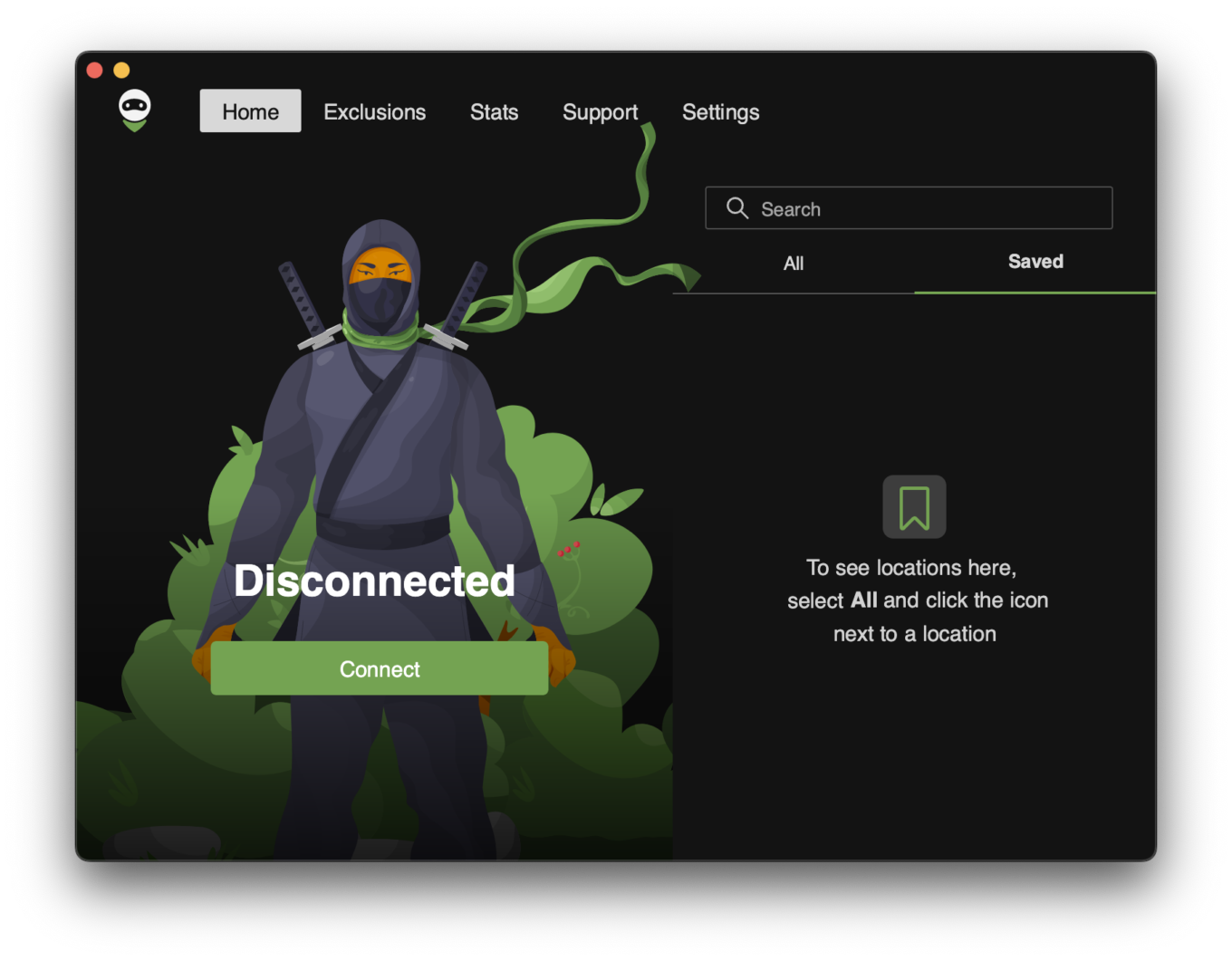
- Saved locations in desktop VPN apps: It’s finally here! You can now save your favorite VPN locations for quick access. No more endless scrolling or typing to connect.
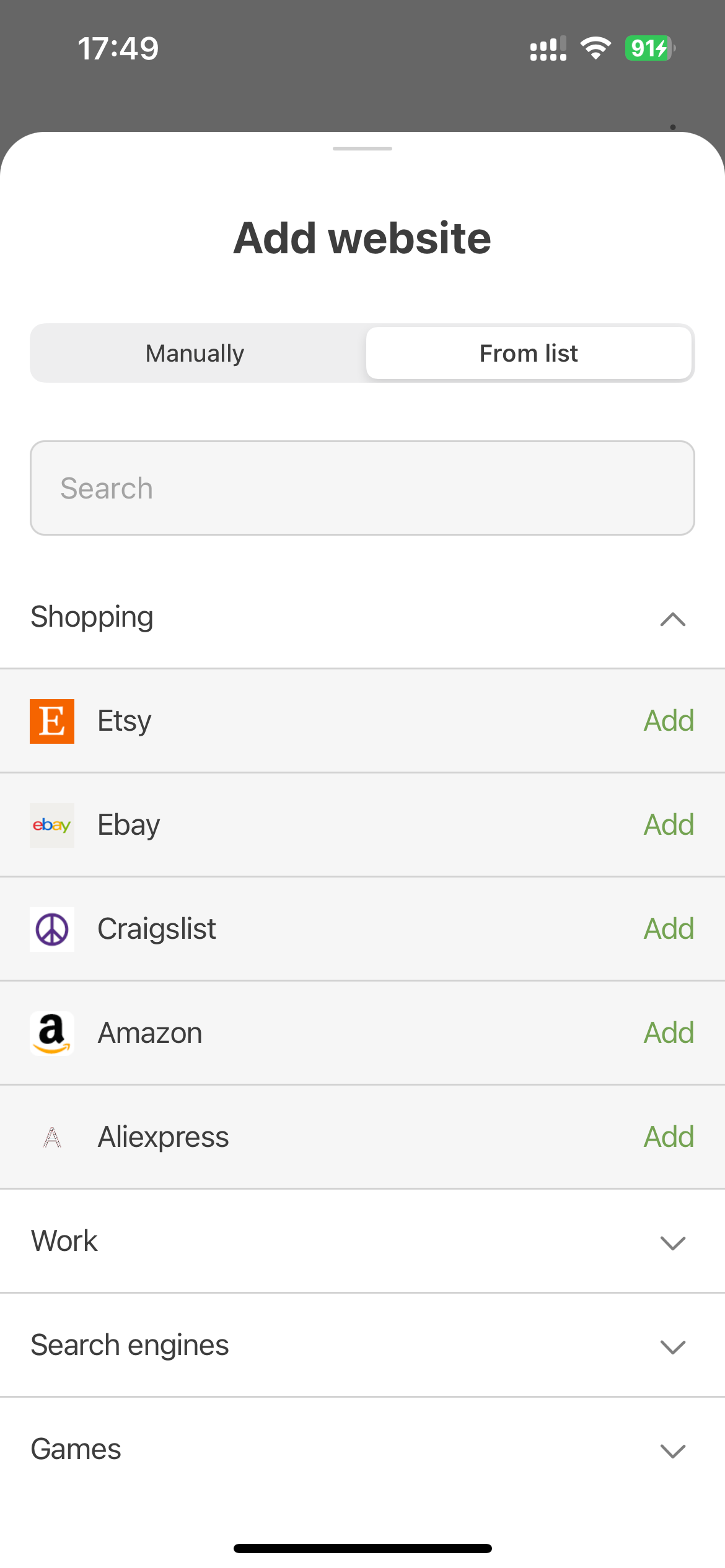
- Streamlined Exclusions in AdGuard VPN for iOS: If you haven’t tried the Exclusions feature yet, now’s the perfect time. We’ve added a list of popular domains for easier setup — just select the ones where you want VPN to be active or inactive. Adding and managing domain exclusions is now simpler, too.
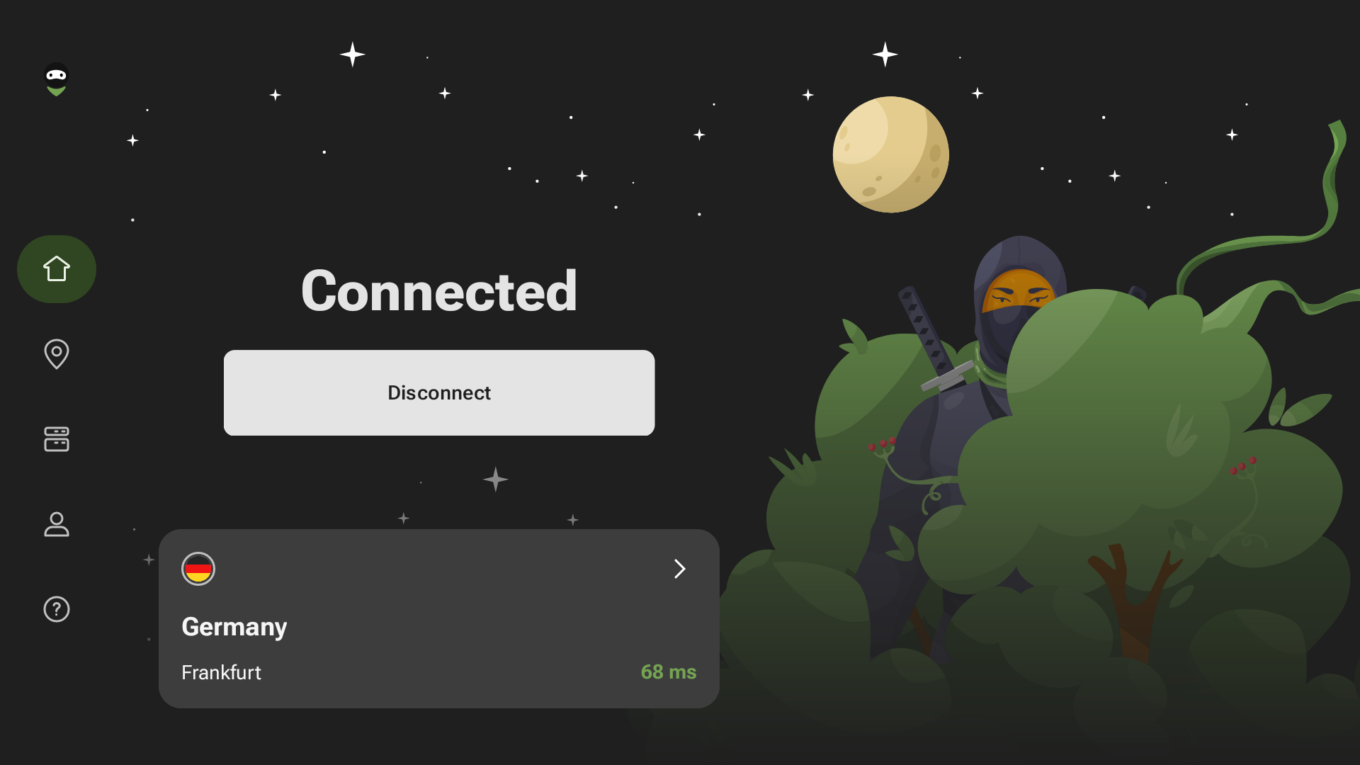
- Revamped AdGuard VPN for Android TV: The app’s interface is now smoother and more intuitive. It features a consistent color scheme across AdGuard VPN apps for all platforms, making navigation easier and more familiar. Plus, color-coded ping indicators help you assess connection quality and choose the best server.
AdGuard DNS upgrades
AdGuard DNS has had a standout year, receiving powerful updates that are both innovative and practical. Some features are industry-first, while others make the service even more accessible to a broader audience.
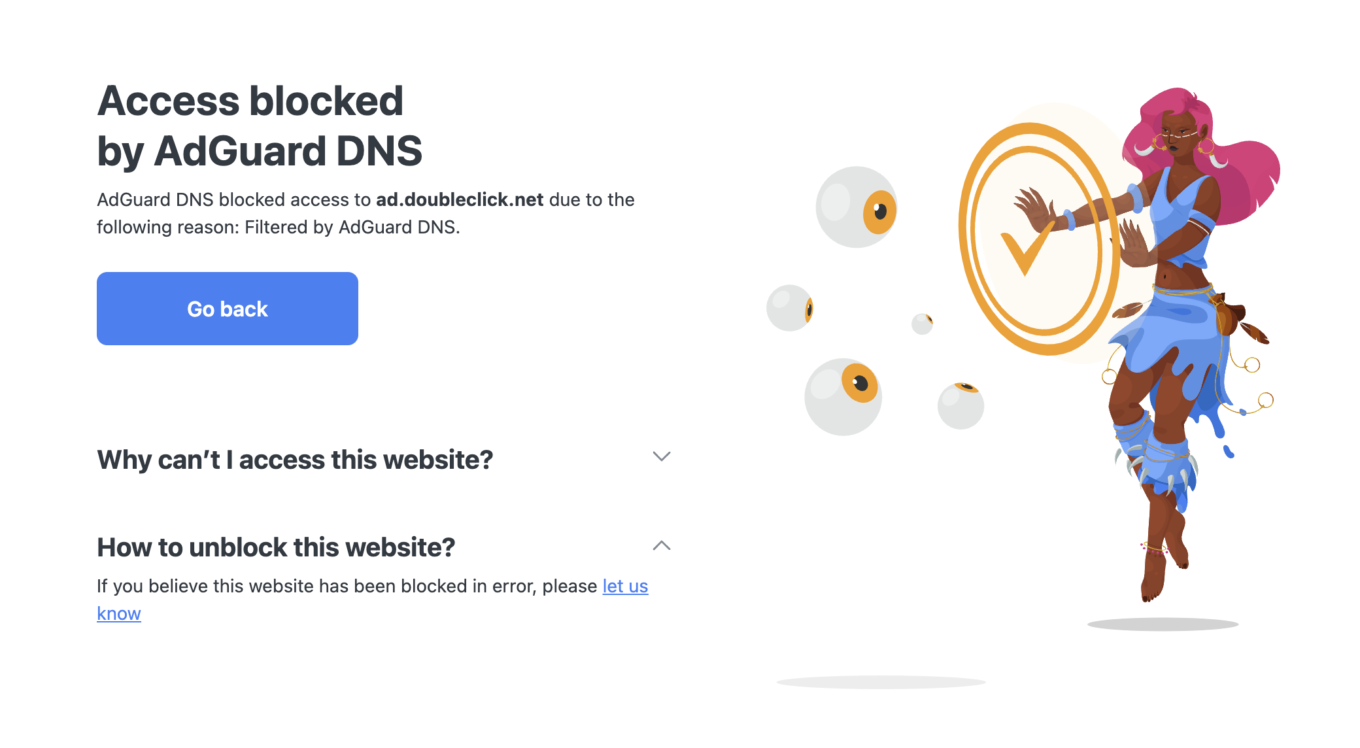
Let’s start with the big one. AdGuard DNS became the first public DNS resolver to support Structured DNS Errors (SDE). Why is this a big deal?
When a website is blocked at the DNS level, users typically see vague messages like “This site can’t be reached” or “No Internet connection.” These don’t clarify the reason for the block. Traditionally, DNS servers could redirect users to an explanation page, but websites using HTTPS (the majority) require individual certificates, making this method impractical.
SDE simplifies the process by adding detailed information, like the reason for blocking, the entity responsible, and contact details, is sent in the DNS response.
This extra info helps users make a more informed decision about what to do next — and hopefully, prevents them from just switching to an insecure DNS resolver out of frustration.
Currently, browsers don’t support SDE. To demonstrate its potential, we’ve created a demo extension. You can try it out from the Chrome Web Store or from GitHub.
A step towards our goal of a safer Internet for everyone is the AdGuard DNS Client, designed for devices that don’t support encrypted DNS. Devices connected via the client will appear on your dashboard, where you can customize filtering and view detailed statistics.
Is it possible to make a privacy-oriented product even more secure? Well, yes. Please welcome DNS-over-HTTPS with authentication: this feature restricts access to authorized users only and, as a result, enhances security.
And what if you manage a network with a large number of devices? It would be nice to have an easy way to configure them all that doesn’t require a lot of manual steps. And we indeed made it easy for you by adding an automatic device connection feature.
Guides and tips
We don’t just develop features; we help you make the most of them. We believe in empowering users with knowledge and tools to take control of their online privacy.
Learn how AdGuard protects you from phishing and malware and which settings to enable
Use AdGuard as parental control for your kids — or even for your own productivity
Now we will step away from our products for a while and concentrate on broader topics. After all, AdGuard doesn’t exist in a vacuum — we’re part of an industry and a global community that constantly evolves. This year brought some notable events and developments that deserve a place in our recap.
Ad-Filtering Dev Summit 2024
To be honest, it was our first time as a co-host, organizing an international event of this scale, and while the task seemed daunting at first, collaboration made it not only achievable but also thoroughly rewarding.

The summit took place over two days at eyeo’s Berlin office and was designed with a highly technical focus based on feedback from previous years. We chose five themes to focus on:
- Ad filtering beyond traditional media
- Blockchain-based advertising and Web3 privacy challenges
- The final stages of the Manifest V3 transition
- Privacy issues related to casual interaction with AI
- New tools for filter list development
Wanna see what the best people in the industry have to say? Check out eyeo’s YouTube channel. For our impressions from the event, visit our blog.
Learning more
To create the best products, we stay connected with what users need. And how to know what they need? Ask them directly.
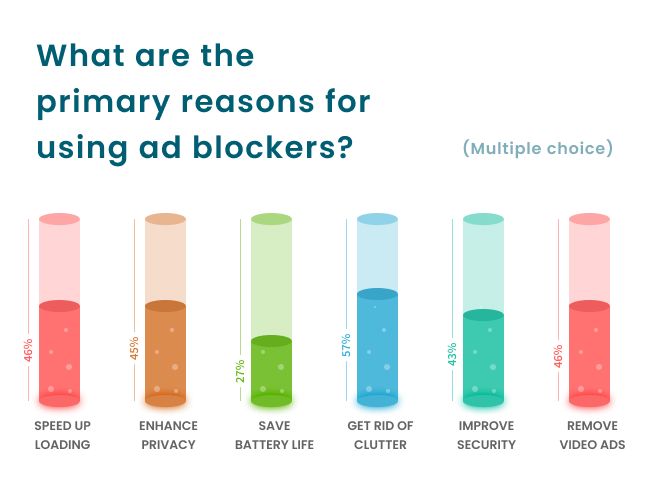
This year, we conducted several surveys and researches to better understand what users think on ads, privacy, and online security.
For example, one survey revealed that while many users are open to paying for ad-free content, the majority still trust their ad blockers to do the job. Privacy concerns are a key driver here — users aren’t just blocking ads; they’re taking back control of their online space from invasive advertisers.
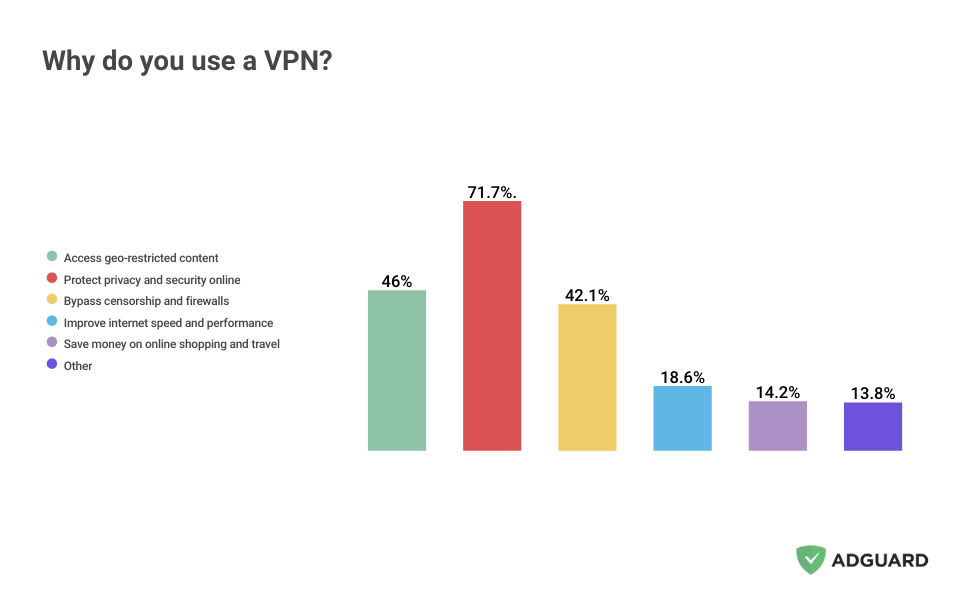
Another survey highlighted the versatility of VPNs. Beyond enhancing online privacy and security, they are vital tools for bypassing censorship, accessing geo-restricted content, and even improving Internet speed in some cases.
And as part of our unofficial tradition, we’ve put together an annual report on ad trackers that examines how the global tracking landscape has evolved over the past year. For now, this is just a sneak peek — stay tuned for the in-depth analysis! But one thing is clear — globally, ad trackers now account for 7.84% of all web traffic, an increase from 2023, and the trend is worrying. For more info, check out the full article.
Sharing insights
More and more online media are rolling out a ‘pay or consent’ model, where readers must pay to avoid personalized ads — or accept tracking in exchange for free access. We took a closer look at how this model works in several UK newspapers. While the details vary, the core question remains: is paying just to avoid being targeted a fair trade? We think not — especially when a completely ad-free experience isn’t even an option.
Another thing that caught our attention is the hypothetical breakup of Google. If the ruling of the US Justice Department goes into power, there’s a very real possibility that Google could face a major reshaping, with one or more of its core parts severed. We shared our insights on what might happen next.
Industry news
At AdGuard, we don’t just focus on our own products — we actively monitor industry developments and trends to understand the broader landscape. And there were a few major themes and players that have been on our radar.
Ads invading new spaces
One trend became particularly evident: Ads are becoming harder to avoid and popping up in unexpected places. From AI-powered search engines like Perplexity AI, which have started displaying ads, to platforms like Discord, known for being ad-free but now incorporating advertisements, the shift is unmistakable. Even external devices aren’t safe — Roku TVs now show ads that invade your privacy, including when using connected devices like gaming consoles. Another once ad-free place — Windows Start menu is now sporting ads as well: Microsoft has apparently decided to squeeze a few more droplets of money out of its operating system.
While ads continue to crawl into new spaces, one thing remains constant: AdGuard will always keep them away.
Encrypted ClientHello solves censorship or not really?
Encrypted ClientHello promises to make your browsing more private by hiding your online activity from prying eyes — but some countries with tight censorship are already blocking it, seeing it as a way to bypass restrictions. But it actually never was meant for bypassing restrictions — it’s a tool that reduces the visibility of what users are doing online, making it harder for third parties like ISPs and censors to track their activity. At the end of the day, ECH is a good mechanism, but it’s not a silver bullet. It was never designed to, and won’t, guarantee your privacy.
Mozilla: A questionable path
Mozilla, a name once synonymous with privacy, has had a year filled with both commendable actions and decisions that raised serious questions. It started with the acquisition of an ad metrics company, a move that immediately sparked debates about whether Mozilla was shifting its priorities. Soon after, they introduced Privacy-Preserving Attribution (PPA): a feature designed to help advertisers track ad performance. While marketed as privacy-friendly, its default activation left many questioning Mozilla’s commitment to putting user privacy above profit. AdGuard’s response is harsh and ruthless: to block PPA completely.
Next thing, Mozilla took steps to improve transparency by removing the Adjust SDK from its browser. However, this move felt more reactive than proactive, especially given the simultaneous continuation of PPA.
As Mozilla ventures further into ad-tech, its actions suggest an attempt to reshape the advertising landscape in a way that aligns with its privacy ethos. Yet it leaves us wondering whether the company can truly maintain its privacy-first reputation while navigating the world of advertising.
YouTube: Ad blocking under fire
YouTube’s ongoing battle against ad blockers intensified last year, but AdGuard has held its ground. Despite YouTube’s crackdown on third-party ad blockers, AdGuard apps remained unaffected. However, YouTube hasn’t stopped pushing the boundaries with new ad formats and technical methods for ad injection.
From pause ads, which interrupt your experience during video breaks, to server-side ad insertion, which makes it harder for traditional ad blockers to filter ads, the platform is doubling down on ad visibility. Even paying for a Premium plan no longer guarantees an ad-free experience — YouTube’s revived Premium Lite plan promises “limited ads” for both YouTube and YouTube Kids videos instead of a full-on YouTube ad experience.
As YouTube continues to innovate in ad delivery, AdGuard remains committed to adapting and making sure you watch videos uninterrupted.
Google: Privacy vs. profit
Google’s actions this year highlighted the persistent conflict between its profit-driven model and user privacy. While there was a small win for transparency — a lawsuit forced Google to update its Incognito mode disclaimer, admitting that it doesn’t provide true privacy — the negatives outweighed the positives.
A study revealed alarming gaps in Google’s vetting process for Chrome extensions, exposing over 346 million users to extensions containing malware, privacy violations, and security flaws. This lack of oversight leaves users vulnerable to threats despite Google’s claims of stringent review processes.
Google’s efforts to reduce cross-site tracking haven’t been convincing either. Its replacement for third-party cookies, the Protected Audiences API, has failed to satisfy both privacy advocates and advertisers. Fortunately, AdGuard blocks both the Protected Audiences API and third-party cookies, ensuring users stay protected while Google continues to grapple with balancing privacy and profit.
Challenges of a restricted Internet
At AdGuard, we believe unrestricted access to information is a basic human right. Here are the cases of censorship and restrictions that we’ve been talking about this year:
Discord blocked: In countries like Turkey and Russia, access to Discord has been restricted.
VPN bans in Turkey and Brazil: Governments have stepped up their crackdown on VPN services, and although the situation in Brazil has calmed down, the trend towards VPN bans is visible.
Reddit is getting serious about blocking unlogged VPN users from accessing its website via browser.
Possible TikTok ban in the US: As talks of a nationwide ban continue, the need for unrestricted Internet access grows.
Looking ahead to 2025
As we look at our plans from last year, we can proudly say that we have accomplished most of them. So here is our plan for 2025:
- AdGuard v8.0 for Windows: A long-awaited major release packed with surprises.
- AdGuard for Linux: Expanding our ad-blocking solutions to new platforms.
- Сompletely reworked products: AdGuard Content Blocker and AdGuard for Safari have been quietly working behind the scenes this year, but that’s about to change! Expect some groundbreaking updates.
- Open-sourcing our VPN protocol: It’s taking us a while, but we want to do it right. Our goal is to make the VPN client and server code available so you can create your own fully-featured VPN service on any platform.
To reveal all our plans would be bad luck, so we’ll leave you with a teaser: brand new and quite surprising products are currently in the works, but tss... You didn’t hear it from us!
Thank you for being with us this year. Here’s to another year of making the Internet a better place!
Stay safe, and see you in 2025 💚




















































