AdGuard year recap: the best moments of 2023
We at AdGuard love the hustle and bustle of Christmas: the usual development routine is joined by the cheerful twinkling of lights and the scent of pine. Of course, the bugs and deadlines don't go away, but the magic in the air helps us tackle the tasks left for the end of the year.
Reflecting on the year past has become one of our most cherished holiday traditions. This process is like piecing together a diverse jigsaw puzzle, each part contributing to the overall tapestry of the year's experiences. We warmly invite you to join us in appreciating the intricate beauty of this collective picture, as we look back on the journey that brought us here.
The past year was a very busy one: we significantly redesigned Ad Blocker mobile apps and added a lot of new features to other products, hosted and spoke at Ad-Filtering Dev Summit together with eyeo, wrote about topical privacy issues on the blog and did a lot for AdGuard users and filter developers.
But let's take it one step at a time.
New AdGuard for Android
We’ve been working on AdGuard v4.0 for Android for almost three years! In short, we redesigned everything: code, structure, design, texts. The app became faster and more stable, new features were added, and the old ones became clearer. We wrote a lot about this update on the blog: talked about the evolution of the app in the release post and published a series of articles to help you understand the new features and find the old ones.
Still, we can't resist reminding you at least briefly about the changes in AdGuard v4.0 for Android:
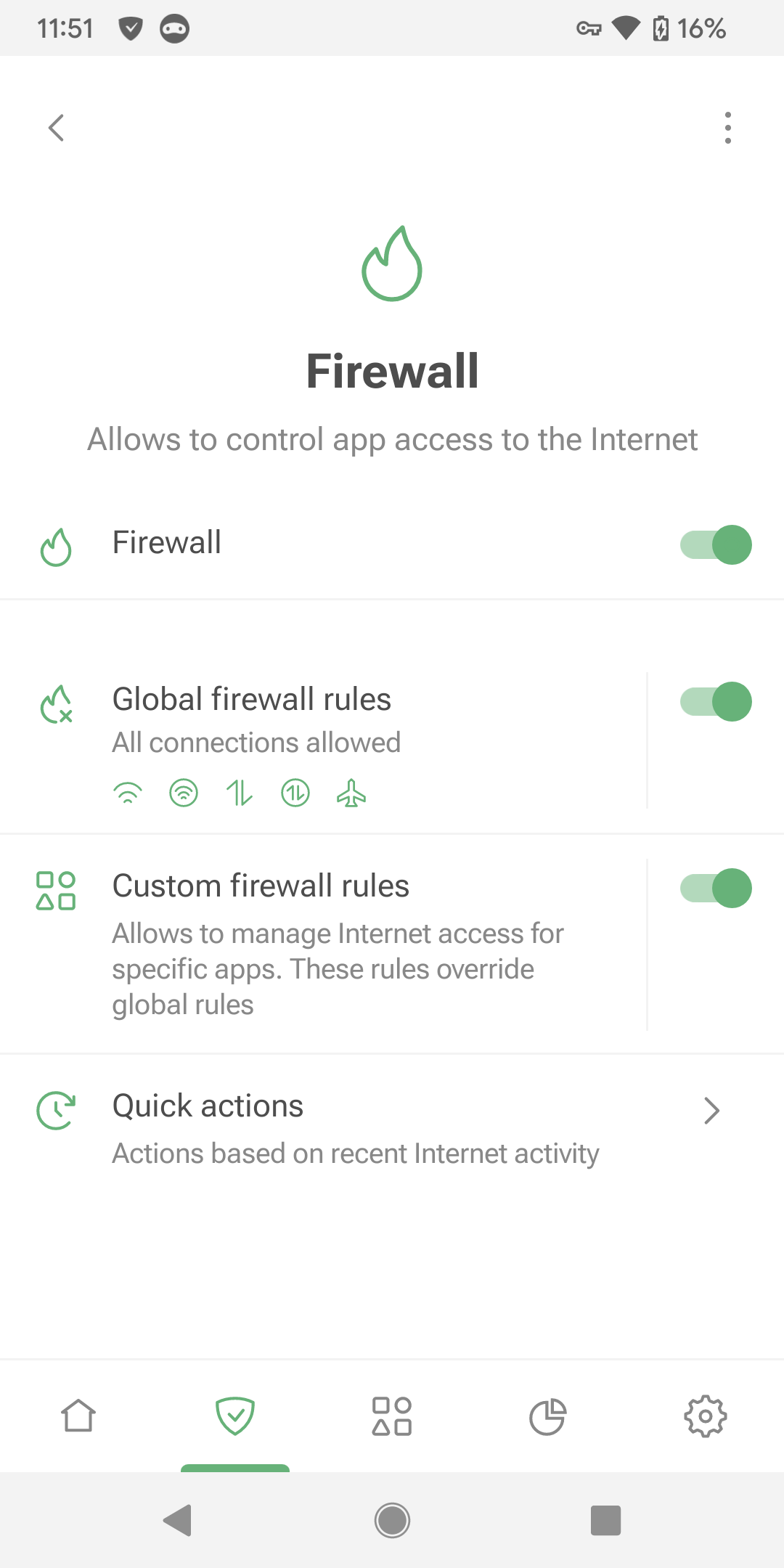
- The app has been completely redesigned, improving user access to core features, and introducing a new Protection section for enhanced control.
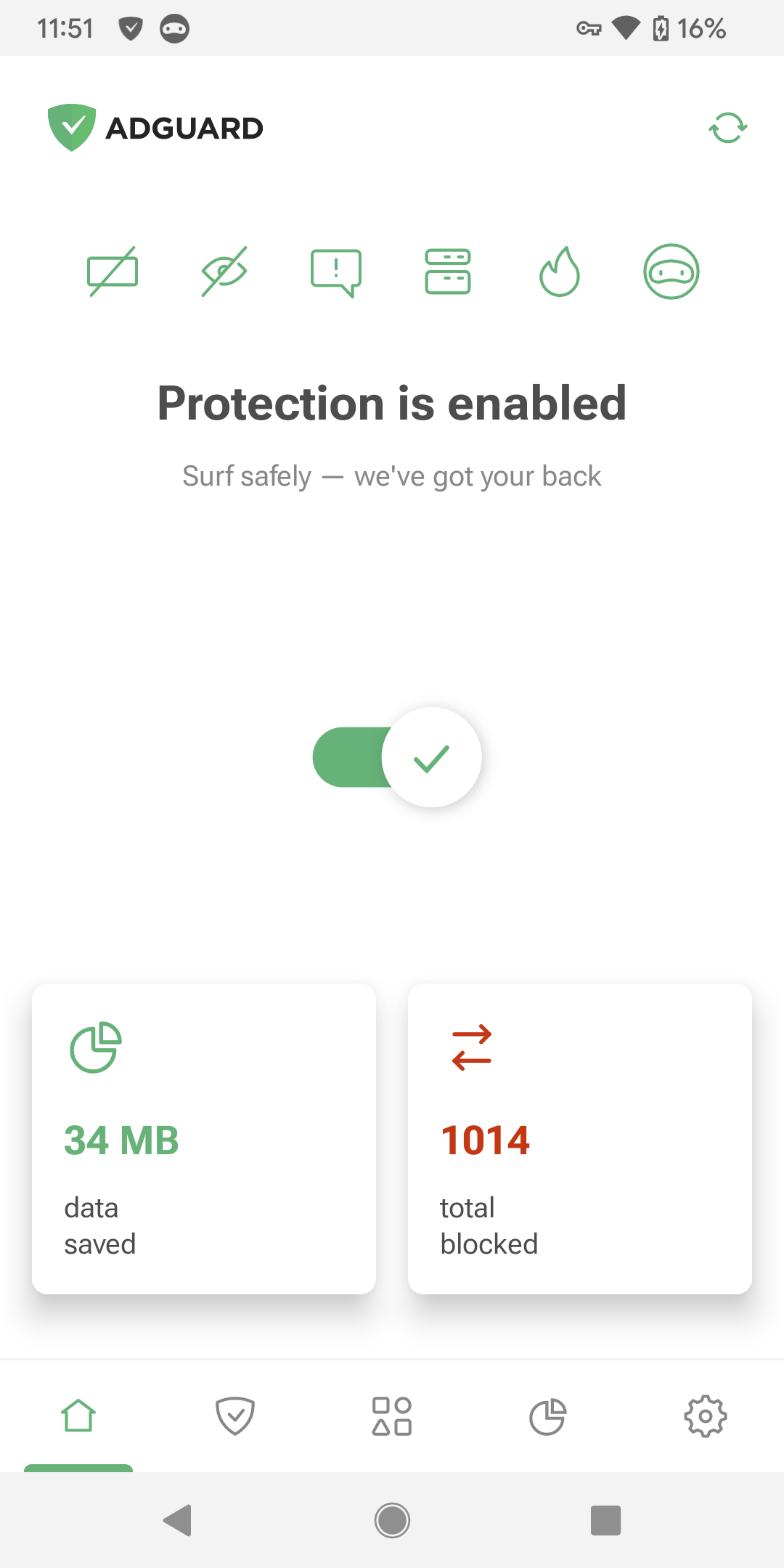
- Detailed statistics have been added, giving users insight about request sources and potential data leaks in apps.
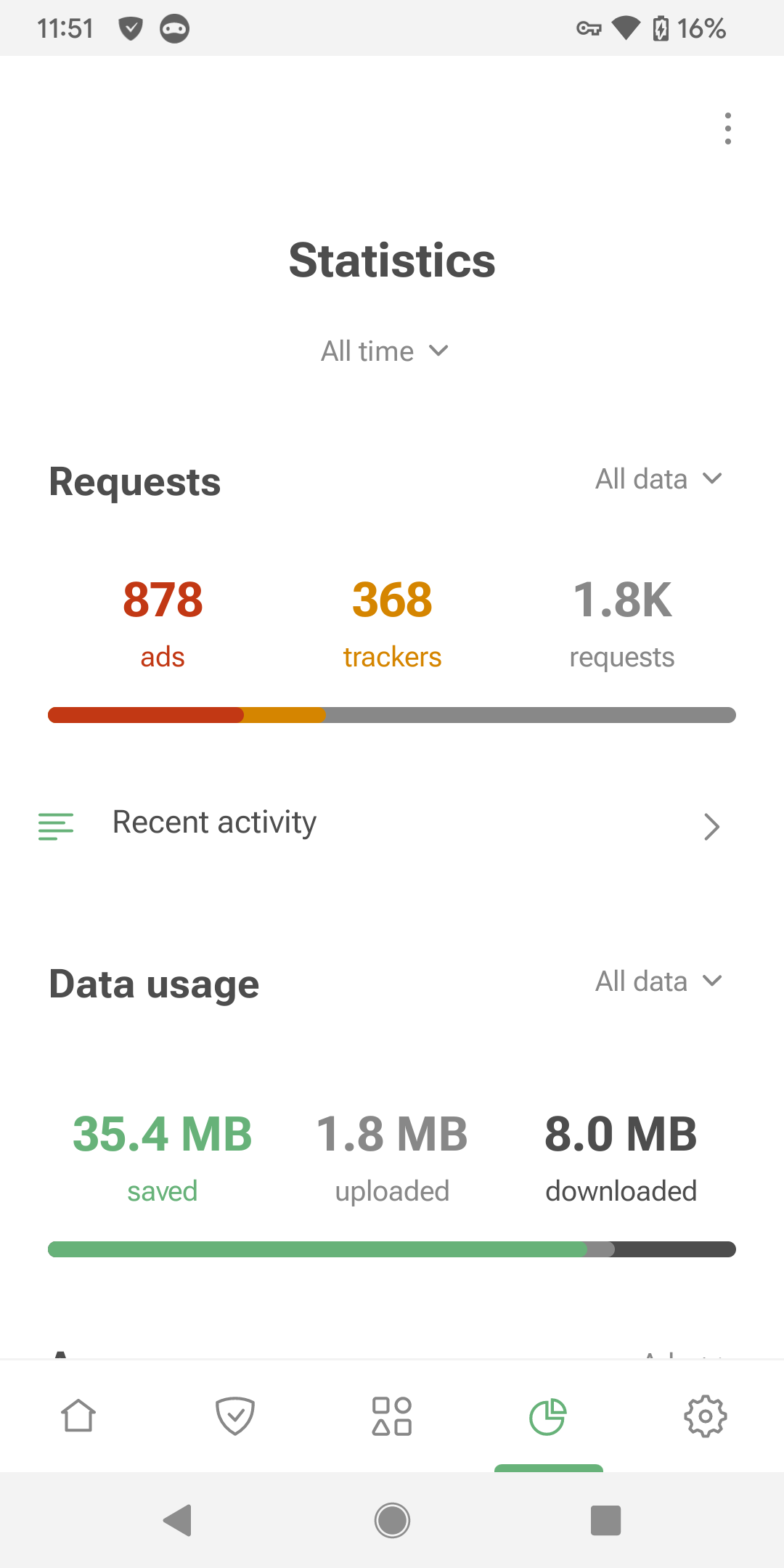
- The Firewall feature has been enhanced, giving users more control over Internet access for apps, including settings for various connection types and screen-off data access.
Integration with AdGuard VPN has been improved, increasing the stability of the simultaneous use of AdGuard and AdGuard VPN.
Special advanced features have been added for users with root access, providing additional customization options.
Our achievements wouldn't have been possible without the invaluable support of our users and dedicated community members. To express our gratitude, we hosted a giveaway, featuring fantastic prizes such as 4 Samsung Galaxy S23 Ultra smartphones and 400 perpetual licenses.
AdGuard for Android TV
But that's not all! Towards the end of the year, we made another breakthrough with the release of AdGuard v4.3 for Android, which now includes support for Android TV.
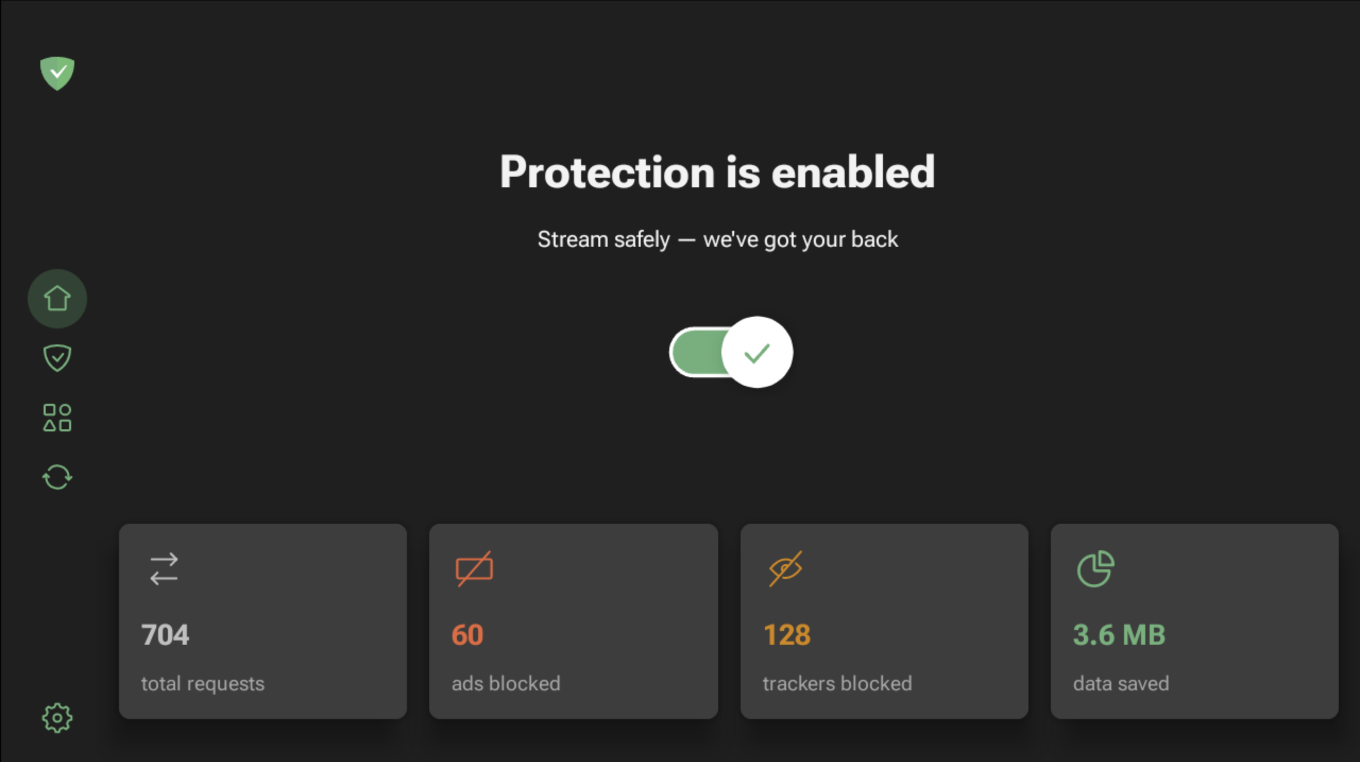
The new design, fully adapted for Android TV, includes new onboarding tailored specifically for TVs, a new Home screen with statistics, adapted Protection and Settings screens. DNS protection adds an extra layer of security that you won't find anywhere else on Android TV.
Discover detailed instructions on how to install AdGuard for Android TV in our blog post and unlock a whole new TV experience.
Ad-Filtering Dev Summit 2023
Ad-Filtering Dev Summit is an annual event for developers of ad blockers and browsers, filters maintainers, software engineers, and independent specialists where they discuss the present and the future of ad blocking. AdGuard has been a constant participant of the Summit every year since its inception, and we’re always looking forward to it.
This year’s AFDS 2023 took place over two days in Amsterdam and was packed with hot topics such as AI, browsers and MV3, sustainability and privacy research. We’ve posted a detailed recap of all the presentations, organized by topic, along with videos of the talks on the blog.
This year AdGuard moved to a new level, changing the role of sponsor to that of a co-host of Ad-Filtering Dev Summit organizer. However, we didn't skimp on the actual talks either! Several of AdGuard representatives delivered speeches on various topics:
Vladimir Zhelvis and Natalia Sokolova devoted their talk to modern LLMs (large language models), how they can be exploited to serve ads to users, and possible methods of blocking ads delivered in this way.
Dávid Tóta analyzed the evolution of tools for filter developers and presented AGLint — the tool that greatly simplifies the creation of filter lists.
Dmitriy Seregin talked about the current state of Manifest V3 and how AdGuard continues to adapt its extensions to the new API.
Andrey Meshkov and Dávid Tóta along with other participants took part in Filter lists maintainers panel, where they touched upon many different topics related to filter lists and, hopefully, cleared for all the viewers what does it mean to be a filter list maintainer.
Speaking of Manifest V3
To remind you, Manifest V3 is a new platform for Chrome browser extensions that will become mandatory in 2024. Back in 2022, we thought we had covered everything about MV3. However, Google's recent decision to resume the MV3 transition, paused last December, has reignited the discussion. During this time, Google's significant steps have shifted our views. AdGuard CTO and co-founder Andrey Meshkov highlights two key developments:
Establishing the W3C WebExtensions Community Group: This group has facilitated meaningful conversations between browser and extension developers, fostering improvements.
Investing in the extensions platform: Chrome has invested significant resources in the platform over the past few years, which has allowed it to expand its team and accelerate development processes.
These changes have shifted our perspective. We no longer see Manifest V3 as a disaster. These broad efforts are shaping a unified cross-browser platform, though complex challenges remain.
We've compiled Andrey Meshkov's answers to key questions about Manifest V3 in one article.
To the piggy bank of good deeds
You would expect that the main focus of a software developing company is on developing the software — and you would be right. But in between endless updates, releases, and hotfixes for AdGuard products we also find time to do more to not only make the lives of AdGuard users easier, but also to support the ad filtering community as a whole. Here's what we've achieved this year:
Updated the Knowledge base. We've revamped the primary source of information about AdGuard Ad Blocker, making it more user-friendly and well-organized. All articles have been reviewed, updated, and missing information has been added. Now, any question you have about AdGuard is likely to be answered in the Knowledge base.
Enhanced AdGuard account. The AdGuard account has been transformed into a hub of valuable information. Here, you can manage licenses, update security settings, track purchases, and monitor product and device activity.
Simplified user feedback for AdGuard DNS. We've made it easier for users to report ads that slip through or trackers that have been unblocked. Reports can be submitted via the special page, step-by-step instructions are available here.
Launched AdGuardian. We're now delivering privacy and security news directly to you through AdGuardian, a bi-weekly newsletter that covers the latest in ad blocking, privacy protection, AI, and related topics. This ensures that you stay up-to-date with industry news and our expert insights.
But one of this year’s achievements that we are especially proud of is the development of AGLint. AGLint is a new tool designed to simplify filter list development (which is no easy task at all!), and we're eager to share it with the entire ad-blocking community. For more details, you can read this article where the AGLint creator Dávid Tóta explains everything about it, or listen to the talk he delivered on the same topic at the AFDS23.
Privacy blog pearls
In 2023, we published almost 100 articles about privacy across our blogs. It's worth mentioning that we have a separate blog on each of our websites: AdGuard Ad Blocker blog, AdGuard VPN blog, and AdGuard DNS blog. Each article offers valuable insights, but we've identified a few that stand out as particularly interesting. Here are some examples:
The state of ad trackers around the world in 2023: an AdGuard report. We conducted research to understand the global distribution of ads and trackers, their average impact on internet traffic, and the specific situation in different countries. While it might seem like tracking is ubiquitous, is that truly the case? We compared the numbers from the beginning and from the end of the year and tried to take notion of the trends. Check out the article for detailed insights.
Google wants to kill the open Web under the guise of making it safer. A group of Google engineers has proposed a new Web API that threatens to uproot the work of apps and browsers if they interfere with its ad business. Will the open Web survive?
Can GPT-4 block video ads better than humans? We put an AI-powered ad blocker to the test. AI has been widely used in apps to streamline and improve their work — but what about ad blocking? We employed an AI-powered ad blocker to block ads in YouTube videos, and the results were not-so-stellar. Come and see for yourself!
Fighting fire with fire: Harnessing the power of large language models to block ads in AI-powered chatbot. In this article, we discussed the emerging trend of ads being integrated into AI chatbot responses through large language models (LLMs). We explored how these ads are tailored to user interactions and their impact on the chat experience. Additionally, the article examines the potential of using LLMs to effectively block these ads, aiming to improve the user experience of interacting with AI-powered chatbots.
YouTube tests new ways to stop ad blockers: what to know and expect and related articles:
New twist in YouTube’s war against ad blockers: pay or see ads after 3 videos,
Windows Phone rises from the ashes to help block YouTube ads. But it’s tricky,
This story started when YouTube began testing methods to bypass ad blockers, leading to unskippable ads for some users with ad-blocking tools. In the articles, we talked about the causes and consequences of this practice, as well as what can be done about it.
What’s new with AdGuard products: 2023 edition
Of course, it's not just AdGuard Ad Blocker for Android that has changed this year. All AdGuard products got a lot of new features, which we will briefly describe next.
AdGuard for iOS: enhanced ad-blocking and tracking protection
This year, AdGuard for iOS has made significant strides in its development and can now offer its users:
- Accelerated implementation of advanced blocking rules which significantly improves the quality of ad blocking and the overall app performance.
- System-wide tracking protection which allows to block in-app trackers that discreetly collect user data.
- Native support for the
:has()pseudo-class which is essential for us: it allows for the selection of ad blocks based on their content. - DNS-over-HTTP/3 support. DNS-over-HTTP/3 is a newer version of the DNS-over-HTTPS protocol. AdGuard has become one of the first to support it, along with Google and Cloudflare.
Additionally, we tackled an unexpected challenge related to an iOS 17 bug that affected content-blocking rules. For more details, read our article on AdGuard v4.5.1 for iOS.
Desktop AdGuard apps: HTTP/3 filtering, ECH support, and more
AdGuard apps for Mac and Windows, while not having their update schedules synced, have both undergone nearly similar enhancements this year:
Experimental Encrypted ClientHello support. This feature enhances security by encrypting the ClientHello, which is the first packet in an encrypted connection and reveals the name of the server you're communicating with. Traditionally unencrypted, this packet allows ISPs to track website visits. ECH aims to encrypt this last unencrypted bit of information, making your connection more secure. If you need more information — read this article.
HTTP/3 filtering. HTTP/3 filtering, powered by our latest CoreLibs v1.12, uses the QUIC network protocol instead of the TCP transport layer protocol, providing increased privacy and security. You can learn more about the advantages of this feature in our blog.
New Advanced settings. Not all users need these settings, however, if you know how to configure them, you can make your internet experience even more secure. All related info can be found in the Knowledge base.
Basic HTTP authentication. Now when adding a custom DNS server through AdGuard, you can specify a login and password that will be used to connect to that server if it supports HTTP authentication.
The View certificate option. To enhance the transparency in HTTPS filtering, AdGuard now offers an option to inspect the original certificate via Filtering log.
Support for selectors in HTML filtering rules. We’ve added support for selectors in HTML filtering rules. This means fewer ads bothering you while you browse.
AdGuard and AdGuard VPN Browser Extensions: ready for MV3
In the summer of 2022, we introduced to the world the first prototype of an ad-blocking browser extension that works under the rules of Manifest V3. A year later, we rewrote the whole filtering code of AdGuard Ad Blocker Browser Extension in TypeScript and moved it to a new, separate library. This step allowed us to prepare the extension for a seamless transition to MV3. For more details read our blog.
As for AdGuard VPN Browser Extension — it has also migrated to Manifest V3 this summer. Moving to this new API presented some challenges, but we were ready to face them. The whole journey is described here.
AdGuard VPN: the list of enhancements
Let's start with the improvements that have affected AdGuard VPN regardless of the platform:
We've increased the number of devices that can be simultaneously connected to AdGuard VPN under a single subscription to 10.
It’s now possible to set up AdGuard VPN on your router. This feature requires an AdGuard VPN subscription and IKEv2/IPsec support. More protocols will be added in the future.
There’ve been no dramatic changes in the AdGuard VPN family in 2023, but we still have a lot to tell you:
AdGuard VPN for Android received the Nightly update channel, location search by country code, dynamic themes and dynamic icons support.
AdGuard VPN for Mac and Windows have become twins this year, each receiving mirrored features. The desktop VPN apps now feature website and app exclusions in a single tab, the capability to enable VPN for selected apps, a list of popular DNS servers, and a statistics tab. Additionally, WinTun support has been exclusively implemented in AdGuard VPN for Windows.
AdGuard VPN for iOS is gearing up for major updates. We've put in a lot of effort this year. As a result, next year will see the launch of a new version of AdGuard VPN for iOS. This update promises to revolutionize the app with its enhanced speed and convenience, all thanks to completely rewritten code! Stay tuned.
AdGuard DNS: security and performance improvements
This year, we've made significant updates to Private AdGuard DNS, all aimed at enhancing security and giving you more control over your traffic. The new Security settings now feature an option to block newly registered domains. This is particularly useful for blocking domains that are less than 30 days old, as they're often risky and potentially harmful.
We’ve also introduced Access settings, a place where you can set your own access rules to better control your traffic. You can specify clients or domains to block — their requests will be denied and won't be counted in your monthly DNS traffic. Alternatively, you can create an "Allowed" list of clients, effectively banning all others. You'll find all the details on our blog.
Also, if your device does not support encrypted DNS protocols, now you can connect it to AdGuard DNS via a dedicated IPv6 address. And soon we’ll implement support for dedicated IPv4 addresses.
Our plans for the next year
The year is coming to an end, but our work on improving AdGuard products never stops. Even right now, as you are reading this recap, our devs are putting the finishing touches on the new versions of desktop AdGuard VPN apps and both mobile apps for Android.
As for plans for the coming year: we wouldn't be us if we didn't make a roadmap for 2024. Take a look at what we’ve planned:
Completing the MV3 saga. As Google phases out MV2 by the middle of next year, we'll be right on schedule to transition our extensions to MV3.
Revamping AdGuard for iOS. Get ready for a complete redesign that will elevate your user experience.
Major overhaul for AdGuard for Safari. We're planning a complete rewrite, ditching the Electron framework to make the extension leaner and faster.
AdGuard v8.0 for Windows. Next year, we're rolling out a major update with new detailed statistics, improved Apps management, firewall functionality, and a sleek new design.
Complete redesign of AdGuard VPN for iOS. Every line of code will be carefully rewritten to make the app faster, smoother, and more visually appealing.
AdGuard VPN for Linux. Early next year, we are going to introduce AdGuard VPN for Linux, which will be the first router-compatible version, allowing you to take advantage of the AdGuard VPN protocol on your routers.
Open sourcing the AdGuard VPN protocol. We're thrilled to open source the AdGuard VPN protocol and its client applications, giving you the tools to build your own server.
Enhancements to AdGuard DNS. Expect a number of improvements, especially for those managing complex networks. These include dedicated IPv4 addresses, a versatile cross-platform AdGuard DNS client for your network setup, basic HTTP authentication for our DNS-over-HTTPS server, and much more.
We've also got many smaller enhancements in the pipeline, too many to list here. And the icing on the cake! We're secretly developing a couple of new products that we'll reveal when they're ready. Stay tuned for the big reveal!
Wrapping up
Oh, wow! Sometimes it's helpful to sit down like this and write out all the accomplishments of the year to realize how many important and cool things were done. But none of this would have happened without our wonderful team and our community, together with whom we make the Internet cleaner and life better. Thank you all very-very much!
Once again, we wish everyone Happy Holidays and all the best — now, next year and always. Chin-chin!




















































