Расширения Safari
Эта статья об AdGuard Mini для Mac, которое защищает только браузер Safari. Скачайте приложение AdGuard, чтобы полностью защитить ваш Mac
Что такое расширения Safari
Расширения Safari — это небольшие программы, которые помогают увеличить функциональность браузера Safari. С их помощью пользователи могут улучшить работу в интернете, добавляя функции, которые не встроены в браузер. В первую очередь AdGuard для Mac использует расширения для того, чтобы применять правила фильтрации на сайтах, открытых в Safari.
Как это работает
Чтобы блокировать рекламу, трекеры и раздражители на сайтах, AdGuard использует правила фильтрации. Правила AdGuard и пользовательские фильтры преобразуются в правила, понятные Safari, и интегрируются в шесть расширений Safari:
- AdGuard Основные
- AdGuard Конфиденциальность
- AdGuard Виджеты соцсетей
- AdGuard Безопасность
- AdGuard Пользовательские
- AdGuard Другие
Каждое расширение блокировки контента может включать до 150 000 активных правил фильтрации. Количество правил в большинстве групп фильтров не превышает 150 000. Однако если вы активируете слишком много языковых или пользовательских фильтров, вы можете превысить лимит. В таких случаях случайные правила, превышающие лимит, будут автоматически отключаться, что может привести к некорректной блокировке. Мы настоятельно рекомендуем активировать только те фильтры, которые вам нужны.
Есть ещё одно расширение, отвечающее за другие функции: AdGuard для Safari добавляет иконку AdGuard рядом со строкой поиска в Safari и позволяет использовать расширенные правила для блокировки сложной рекламы.
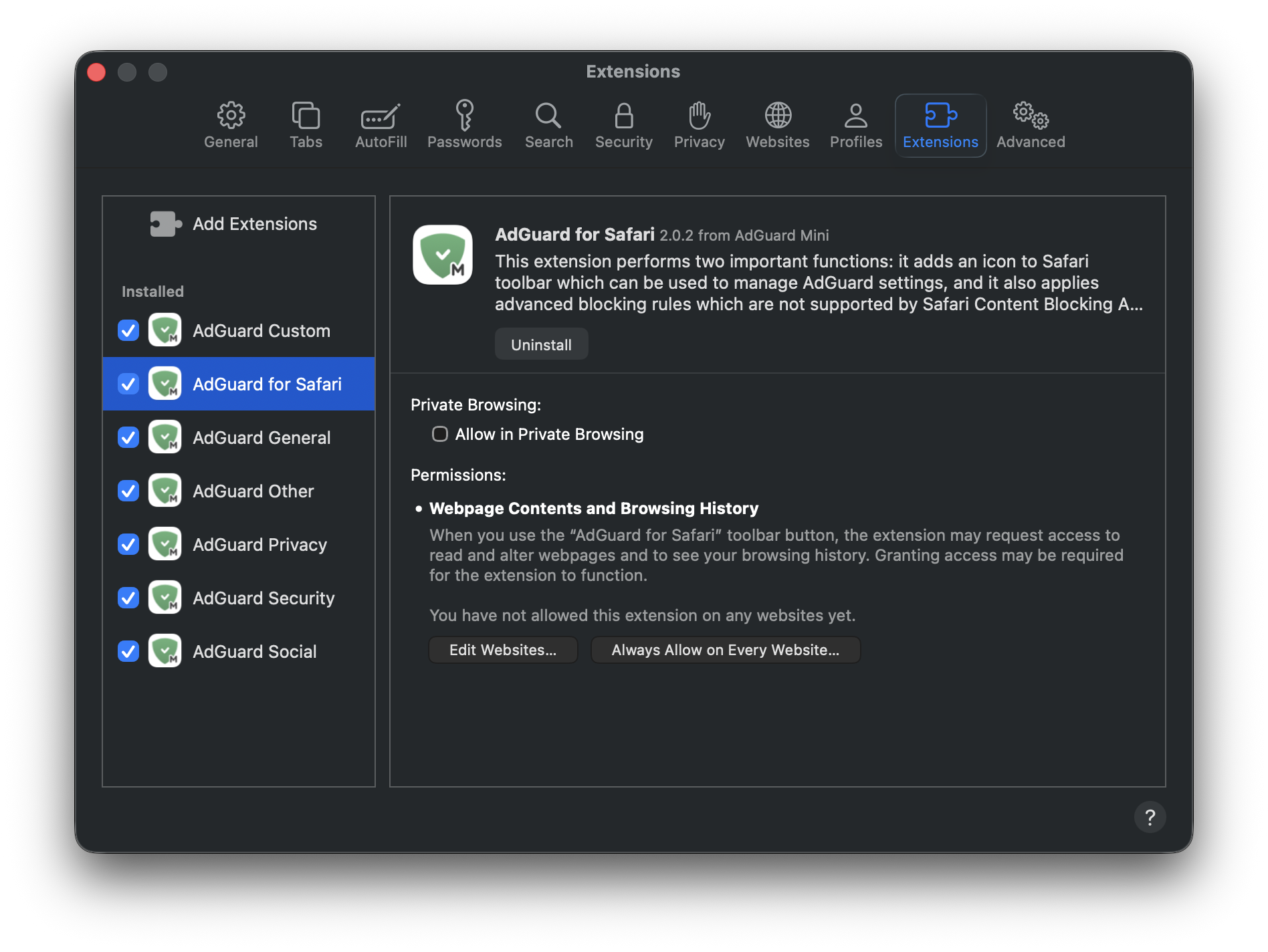
Подробнее о каждом расширении ниже.
Расширения для блокировки контента
AdGuard Основные применяет правила из фильтров, которые вы можете найти в Настройках → Фильтры → Блокировка рекламы и Языковые. Это расширение ориентировано на комплексную блокировку рекламы и включает фильтры для рекламы на определённых языках.
AdGuard Конфиденциальность применяет правила из раздела Фильтры → Антитрекинг. Это расширение блокирует механизмы отслеживания и гарантирует, что ваши действия в интернете останутся конфиденциальными.
AdGuard Виджеты социальных сетей применяет правила из раздела Фильтры → Виджеты социальных сетей и Фильтры → Раздражители. Расширение блокирует всплывающие окна, кнопки соцсетей, окна онлайн-помощников и другие элементы на страницах, которые могут вас раздражать.
AdGuard Безопасность применяет правила из раздела Фильтры → Безопасность. Это расширение выявляет и блокирует потенциально опасные элементы, защищая пользователей от вредоносного контента.
Расширение AdGuard Другие применяет правила фильтров из раздела Фильтры → Другие. Эти фильтры не относятся к предыдущим категориям: Фильтр полезной рекламы, DNS-фильтр и Экспериментальный фильтр.
AdGuard Пользовательские применяет правила фильтров, которые вы добавляете самостоятельно в Собственные фильтры.
Пользовательские правила и правила белого списка включаются в каждое расширение.
AdGuard для Safari
AdGuard для Safari добавляет иконку AdGuard рядом со строкой поиска. Это полезно, если вы хотите быстро настроить защиту на конкретном сайте или заблокировать рекламу вручную.
Расширение AdGuard для Safari также содержит расширенные правила, которые не конвертируются в формат, поддерживаемый Safari. К ним относятся правила CSS, расширенные селекторы CSS и скриптлеты, которые позволяют AdGuard блокировать сложную рекламу, такую как реклама на YouTube.
Как управлять расширениями Safari
Откройте Safari и нажмите Safari в левом верхнем углу экрана, чтобы развернуть меню.
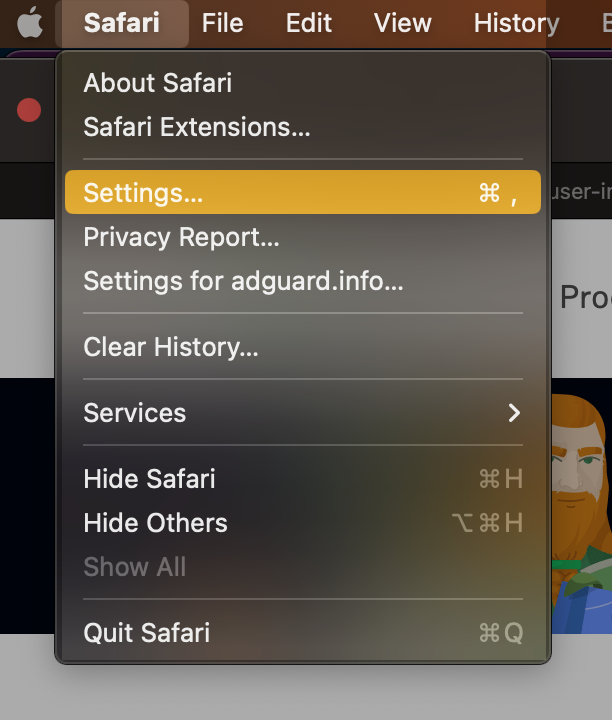
Нажмите Настройки...
Выберите Расширения.

Почему AdGuard для Safari нужны разрешения
При включении расширения AdGuard для Safari вы можете заметить, что оно запрашивает доступ к содержимому страницы и доступ к истории поиска. Вот зачем ему нужны эти разрешения:
- Доступ к содержимому веб-страницы необходим для правильной работы правил ручной блокировки рекламы и расширенной блокировки
- Доступ к истории просмотров нужен для проверки статуса защиты на сайтах и определения того, какие расширенные правила следует применять
Мы не используем эти данные в других целях и никому их не передаём. Подробности читайте в Политике конфиденциальности.