AdGuard ad blocking extension for Safari
Safari – the fourth popular browser in the world, – was designed by Apple Corporation especially for Mac and iOS users. It has a list of advantages, for example, if you use Safari on more than one device, you can share information through your iCloud account. This browser saves your bookmarks, passwords and credit card numbers. Also, Safari offers native support for Netflix users. Chrome and Firefox browse videos longer that can be very annoying for a series fan.
Unfortunately, Safari is vulnerable to the malware which is not usually a big problem for Mac users, but anyway it is never late to use any methods of precaution and think about how to get ad blocking in safari for mac.
Though Safari browser is a good one, we don’t forget about annoying publicity that surrounds us everywhere. Pop-ups that literally begging us to click them, pages that want us to subscribe or enter our e-mail and telephone number, video ads that make us wait before we watch a new episode of favourite series or movie…Well, it’s not the worst about advertisements, but sooner or later you’ll think about how to block ads on Safari. Some people just want you to see their products, but others want to steal your data, and that´s why AdGuard can be so useful to you. It is not just a service for blocking ads in Safari, it's an essential tool that stops ads and prevents your computer from installing malicious adware.
Normally, Safari is installed by default on every Apple device. Until recently, it had one significant disadvantage comparing with competitor browsers – inability to install extensions. Whereas in other popular browsers (Chrome, Opera, Firefox) one could easily add different useful extensions, for example, adblockers.
This situation changed at the end of 2012 when version 6 of Safari was released. One of the novations of this version was an ability to add browser extensions. This new feature gave the opportunity to extend the possibilities of the browser through external plugins that can be installed from Safari Extensions Gallery or other websites. We (Adguard team) decided not to stand aside and issued AdGuard adblock extension for Safari and we want to give you a closer look at it.
 Multifunctional extension
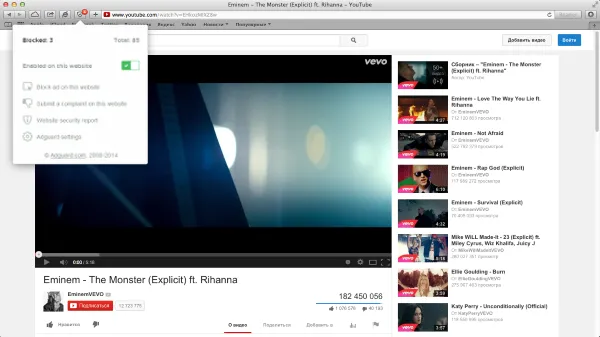
AdGuard extension blocks all type of advertisements including video ads from the Safari browser. It happens because the addon has many elaborated blocking filters and. Also with this plugin, you can remove any element on the page.
What’s more, AdGuard blocks online trackers that collect your data and prevent you from downloading spyware, malware, and adware by not letting you visit malicious websites.
Sometimes when you visit one page appears a pop-up window asking you deactivate your Adblock app. Fortunately, AdGuard can bypass Anti-AdBlock script. With AdGuard, you won’t need to turn off our extension, so AdGuard is an ideal ad blocker for Safari
To sum everything up, AdGuard blocks pop-ups, also it’s a perfect remover of banners and social widgets and ensures your work on the Internet without any ads. Our multifunctional and easy-to-use extension not only blocks undesirable advertising elements but also takes care of user safety by blocking access to phishing and fraudulent websites.
You can download the extension for free from the Mac App Store.
We will be happy to receive your comments, reviews, ratings and suggestions related to the work of this Adblock for Safari (just go to Support tab inside the extension)..
Also, we have an ad blocker for iOS Safari, you can get it free from the App Store.