Email alias vs plus addressing: what’s the real difference?
You signed up for one newsletter. Now five companies email you daily. Your address ended up on a list, then another, then another.
Two tools promise to fix this: email alias and plus addressing.
Plus addressing — sometimes called email plus addressing — lets you add a plus sign and a word to your existing address. yourname+newsletter@gmail.com still lands in yourname@gmail.com. Gmail plus addressing has worked this way for years. No setup required. You give a different version to every site.
An email alias is a separate address that forwards to your main inbox. It looks nothing like your real one. You create it, you can delete it.
Both hide your primary address. They do it differently.
What is plus addressing?
Plus addressing is a way to create unlimited variations of your existing email address by adding a plus sign and a word before the @ symbol. The message still lands in your main inbox. You don’t create a new account. You don’t change settings. You just type you+shopping@gmail.com instead of you@gmail.com when you sign up somewhere.
The tag after the plus is a label. It tells you which company sold your address.
How the plus sign works in an email address
The transformation is mechanical. Your provider strips everything from the plus sign onward, then delivers the message to the base address.
you@gmail.com → you+netflix@gmail.com · you+shopping@gmail.com · you+forum@gmail.com
All three variants land in you@gmail.com. You can create as many as you want.. The tags are arbitrary — letters, numbers, any combination without spaces.
A tag does not create a new mailbox. There is nothing to configure, no settings to toggle, and no new account to manage. It is just a routing instruction for your existing inbox. Technically, the mail server strips the tag and reads only the base address. Because it relies on standard mail routing, it works instantly on any device and in any email client without extra setup.
Subaddressing: the technical name for plus addressing
Plus addressing is a nickname. The technical term is email subaddressing, also called subaddressing or detailed addressing.
RFC 5233, published in 2008, defines it as “the practice of augmenting the local-part of an address with some ‘detail’ information in order to give some extra meaning to that address.” The RFC describes the plus sign as a common separator, but it’s not mandatory. Yahoo used a hyphen for its older disposable addresses. The plus is a provider convention, not an internet standard.
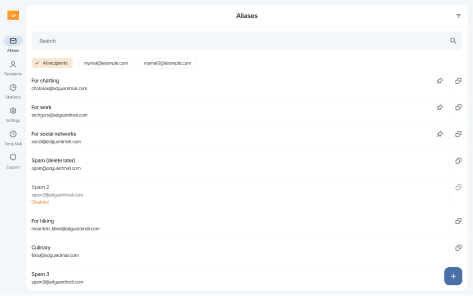
AdGuard Mail implements subaddressing for aliases: you can add a tag to any alias, and the tag helps you filter forwarded mail in your main inbox. For example, alias+shops@adguardmail.com still delivers the same alias, but you can sort it separately.
Using the Gmail plus trick, step by step
The Gmail plus trick takes thirty seconds. Here's the full workflow.
Pick a tag. Choose a word that identifies the service:
netflix,bank,newsletters. Your address becomesyou+netflix@gmail.com.Use it when you sign up. Paste the tagged address into the registration form. Gmail delivers everything to
you@gmail.comregardless of the tag.Create a filter. In Gmail, go to Settings → Filters and Blocked Addresses → Create a new filter. In the To field, enter your tagged address — for example,
you+netflix@gmail.com. Click Create filter.Apply a label. Check Apply the label and create one named after the tag. You can also check Skip the Inbox to keep tagged mail out of your main view.
Now every message sent to that tag lands in its own folder. If you start receiving spam at you+netflix@gmail.com, you know Netflix sold your data.
Which email providers support plus addressing
Support varies. Some providers skip it entirely. Many registration forms also reject the plus symbol during validation, which breaks the workflow entirely. See the table below for details.
| Provider | Supported | Separator | Notes |
|---|---|---|---|
| AdGuard Mail | Yes | + | Supports subaddressing on aliases. You can tag an alias like alias+shops@adguardmail.com to filter forwarded mail in your main inbox. |
| Gmail | Yes | + | Works on @gmail.com and Google Workspace domains. Gmail also ignores dots, so y.o.u@gmail.com reaches the same inbox. |
| Outlook.com | Yes | + | Outlook also lets you create up to 10 real aliases in account settings — a stronger option than tagging. On Microsoft 365 and Exchange Online, plus addressing is an admin-controlled setting and may be switched off in a work tenant. |
| Proton Mail | Yes | + | Available on free accounts. Paid plans add real hide-my-email aliases through SimpleLogin, which Proton owns. |
| iCloud Mail | Yes, undocumented | + | Works in practice, but Apple doesn’t document it, so behavior could change without notice. Apple officially offers three real aliases, and Hide My Email for iCloud+ subscribers. |
| Fastmail | Yes | + | Documented and fully supported. Fastmail also accepts any address at a subdomain you control, and offers masked addresses through 1Password. |
| Yahoo Mail | No | No | Yahoo doesn’t support plus addressing on your main address. Its older hyphen-based disposable addresses were retired; extra addresses are now a paid Yahoo Mail Pro feature. |
Google documents plus addressing in its Workspace help center under Gmail settings and filters. The caveat is universal: test any address with a plus before you rely on it. Some forms silently strip the tag and register your base address instead.
Where plus addressing breaks down
Plus addressing solves filtering. It does not solve privacy, and it has hard limits. Here are five.
The tag is stripped by one line of code. Any mail server or spam filter can normalize you+netflix@gmail.com to you@gmail.com by cutting everything between the plus and the at sign. It is a trivial string operation. If a company wants to resell your address, the tag disappears before anyone sees it.
Your real address is still visible. Plus addressing does not hide anything. Anyone who receives a message from you sees you@gmail.com in the From field, because Gmail sends from your base address. The tag only exists on inbound mail. Anyone can see your real address, and some websites will even incorrectly consider the tagged variant invalid.
Forms reject the plus sign. The plus character is legal under the email specification. Many registration forms reject it anyway. Microsoft’s own account system “does not accept the ‘+’ symbol” for backup addresses — a deliberate design choice, not a protocol limit. Apache’s EmailValidator rejects the plus sign despite it being valid under RFC 822 and 2821. When a site rejects your tagged address, you have no workaround.
You cannot revoke a tag. A real email can be deleted. The address stops working and mail bounces. A plus tag has no off switch. You can create a filter to delete everything sent to you+netflix@gmail.com, but the address still resolves. Anyone who has it can keep sending. The tag is permanent.
You cannot reply from a plus address. Gmail always sends from your base address, regardless of which variant received the message. In Exchange Online, plus addresses are receive-only by design: "they cannot send emails from plus addresses". Fastmail requires manual setup to send from a plus address, and most users never configure it. If a company filters inbound mail by matching the From address to the address on file, your reply may be rejected.
What an email alias does instead
An email alias is a separate address that exists only to forward mail. You never log into it. You never send from it by default. It is a relay: mail arrives at the alias, and the alias server forwards the message to your real inbox. The sender never sees your real address.
In the To header, the server puts the alias address instead of your real one. Ordinary forwarding keeps the final recipient there, but mail clients quote the previous message’s headers when you reply, and that would expose your real address. With the alias in To, the quote contains only the alias.
The From field is rewritten too, and when you reply, the server swaps the addresses back before sending. The other side sees only random-string@aliasdomain.com, never you@gmail.com. This is email hiding in practice: not encryption, just substitution.
AdGuard Mail works this way. You create an alias like alias+shops@adguardmail.com, link it to your real inbox, and hand it out instead of your personal address. Every message sent to that alias is forwarded to you. You can reply, and the reply goes out from the alias, not from your real address. If the alias starts attracting spam, you delete it or switch off. The address stops resolving. Mail bounces. The leak is contained.
That is the structural difference from plus addressing. A plus tag is a label on your real address. An email alias is a disposable address that replaces it.
Email alias vs plus addressing, side by side
The table below compares both tools across eight practical criteria. Two rows have a clear winner — setup effort and cost — and plus addressing takes both.
| Criterion | Plus addressing | Email aliases |
|---|---|---|
| Hides your real address | No — your real address is right there, before the + | Yes — the alias shares no characters with your real address |
| Can be revoked | No. You can filter or delete incoming mail, but the tag keeps working forever | Yes. Switch the alias off and delivery stops immediately |
| Survives a data breach | No. A leaked you+shop@gmail.com exposes you@gmail.com to everyone who reads the dump | Yes. A leaked alias exposes only that alias, which you can then disable |
| Accepted by signup forms | Sometimes. Plenty of forms reject the + character during validation | Yes. An alias is an ordinary address, so it passes any validator |
| Reply from the address | No. Gmail sends your reply from your primary address, revealing it | Yes. Replies go out from the alias, so the conversation stays separated |
| Works on a custom domain | Only if your mail host implements it — most do, but it’s not guaranteed | Yes, on plans that include custom domains |
| Setup effort | Plus addressing wins. Nothing to set up. Type the tag and it works instantly, on any device, with no account and no tool | One click in the app or browser extension — fast, but still a step |
| Cost | Plus addressing wins. Free, always. It’s a built-in feature of the mailbox you already have | Free to start; unlimited aliases require a paid plan |
What about the dot trick and catch-all addresses?
Two other tricks come up in the same conversation.
The Gmail dot trick. Gmail ignores dots in the local part of an address. first.last@gmail.com, firstlast@gmail.com, and f.i.r.s.t.l.a.s.t@gmail.com all reach the same inbox. You can hand out a different dot placement to every service and filter on it. It behaves exactly like plus addressing: it is a variant of your real address, not a separate one.
Catch-all addresses. A catch-all domain accepts mail sent to any address at that domain, even mailboxes that do not exist. You create one mailbox that receives everything sent to *@yourdomain.com. It is useful if you own a domain and want to catch misspellings or old addresses. It is not a disposable email service — every message lands in the same inbox.
Which one should you use?
Plus addressing and email aliases solve different problems. Plus addressing is a sorting tool. An alias is a privacy tool. Pick based on what you need.
Use plus addressing if:
- You want to sort incoming mail into labels.
- You trust the sender and only need to organize their messages. You are not worried about them sharing your data.
- You need a quick tag for a low-risk, one-off task: a free PDF download, a forum you will never visit again.
- You want zero setup. Type the tag and it works.
Use an alias if:
- You do not want the sender to see your real address.
- You need the option to revoke the address later.
- You are signing up for a service you do not trust.
- You want to reply from the masked address, not your real one. This keeps the conversation entirely separate.
Email plus addressing is free and instant. But it is not privacy. An alias takes a click to create. It is the only one that survives a breach.
FAQ
Can you have a plus sign in an email address?
Yes. The plus sign is valid under RFC 5233, the standard for subaddressing. Providers like Gmail, Outlook, Proton Mail, and AdGuard Mail support it. However, many signup forms and validators — including Microsoft accounts — reject the plus character. It is legal, but not universally accepted.
Does plus addressing stop spam?
No. It helps you trace spam, not block it. If you start receiving junk at you+netflix@gmail.com, you know Netflix leaked your address. But the spam still arrives. Mail servers often ignore the suffix because it is just extra text. Spammers also add random plus tags to bypass filters that look for exact addresses. You can filter tagged mail, but the tag does not stop delivery.
How does an email alias work?
An alias is a separate address that forwards mail to your inbox. The server changes the delivery (envelope) address but keeps the alias in the To header, so your real address never appears in the message. When you reply, the server swaps the addresses back. The recipient sees only the alias. AdGuard Mail works this way: you create an alias, link it to your inbox, and reply from it. It is both a relay and a mask.
Is an email alias the same as email forwarding?
No. Email forwarding is a simple redirect. It sends mail from one address to another. It does not create a separate identity. An alias is more than a redirect. It masks your primary address. It lets you reply from the alias, not from your real inbox. Forwarding is a pipe. An alias is a mask. The difference matters when you need to cut off a sender without changing your real address.
Which email providers support plus addressing?
Gmail, Outlook, Proton Mail, iCloud, and Fastmail support it. AdGuard Mail supports it too, under the name subaddressing. Yahoo does not. See the table above for details. One caveat applies everywhere: many signup forms reject the plus sign during validation, regardless of provider support.
Can you reply from a plus address?
No, not by default. Gmail sends your reply from your primary address, revealing it. You can add the plus address as a separate “Send mail as” account, but that requires manual setup for every tag. An alias replies from the alias without extra work. AdGuard Mail supports replies from aliases in its paid plan, and subaddressing works with aliases, not your primary address.