Inside AGLint v4: a Developer – Contributor – User perspective on linting adblock filters
At the core of ad blocking lie filter lists — sets of rules written in special syntax that tell ad blockers which elements on the page to block and which to leave alone. Each filter list can consist of thousands of individual filtering rules, and some of those rules are very complex.
They don’t appear magically out of nowhere, of course. Real people work on them, creating new rules and fixing up older ones. These people are called filter maintainers, and often they do this work for free, out of pure enthusiasm and their will to help the ad-blocking community. If not for their continuous efforts, there wouldn’t be ad blocking as we know it. This is why we created AGLint — a tool aimed to make filter maintainers’ lives just a little bit easier.
A bit of history: why AGLint exists
At AdGuard, we have our own in-house filter developers, so we know firsthand what it’s like to maintain over a dozen filter lists containing thousands of filtering rules each. And let us tell you, it is not an easy task!
Filtering rules are written in a special syntax, so nuanced, that it increasingly resembles a programming language. And like any “language,” it’s easy to make a mistake when creating a filtering rule, and sometimes tiny ones can cause surprisingly big issues. With hundreds of rules created and updated every day, the odds of an error slipping into a public release go up fast. So, naturally, an idea came to us to create a tool that would help filter maintainers catch those errors early before they reach users.
Thus we developed AGLint, a program designed specifically to inspect filtering rules and point out common mistakes in them. At its core, AGLint is a linter for adblock filter lists — the name isn’t a coincidence.
In the case of AGLint, it inspects filtering rules, detects common mistakes, and flags them with actionable feedback. First released almost three years ago, AGLint has evolved into a customizable, cross-platform, open-source tool that supports multiple popular ad-blocking syntaxes (AdGuard, uBlock Origin, AdBlock, Adblock Plus).
It’s being used by many filter developers, and so we’ve received a lot of feedback on it. One of the most common complaints was that when you install AGLint into a new GitHub repository, you often get overwhelmed with a barrage of warnings, and that every single error requires manual input to fix. Motivated by this feedback, we came up with a system of automatic fixes to ease filter maintainers’ manual workload. This system, along with other changes made in the AGLint v4.0, — currently in the late beta stages — was the focus of Dávid and Liza’s presentation at the AFDS.
Before we dive in, let’s meet the speakers behind the presentation.
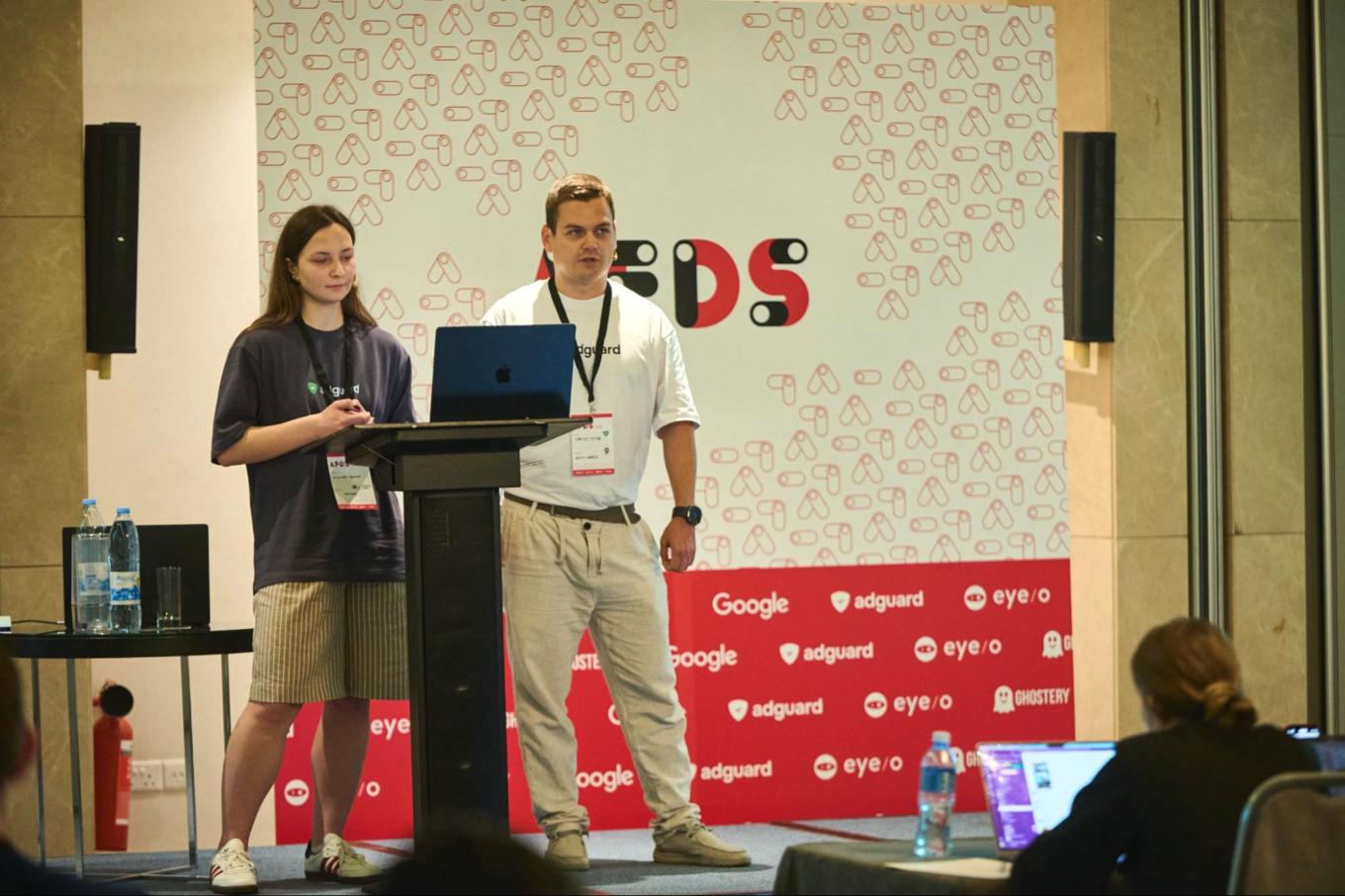
My name is Liza, and I’m a filter list maintainer as well as an AGLint contributor. I’m really excited to talk about AGLint v4 — a specialized linter for adblock filter lists. I’ll focus on how the improvements in AGLint v4 help maintainers like me — from rule writing and debugging, to using the new APIs and benefiting from performance boosts. Together with Dávid, we’ll show how AGLint supports both casual users and advanced contributors.
–Elizaveta Egorova, Developer & Filter maintainer, AdGuard
My name is Dávid, I’m from Hungary, and I work for AdGuard in the Extensions team as a developer. We’ve been working hard on a full rewrite of the tool, and in this talk I’ll walk you through the major updates and the motivation behind them.
–Dávid Tóta, Developer, AdGuard
Their talk is structured in three parts. First comes a quick introduction to AGLint — what it is, why it matters, and how it can be helpful to you even if you’ve never used it before. Then they walk through the key updates in AGLint v4, with practical examples to show the improvements in action. Finally, Dávid and Liza share a brief look at what’s next, outlining the ideas and plans for AGLint’s future. Below is the adapted and slightly simplified version of this presentation. For the full version, watch the video from the AFDS at the end of the article.
What AGLint does (and who it’s for)
AGLint is a linter for adblock filter syntax that supports all popular syntaxes:
- Adblock Plus / AdBlock
- AdGuard
- uBlock Origin
It scans the rules, highlights problems, and suggests fixes. The main goal is to help maintainers produce higher-quality filter lists that are more reliable and easier to maintain.
AGLint isn’t just a command-line tool — it also integrates into popular editors like Visual Studio Code. That means you get real-time feedback as you write or edit rules, with syntax highlighting, autocomplete, and instant linting built right into your workflow. The concept of AGLint is inspired by ESLint, a popular linter for JS.
AGLint logo and what its colors represent
AGLint is built with different types of users in mind, who may have different needs and levels of involvement — from casual maintainers to advanced contributors.
For most maintainers, the ideal workflow is simple: install AGLint, initialize a config, and lint your lists. AGLint also integrates with editors (notably VS Code), giving you “linting while you type” experience, with syntax highlighting and built-in tools, all right in your editor, with no extra setup needed.
For more advanced users, AGLint offers a plugin-style approach: an API that lets you adjust behavior, create custom rules, adjust existing configurations, or extend the linter for specific workflows.
Features and what’s changed in AGLint v4
AGLint v4 is not a single feature release — it’s a broad upgrade that touches performance, developer experience, and extensibility.
Here’s what the v4 update focuses on:
- a rewritten, more performant core
- caching to avoid re-linting unchanged files
- autofix and suggestion APIs
- a smoother CLI experience
- new linter rules
- better editor integration
The common thread is efficiency: faster feedback, fewer repetitive actions, and a workflow that scales with large filter repositories. Let’s zoom in closer on some of these changes.
Under the hood: a rewritten engine
The biggest change in AGLint v4 happened under the hood: we completely rewrote the engine. From now on, the engine allows efficient management of parsers and querying of the data structure using selectors. This provides a much more flexible solution — both for the core’s internal implementations and for the linter rules.
This rewrite also made the engine more flexible: it now supports debugging mode, caching, and a refined autofix and suggestion API. It also lays the groundwork for a future plugin system. Finally, we’ve put more emphasis on web support. While this already existed in earlier versions, our roadmap now includes deeper integration with web-based editors. This opens the door to better integrations and faster feedback, even without needing a full development setup.
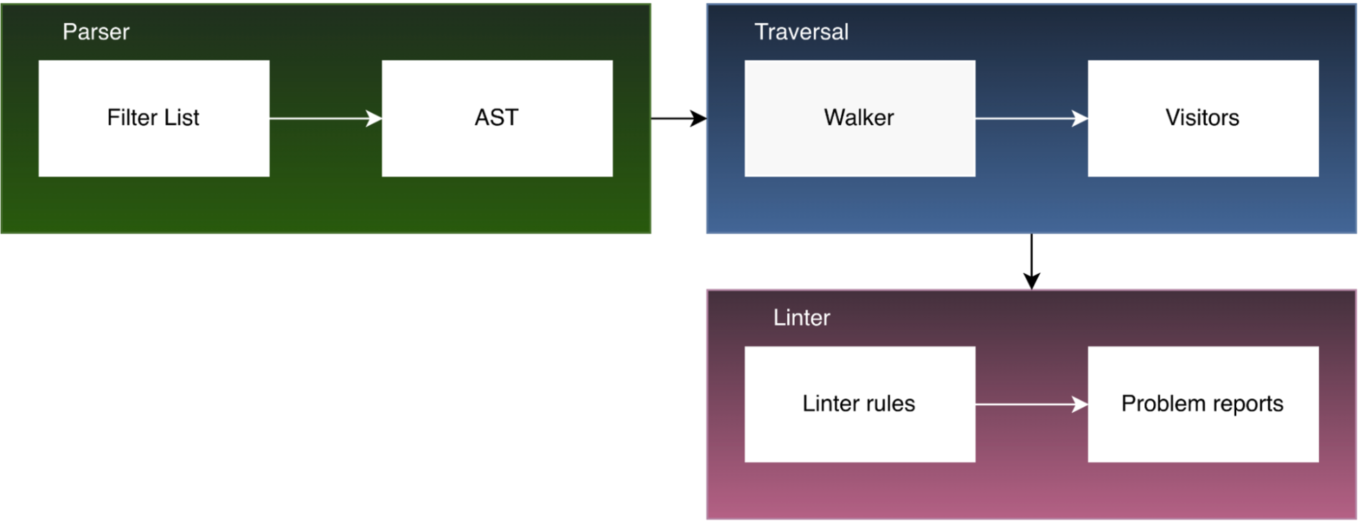
This is the basic operation of the core through a very simple example
The very first step is parsing the filter lists into what’s called an Abstract Syntax Tree, or simply AST. The AST is essentially a structured object that represents the elements of the source code — in this case, the filter list. With the new engine, this process is much more efficient and allows us to use even multiple parsers effectively. The importance of the other parsers becomes apparent in cases like this: for example, by default we parse modifiers as ‘key-value’ pairs, but the value itself isn’t further parsed by the main parser. However, in the linter, we need to parse that value as well.
For instance, in the example shown below, we need to parse a pipe-separated domain list — and the engine provides a way to do that.
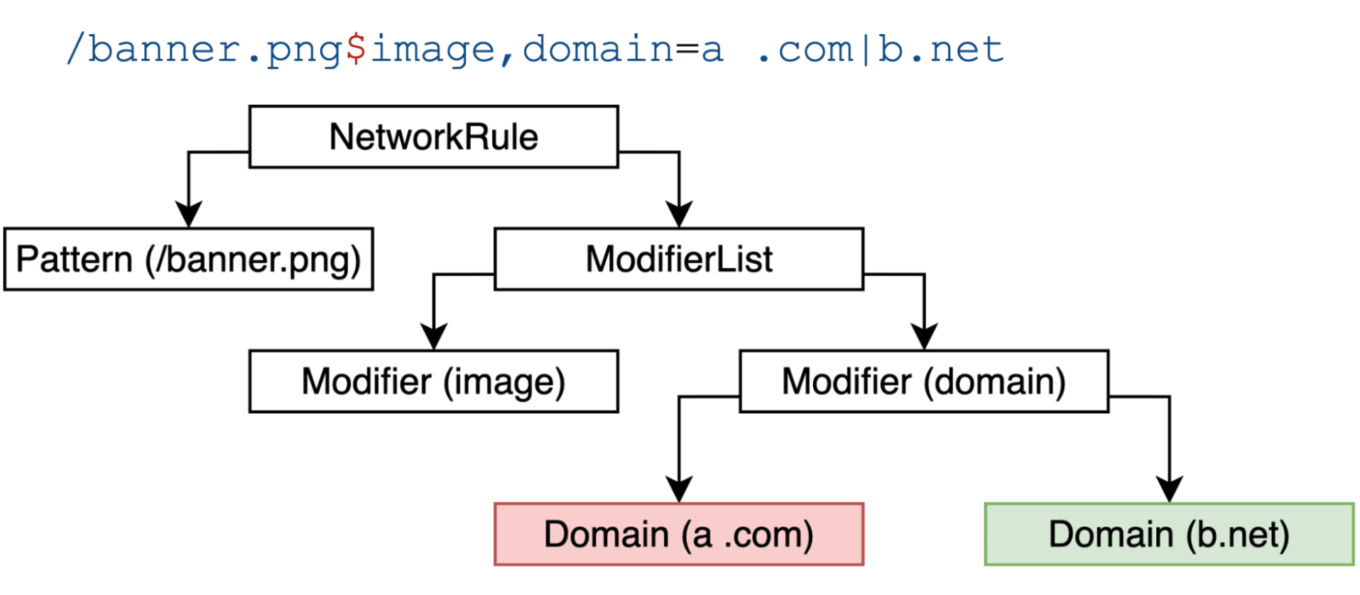
You can see a simple network rule, and below it, an illustration that shows how the AST should be imagined. In reality, the structure is a bit more complex, but the example illustrates the main idea well.
The key point is that the network rule is broken down so that we can identify the pattern, see which modifiers are used, and what values they have. In this example, the a. com domain will be considered invalid in the linter because it contains a space.
By the way, we have a two-panel AST explorer that allows you to view the AST of any filter list in an interactive, user-friendly, and well-organized way.
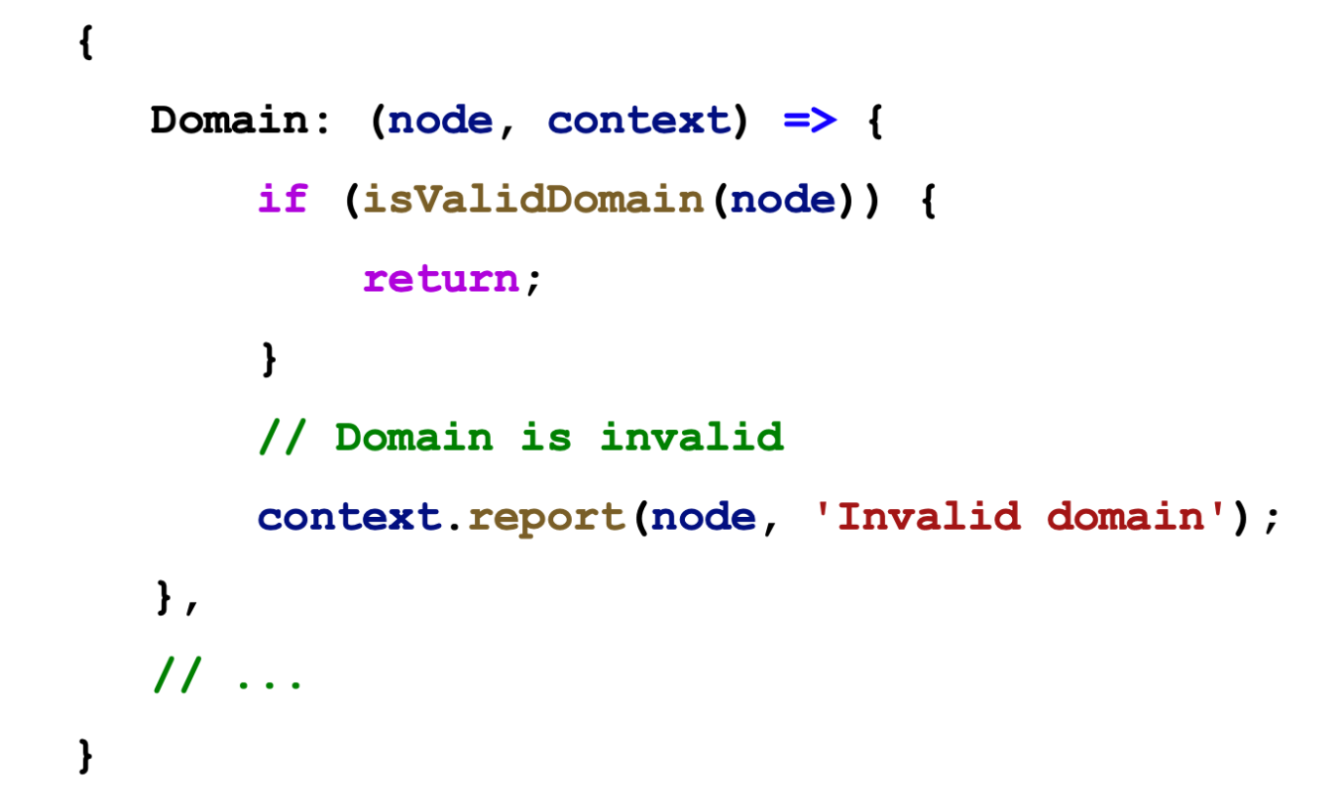
The second step is loading the linter rules. Linter rules essentially use CSS-like selectors to target specific parts of the AST. These selectors are then linked to handler functions that determine what happens when the corresponding nodes are reached. When we reach a domain node, its value (the domain) is validated by a function. If the function deems the domain invalid, the linter rule reports the issue back to the core. Otherwise, if everything is fine, we simply continue processing.
The API is made up of two main parts:
- Meta – holds rule information, like the type, description, and other details.
- Create – this function runs when a linter rule is initialized. Within this function, you can return selectors and their corresponding handlers.
Essentially, they are selectors to which we can attach a handler. For example, if we want to access the body of element hiding cosmetic rules, we can simply specify elementhidingrulebody and assign a handler to it.
New caching mechanism
Let’s start with a bit of context. In our GitHub setup, AGLint runs automatically on every commit — this happens through continuous integration (CI). That’s great for catching issues early, but it used to be… quite wasteful. Most commits only touch a single file, maybe two or three. It’s very rare that someone changes more than five files at once. But before caching, the linter would still process the entire repository — every single file — even if 99% of them hadn’t changed. As the project grew, this started to slow things down noticeably.
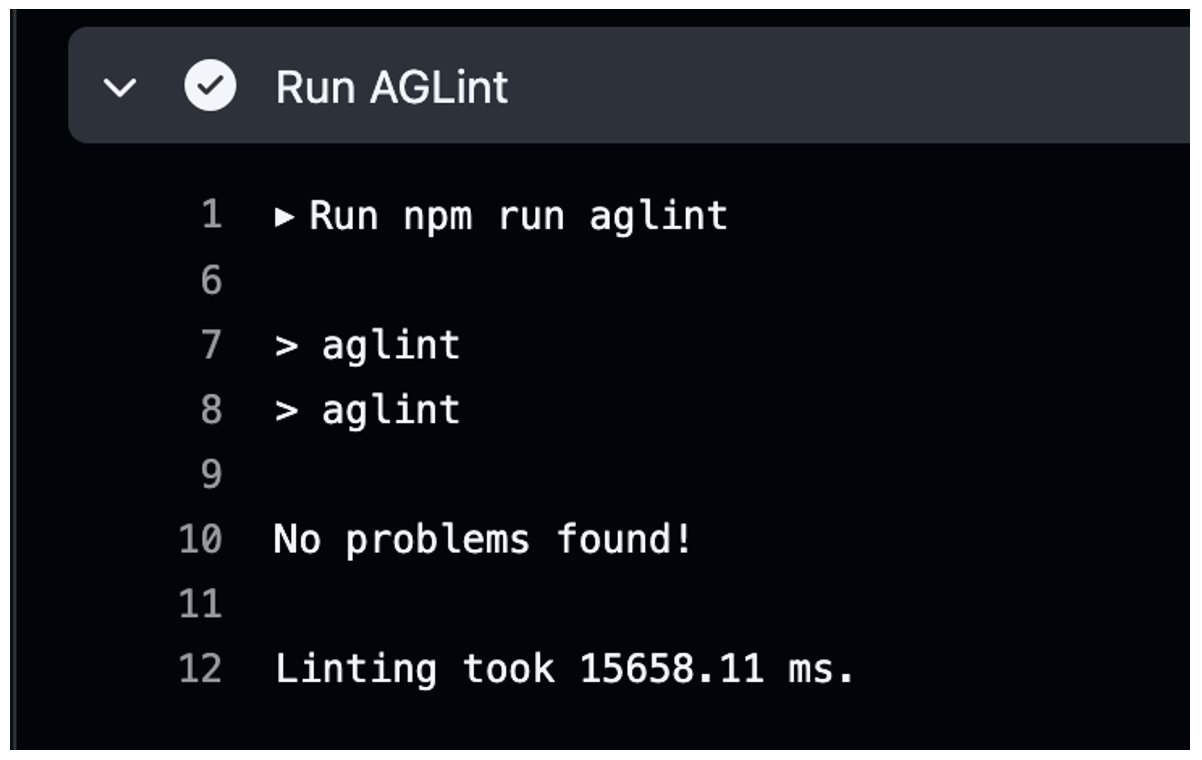
In AGLint v4, we’ve introduced a caching mechanism. Now, the linter keeps track of previously linted files and their content checksums. If a file hasn’t changed since the last run — we just skip it. Only files that were modified in the current commit are linted.
Local linting performance has been significantly improved thanks to caching. When cached, the process now takes only 66 ms on average — a major speedup compared to older runs. In a single-threaded setup, linting takes around 2.5 seconds, but with multi-threading that number drops to 1 second — more than twice as fast. These optimizations make development much smoother and more efficient for filter maintainers.
After cache:
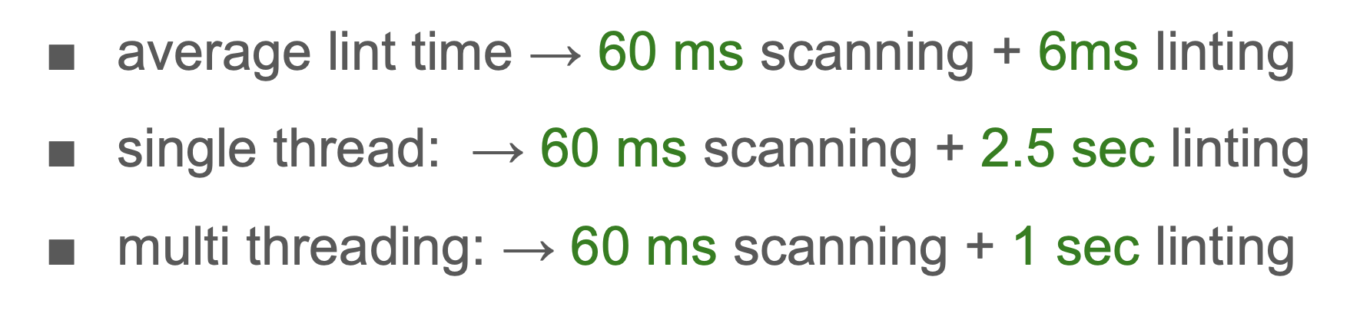
Local linting times for AdGuard Filters repository after introducing cache
This change is especially helpful for filter maintainers working on large lists — they get faster feedback, and CI pipelines don’t bottleneck as the project scales. It’s one of those things you don’t necessarily see… but you definitely feel the difference.
Autofix and Suggestions API
When we set up AGLint in a new project, we quickly run into lots of small issues — like naming, formatting, and rule changes. These weren’t hard, but AGLint couldn’t fix them automatically, so we had to do it all manually. It was slow and left a lot of room for mistakes. And after setup, every time AGLint updated with new rules or changes, we got even more issues. These were mostly small fixes, but without automation, it took a lot of time to clean them up.
This brings us to one of the most user-facing improvements in AGLint v4 — how we help users fix problems in their filter rules. Sometimes, when the linter detects an issue, there’s a clear and safe way to fix it. In those cases, we can just apply the fix automatically. But other times, the situation is a bit more complex — maybe there are multiple valid fixes, or it depends on user preference. That’s why AGLint now provides two types of fixing APIs:
- one for autofixes, where AGLint applies the fix automatically
- one for suggestions, where it’s the user who makes the final decision.
They work together to improve the developer and maintainer experience, both in the CLI and in your code editor. Let’s have a look at each of these APIs in more detail.
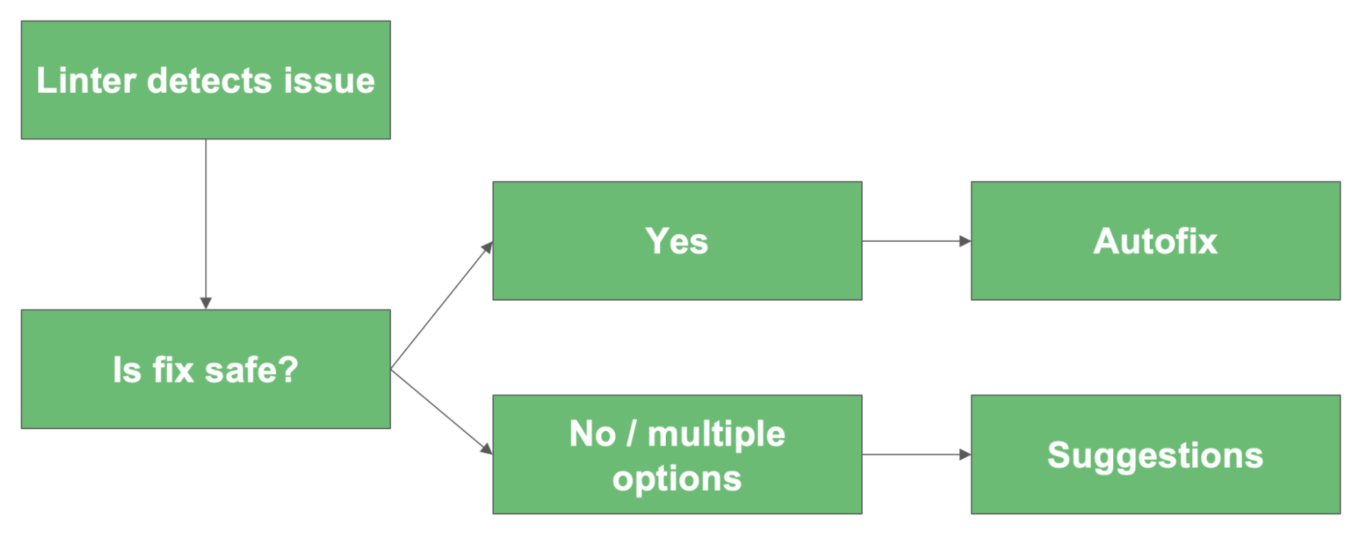
This flow helps compare Autofix and Suggestions. Both start the same way: the linter finds an issue. Then the key question is — can the fix be applied safely?
- If yes, we use Autofix — the change is done automatically, no extra work for the developer.
- If no, or if there are multiple possible fixes, then we use Suggestions — the linter explains the options, and the developer decides.
So Autofix is about speed and automation, while Suggestions is about guidance and choice.
Autofix is all about safety — if the linter is confident that the fix is safe, it just does it for you. It’s great for low-risk issues like formatting, quoting, or other simple rule patterns. It works seamlessly whether you’re in the terminal or using a code editor.
Autofix API:
- Automatically applies safe, unambiguous fixes
- No user interaction needed
- Great for formatting issues and simple rule mistakes
- Works in both CLI and editor integrations
- Built for performance and repeatability
Here is a real-world example of when we can use autofix. On macOS keyboards, it is easy to type curly quotes without noticing. Curly quotes do not follow the style guide and can make the rule invalid.
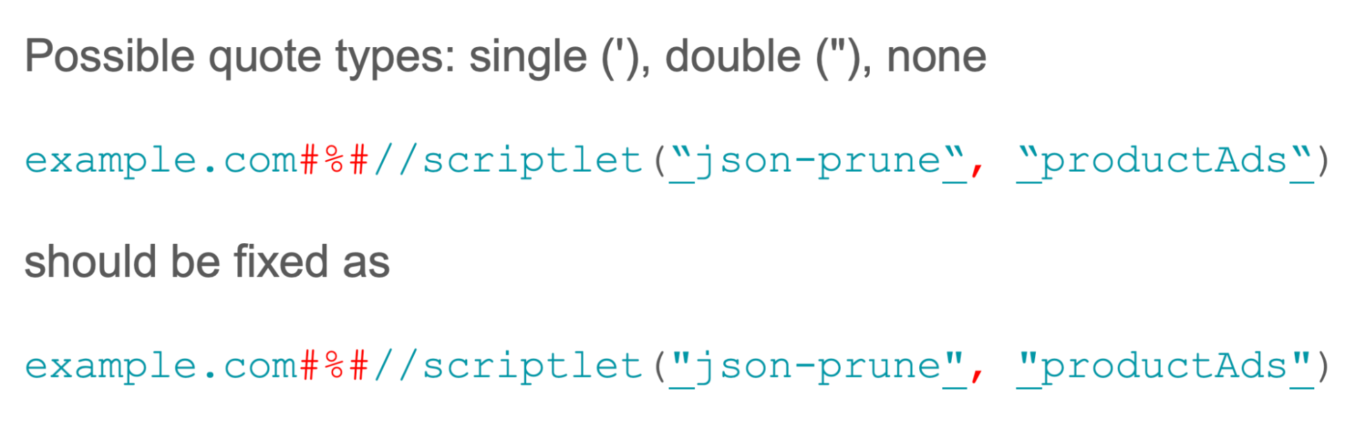
AdGuard syntax only accepts straight quotes: single ' or double ". In the first version, curly quotes are used around "json-prune" and "productAds". The corrected version replaces them with straight double quotes, and the rule works as expected.
This type of fix is safe to automate because it does not change the meaning of the rule. It only replaces curly quotes with straight ones. Curly quotes are never valid, so autofix can always correct them without any risk of breaking the rule.
Suggestions are there to guide rather than decide. In situations where the linter can’t confidently pick a single fix — or where user preference makes a difference — it doesn’t try to force a choice. Instead, it offers one or more possible fixes.
Suggestions API:
- Offers possible fixes for ambiguous issues
- User decides which suggestion (if any) to apply
- Ideal when multiple valid options exist
- Integrated into editor UI (e.g. VSCode code actions)
- Gives control without sacrificing guidance
This is especially useful when multiple valid options exist. For example, a rule might be technically correct in more than one form, but it’s up to the maintainer to decide which style they prefer. The Suggestions API gives you that flexibility. The best part is that these suggestions are directly integrated into the editor UI, like VSCode. So instead of looking at cryptic warnings, you get a familiar code action menu — click, choose the suggestion you like, and move on. It’s all about keeping the user in control, while still providing enough guidance so you don’t have to figure everything out on your own.
Autofix and Suggestions are also built right into the CLI. That means when you run AGLint locally, you can not only see the issues but also apply safe fixes directly from the command line, without leaving your normal workflow. Let’s have a look at a couple more examples of applying Autofix and Suggestion APIs.
Example: Removing duplicate CSS declarations
This is an interesting case. In CSS styles, the same property can sometimes be written more than once. Let's think about when we can use autofix and when we can't. In the first situation, both the property and its value are exactly the same. In the image below, you can see the same line repeated twice. In this case, it is safe to remove one of them, because the duplicate does not change anything. So, we can use Autofix.
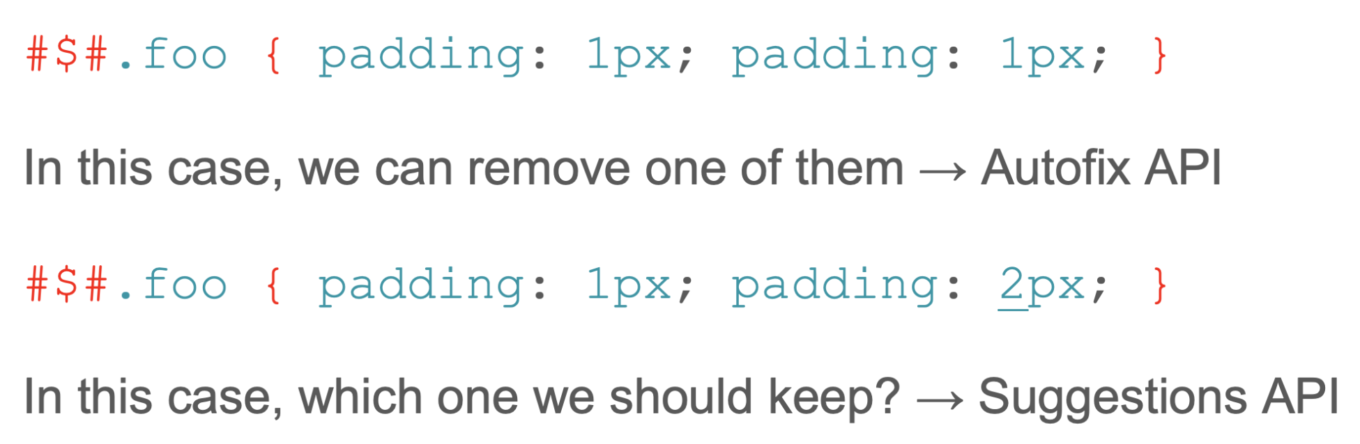
The second situation is different: the property is the same, but the values are not. Here, the linter cannot guess which value the user really wants. Therefore, in this case, suggestion is more appropriate. The user should decide which one to keep.
Example: Detecting unsupported CSS pseudo-classes
We support known pseudo-classes like :not(...), :has(...), or extended ones like :contains(...). But sometimes users write something unsupported, like :foo(...).
The tricky part is typos — for example, :contins(...) probably means :contains(...). A linter can’t be 100% sure, but if we find something invalid, we can do a fuzzy search (a technique that identifies matches even when the search query does not exactly match the data, allowing for misspellings, typos, and variations) and suggest likely matches.
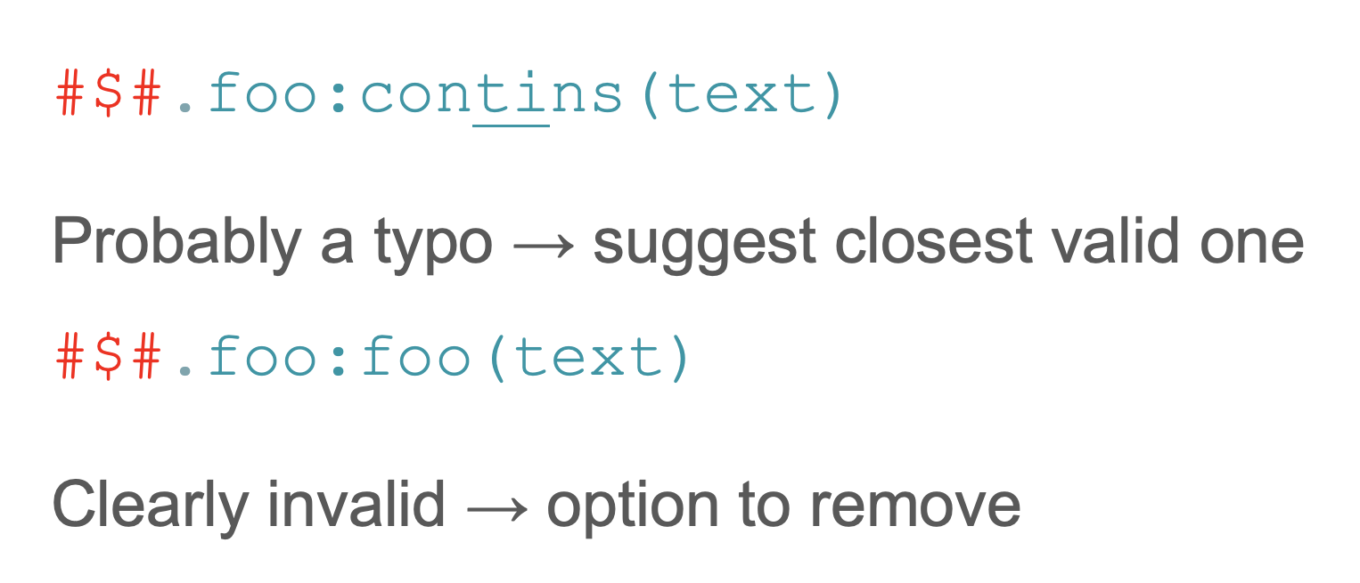
According to what you see on this image, this contins typo can be suggested to fix as contains, because there is a very high degree of certainty that that’s what the user meant. And in the second case, if the fuzzy search algorithm does not find anything from the known names close to foo, we should offer to remove the pseudo class. However, it probably breaks the selector, so it’s not safe and we can only offer the suggestions. And this idea isn’t limited to pseudo-classes — we can apply it to modifiers, scriptlets, and more.
But how do you quickly check whether a specific modifier, redirect, or scriptlet exists in a certain syntax? For that purpose, compatibility tables exist. Compatibility tables are essentially YAML files containing information about scriptlets, modifiers, and redirects for each adblock syntax, along with APIs for interacting with this data.
They help developers avoid guesswork and ensure consistent behavior across syntaxes. The tables should be always updated as new features are added, and to keep them accurate and complete, we invite everyone to contribute. Your input helps improve the reliability of these compatibility resources. Now that compatibility tables are part of AGTree, you can check our repo at tsurlfiltr.
Preferred linter rule syntax
It is important to check rules for the correct syntax. This is especially useful for filter maintainers who work with third-party filters or with different blocker syntaxes.
In real-world filter development, it’s common to work with third-party lists, mixed syntaxes, or repositories transitioning from one style to another. AGLint’s configuration can enforce a preferred syntax and help keep rule formats consistent.
This isn’t just aesthetics: when a repo quietly accumulates mixed syntax conventions, maintenance becomes harder, and reviewers have to keep more “context” in their heads. Setting a preferred syntax makes the linting output clearer and reduces accidental inconsistency.
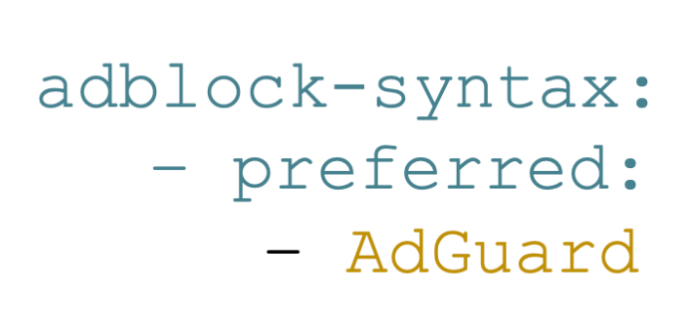
Part of the AGLint configuration that sets preferred syntax to AdGuard format
AGLint future
So what’s next for AGLint? Our immediate focus is on expanding the rule set to make filtering more flexible and powerful. And we’d love your help — whether that means voting on new rules, creating them, or keeping existing ones up to date. If you’d like to get involved, join us on GitHub: AdGuardTeam/AGLint.
We plan to release the next version soon, but we don’t want to do it in a vacuum. We’re actively looking for input from filter maintainers who work with real-world cases every day. Your feedback will help us shape rules that are not only smarter, but also easier to use and maintain.
Next, we plan to integrate these features into the user rules editor in AdGuard products, making it possible to customize and extend linting rules without touching the core code.
We’re also exploring formatting support. It’s still an open question, but the goal is to complement linting with consistent style — so rules can be not only correct, but also clean and uniform.
And finally, we want to create an AGLint GitHub action for GitHub Marketplace. The idea is to bundle key features — caching, autofix, and potentially even automated pull requests or issues — so teams can plug AGLint into their CI/CD pipelines with minimal setup.
Currently, Dávid Tóta is working on the official release of AGLint v4, and once it comes out, he is going to publish a separate article with a more in-depth look into it. Stay tuned!
Liza and Dávid presenting AGLint v4 at AFDS