YouTube rolls out 30-second unskippable ads, reviving the TV experience viewers once fled
YouTube has made 30-second unskippable ads part of the viewing experience for those watching the platform on TV. In a blog post on March 2, the Google-owned company announced that the format is now rolling out globally.
It’s not YouTube’s first rodeo with this particular format. Almost 10 years ago, the platform decided to retire 30-second unskippable ads, since at the time they were widely seen as a relic of traditional TV. That was something that everyone, including the tech leaders of the day, was eager to leave behind. Well, how the times have changed…
The return of the once discarded format was first announced back in 2023, and it took YouTube a whole three years to reintroduce it.
At 30 seconds, the new format officially becomes the longest standard unskippable ad YouTube offers. That said, there has been plenty of anecdotal evidence of much longer unskippable ads appearing on the platform, with reports ranging from several minutes to an eye-watering (sic) 58 minutes.

However alarming these reports may sound — and the mere thought of an hour-long ad is enough to make anyone shudder — YouTube has either dismissed them as glitches or declined to comment altogether.
For now, the 30-second spots coming to connected TVs are the longest officially recognized format, and they appear to be here to stay.
Where the ads will be shown
In the blog post, YouTube says that VRC non-skip ads (VRC stands for Video Reach Campaign) are designed specifically to run on Connected TV (CTV) devices, like smart TVs, streaming devices (Roku, Fire TV, Apple TV, Chromecast), and other internet-connected big screens in living rooms. The longer, 30-second non-skippable spots are CTV-only, while Google’s AI dynamically mixes in 6-second bumper ads and 15-second standard non-skippable ads across other YouTube environments such as mobile, desktop, and tablets.
The rationale behind this is that viewers who watch YouTube on big screens will be more tolerant towards long commercials than those who watch YouTube on their PC or phones. That seems to be a fair assumption, but it nevertheless brings us back to where we started, and we’re talking about the era before streaming services and YouTube took off.
Back to the old but not-so-good times
This new addition inevitably brings back memories of the era when long commercial breaks were simply part of watching TV. Anyone who grew up with traditional broadcasting will remember the routine: the moment the screen faded to a commercial break, you would get up from the couch, grab some popcorn, maybe pour yourself a coffee, and return a few minutes later hoping the show had just resumed. It was a shared experience, something almost everyone went through at some point.
The problem is that very few people actually want to repeat it. Streaming and online video platforms became popular precisely because they moved away from that model. And yet with these longer, unskippable ads, YouTube seems to be edging back toward the same viewing habits many viewers were happy to leave behind. Nostalgia for the “good old days” is one thing, but this feels less like a throwback and more like a regression.
There is also another important difference. In traditional television, shows rarely cut off randomly for commercials. The breaks were usually deliberate — often placed at moments designed to keep viewers hooked, sometimes even right on a small cliffhanger. That could still be annoying, of course, but at least there was some structure and intention behind it. Today’s streaming viewers, on the other hand, have become used to a far more seamless experience. And in that context, the idea of returning to long, unavoidable interruptions feels like an unwelcome step backward.
More ads, fewer escapes: YouTube tightens the screws
The addition of a new ad format is in line with a trend that has defined YouTube’s broader strategy in the past few years: maximizing ad revenue. By that measure, YouTube has been enormously successful. According to estimates from research firm MoffettNathanson, reported by The Hollywood Reporter, the platform pulled in a staggering $40.4 billion in ad revenue in 2025, surpassing the combined ad revenue of Disney, NBCUniversal, Paramount, and Warner Bros. Discovery, which together generated $37.8 billion.
Another strategy that complements this approach (and ultimately serves the same goal) is cracking down on ad blockers to drive the subscription revenue. As we’ve reported earlier, YouTube has recently begun discouraging ad-blocking users by intentionally worsening user experience. It is doing so by hiding video descriptions and comments until the blocker is disabled.
Only this year, YouTube appears to have tightened several other loose screws as well. One example is background playback, a feature officially reserved for YouTube Premium subscribers but previously accessible through a loophole: watching videos through alternative mobile browsers like Samsung Internet, Brave, Vivaldi, or Microsoft Edge, often paired with ad blockers. Earlier this year, many users reported that the workaround suddenly stopped working. Minimizing the browser or turning off the screen now cuts the audio. A Google spokesperson later confirmed to Android Authority that YouTube had updated the experience to ensure background playback remains exclusive to Premium across all platforms.
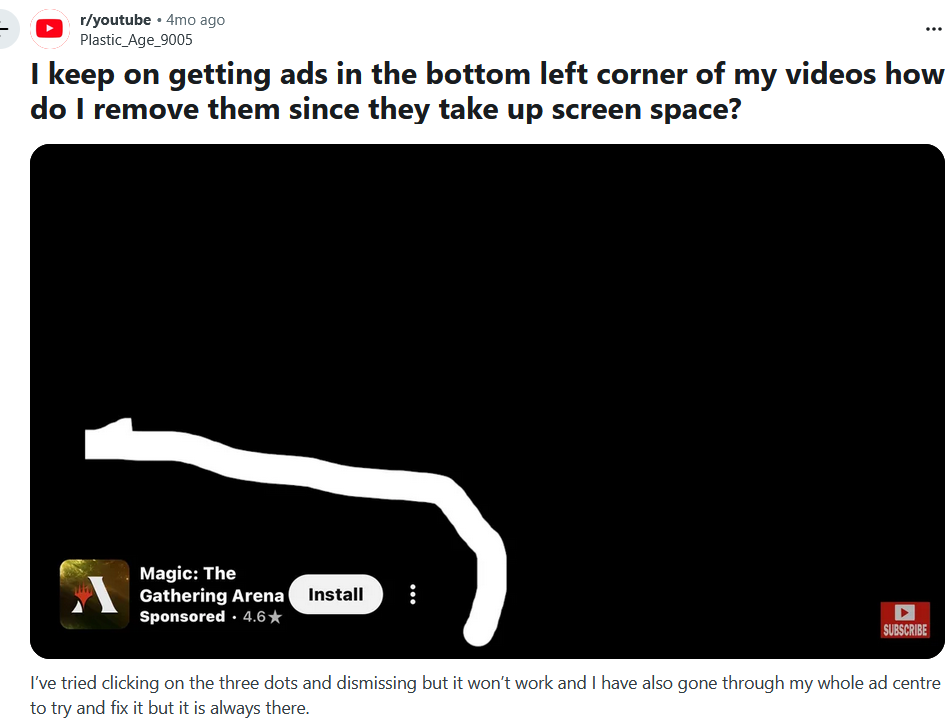
Earlier this year, free YouTube users also reported seeing a new form of persistent advertising inside the mobile apps. These banners appear in the bottom-left corner of the video, and in some cases cannot be dismissed unless the viewer exits the video and restarts playback.
The perils of YouTube Premium subscriptions
By the look and sound of it, YouTube’s broader goal seems fairly obvious: discourage users from turning on ad blockers and nudge them towards premium subscriptions — all at the same time. That would fit neatly into the wider subscription economy that has taken hold across industries, from streaming services to printers, and even cars.
The push also comes at a time when the original free YouTube experience is becoming increasingly difficult to enjoy, thanks to constant interruptions. The most straightforward solution would be to subscribe to Premium — at least that’s how it looks on paper. In reality, there have been multiple reports over the years of users still encountering ads even after switching to Premium. Google typically attributes these cases to glitches or user-side issues — such as watching videos while logged out — but the reports keep surfacing, with some users claiming they still see ads on the homepage and other parts of the platform).
And then there’s the price. A full Premium subscription currently costs $13.99 per month for individuals or $22.99 for a family plan, which is not exactly trivial for many viewers. Unsurprisingly, some users look instead to Premium Lite, available in the U.S. for $7.99 a month. The catch, however, is that it only offers a mostly ad-free experience — ads can still appear on music content, Shorts, and during browsing or search.
Given the trajectory YouTube seems to be on, it would not be surprising to see the number of subscription tiers expand even further, with a completely ad-free experience gradually turning into something of a luxury. After all, from a business perspective the ideal scenario would be to keep both revenue streams flowing: ads and subscriptions alike.
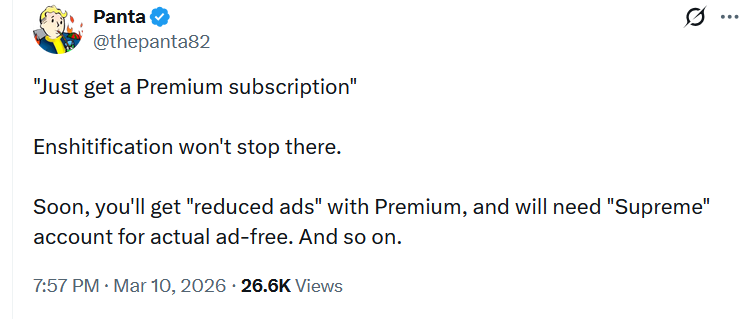
Some observers think the situation could escalate even further. As one commenter on X put it: “Soon you'll get ‘reduced ads’ with Premium, and will need a ‘Supreme’ account for actual ad-free. And so on.” While that prediction may be somewhat tongue-in-cheek, it is not entirely difficult to imagine a future where the lines between free, paid, and “premium-premium” tiers become increasingly blurred.
Alternative — ad blockers, where possible
There is also another reason why YouTube’s advertising push is increasingly focused on connected TVs. Compared to PCs or smartphones, smart TVs offer far fewer ways to avoid ads in the first place. Traditional browser-based ad blockers simply cannot be installed on most TV platforms. That leaves network-level approaches such as DNS filtering as one of the few available options. However, even those methods have significant limitations. Because YouTube often serves ads from the same domains as the video content itself, DNS-based blockers generally cannot filter them out without also breaking video playback. In practice, that makes YouTube ads far harder to block on smart TVs than on desktop or mobile devices.
For many users, the combination of longer ads, tighter platform restrictions, and an increasingly aggressive push towards Premium leaves one obvious alternative: turning to ad blockers — at least on the devices where they still work reliably. AdGuard and other ad-blocking solutions have long been locked in a classic cat-and-mouse game with YouTube, as the platform continuously introduces new measures designed to detect and discourage ad blocking. The crackdown may be intensifying, but the other side of that equation is constantly adapting its approaches as well.
And given the current trade-offs, it is not hard to see why people keep turning to them. When Premium subscriptions continue to rise in price, occasional glitches still let ads slip through, and even cheaper tiers remain partially ad-supported, the balance can start to feel a little unfair. In the meantime, the goal remains simple: make YouTube watchable, like it used to be once, even if the platform itself seems determined to make that harder.