AdGuard Browser Extension v5.4: Filtering you can trust, settings you can share

Perfect ad blocking, like an Olympic record, isn’t easy to achieve — but we’re working toward it with every update. Filters need to update instantly, apply flawlessly, and exclusions should trigger precisely. In this release, we’ve raised the bar even higher: refined filter update logic, fixed several issues that could cause blocking to behave incorrectly, and improved how exclusions are handled. Beyond speed and accuracy, we’ve also focused on usability: you can now easily share your extension settings, and new interface prompts help prevent accidental mistakes.

Filtering: Faster, stronger, better

Custom filters in MV3 can now update independently from extension updates again, so ad blocking stays accurate and responds to changes more quickly.

We’ve also fixed several issues where filters could be added but wouldn’t work properly. For example, the extension now validates sources when you add a custom filter by URL — this prevents situations where a filter appears in your list but doesn’t actually apply.

Beyond filter improvements, we’ve refined Allowlist: if you add a full page URL to your exclusions (say, copied straight from the address bar), the extension will automatically extract the domain, and the exclusion will work as expected.

Settings import: Show, don’t tell

You can now share your extension settings. This makes it easy to set up AdGuard on a new device or after reinstalling your browser. You can also help a friend configure their extension, or share your setup with the support team — they'll see your exact settings instantly. Just go to General and click Share settings.
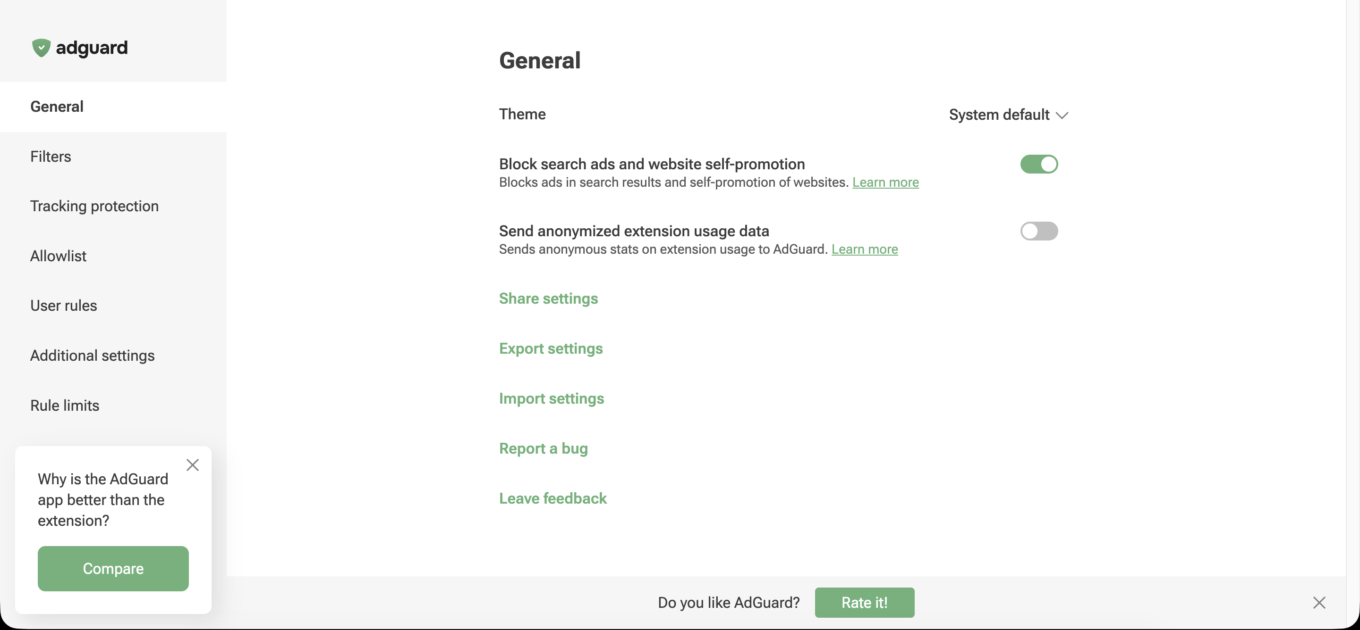
If you’re an active GitHub user, you can now import settings directly from Issues — especially useful for filter developers and those helping test fixes.

Interface: Better prompted than puzzled

We’ve added a few small improvements to prevent confusion and make the extension behave more predictably.

  • Warning for Opera users. Opera doesn’t grant extensions access to search engine pages by default, which prevents AdGuard from blocking ads in search results. The extension popup now shows a notice prompting you to allow this access. Click Go to Settings in the popup — you’ll be redirected to the extension settings in Opera, where you can turn on the Allow access to search page results toggle.
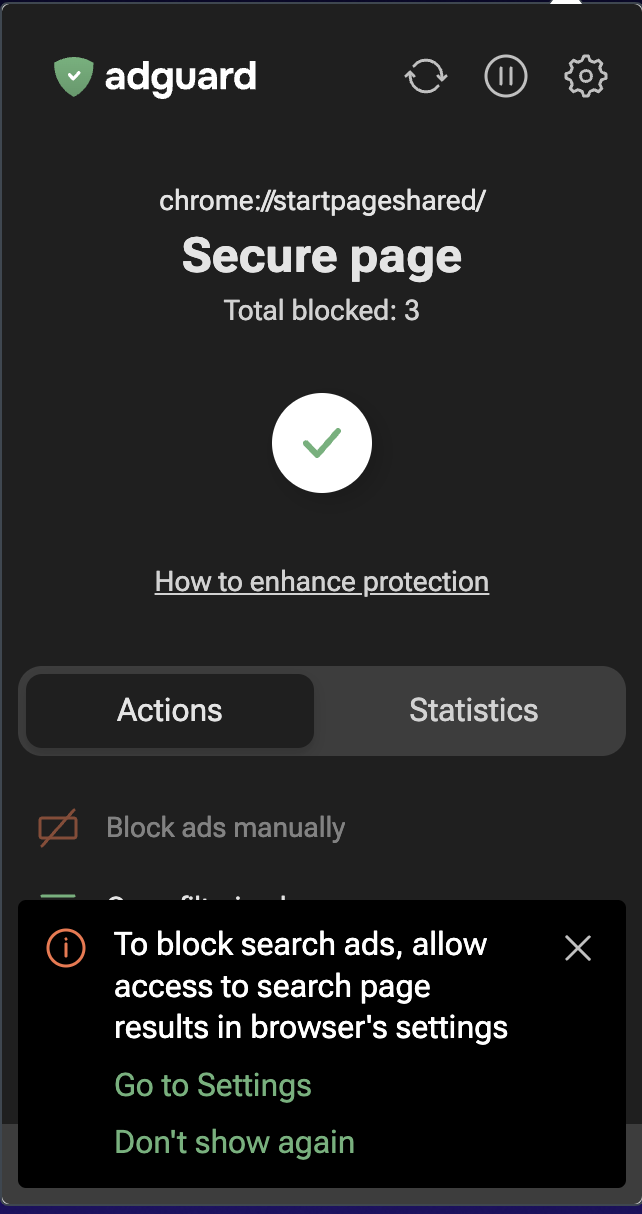
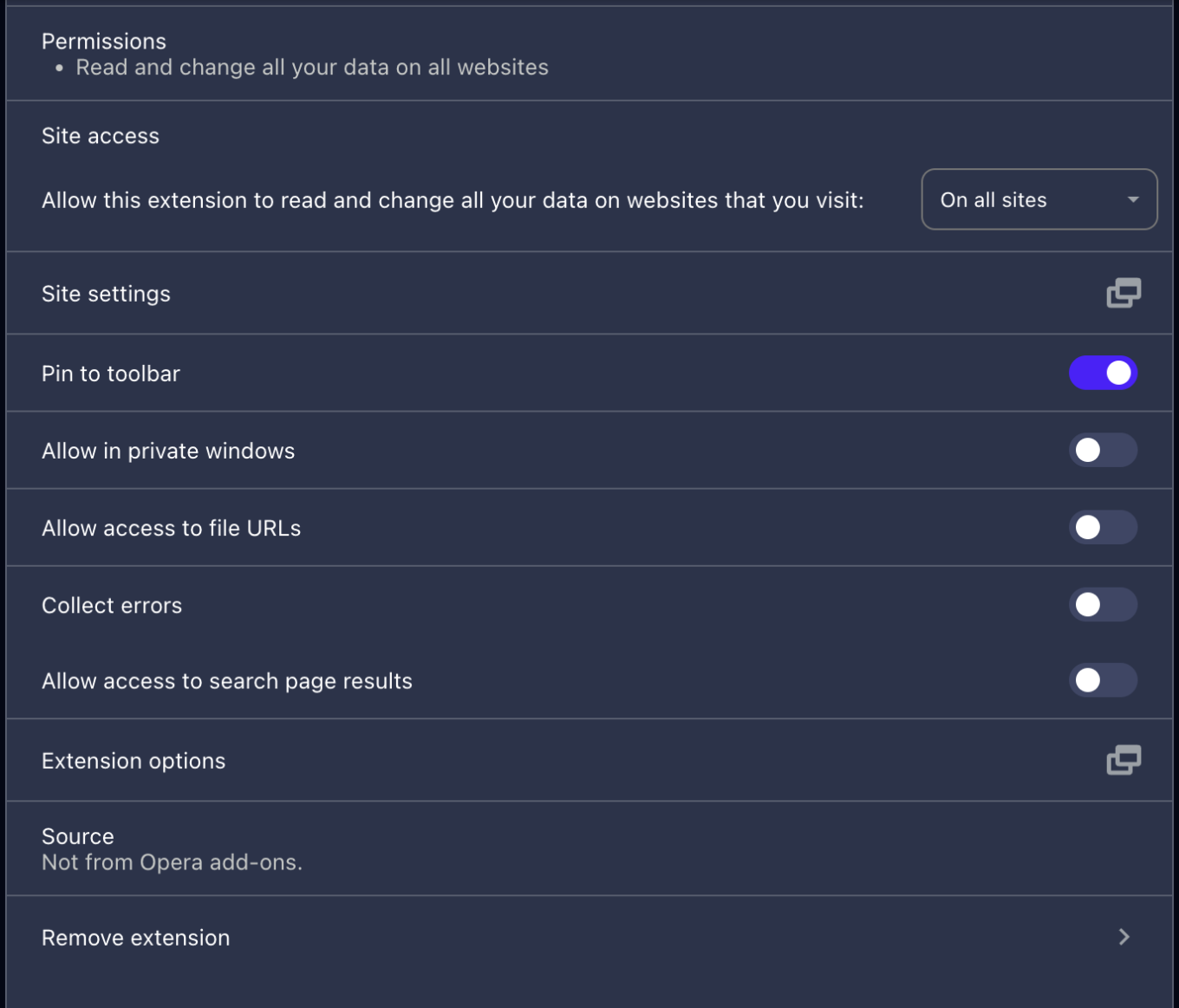
Opera popup *mobile

  • Confirmation for Invert Allowlist. The Invert Allowlist feature reverses how the extension works: blocking is disabled everywhere except sites on the list. To prevent accidental activation, we’ve added a confirmation dialog that explains what will happen when you enable it.

More sharing: This time, your thoughts

Enjoying the update? Have ideas for what’s next? Share your feedback on our social channels or start a conversation on GitHub. Every comment helps us improve.


Liked this post?
AdGuard VPN AdGuard DNS AdGuard Mail AdGuard Wallet
20,184 20184 user reviews
Excellent!

Ad blocker for Windows

AdGuard for Windows is more than an ad blocker. It is a multipurpose tool that blocks ads, controls access to dangerous sites, speeds up page loading, and protects children from inappropriate content.

By downloading the program you accept the terms of the License agreement
Microsoft Store
Ad blocker for Windows v7.22, 14-day trial period
20,184 20184 user reviews
Excellent!

Ad blocker for Mac

AdGuard for Mac is a unique ad blocker designed with macOS in mind. In addition to protecting you from annoying ads in browsers and apps, it shields you from tracking, phishing, and fraud.
By downloading the program you accept the terms of the License agreement
Read more
Ad blocker for Mac v2.18, 14-day trial period
20,184 20184 user reviews
Excellent!

Ad blocker for Android

AdGuard for Android is a perfect solution for Android devices. Unlike most other ad blockers, AdGuard doesn't require root access and provides a wide range of app management options.
By downloading the program you accept the terms of the License agreement
Read more
Scan to download
Use any QR-code reader available on your device
Ad blocker for Android v4.12, 14-day trial period
20,184 20184 user reviews
Excellent!

Ad blocker for iOS

The best iOS ad blocker for iPhone and iPad. AdGuard eliminates all kinds of ads in Safari, protects your privacy, and speeds up page loading. AdGuard for iOS ad-blocking technology ensures the highest quality filtering and allows you to use multiple filters at the same time
By downloading the program you accept the terms of the License agreement
Read more
Scan to download
Use any QR-code reader available on your device
Ad blocker for iOS v4.5
20,184 20184 user reviews
Excellent!

AdGuard Content Blocker

AdGuard Content Blocker eliminates all kinds of ads in mobile browsers that support content-blocking technology — namely, Samsung Internet and Yandex Browser. Its features are limited compared to AdGuard for Android, but it is free, easy to install, and efficient
By downloading the program you accept the terms of the License agreement
Read more
AdGuard Content Blocker v2.8
20,184 20184 user reviews
Excellent!

AdGuard Browser Extension

AdGuard is the fastest and most lightweight ad blocking extension that effectively blocks all types of ads on all web pages! Choose AdGuard for the browser you use and get ad-free, fast and safe browsing.
Install
By downloading the program you accept the terms of the License agreement
Install
By downloading the program you accept the terms of the License agreement
Install
By downloading the program you accept the terms of the License agreement
Install
By downloading the program you accept the terms of the License agreement
Install
By downloading the program you accept the terms of the License agreement
Read more
AdGuard Browser Extension v5.4
20,184 20184 user reviews
Excellent!

AdGuard Assistant

A companion browser extension for AdGuard desktop apps. It allows you to block custom items on websites, add websites to allowlist, and send reports directly from your browser
AdGuard Assistant v1.4
20,184 20184 user reviews
Excellent!

AdGuard Home

AdGuard Home is a network-based solution for blocking ads and trackers. Install it once on your router to cover all devices on your home network — no additional client software required. This is especially important for various IoT devices that often pose a threat to your privacy
AdGuard Home v0.107
20,184 20184 user reviews
Excellent!

AdGuard Pro for iOS

AdGuard Pro for iOS comes with all the advanced ad-blocking protection features enabled. It offers the same tools as the paid version of AdGuard for iOS. It excels at blocking ads in Safari and lets you customize DNS settings to tailor your protection. It blocks ads in browsers and apps, protects your kids from inappropriate content, and keeps your personal data safe
By downloading the program you accept the terms of the License agreement
Read more
AdGuard Pro for iOS v4.5
20,184 20184 user reviews
Excellent!

AdGuard Mini for Mac — Safari ad blocker

AdGuard Mini for Mac is a powerful Safari ad blocker. This lightweight app removes ads, blocks trackers, and speeds up page loading. It helps you browse the Web in Safari without distractions and keep your data private
Install
By downloading the program you accept the terms of the License agreement
Read more
AdGuard Mini for Mac v2.1
20,184 20184 user reviews
Excellent!

AdGuard for Android TV

AdGuard for Android TV is the only app that blocks ads, guards your privacy, and acts as a firewall for your Smart TV. Get warnings about web threats, use secure DNS, and benefit from encrypted traffic. Relax and dive into your favorite shows with top-notch security and zero ads!
AdGuard for Android TV v4.12, 14-day trial period
20,184 20184 user reviews
Excellent!

AdGuard for Linux

AdGuard for Linux is the world’s first system-wide Linux ad blocker. Block ads and trackers at the device level, select from pre-installed filters, or add your own — all through the command-line interface
AdGuard for Linux v1.3
20,184 20184 user reviews
Excellent!

AdGuard Temp Mail

A free temporary email address generator that keeps you anonymous and protects your privacy. No spam in your main inbox!
20,184 20184 user reviews
Excellent!

AdGuard VPN

76 locations worldwide

Access to any content

Strong encryption

No-logging policy

Fastest connection

24/7 support

Try for free
By downloading the program you accept the terms of the License agreement
Read more
20,184 20184 user reviews
Excellent!

AdGuard DNS

AdGuard DNS is a foolproof way to block Internet ads that does not require installing any applications. It is easy to use, absolutely free, easily set up on any device, and provides you with minimal necessary functions to block ads, counters, malicious websites, and adult content.
20,184 20184 user reviews
Excellent!

AdGuard Mail

Protect your identity, avoid spam, and keep your inbox secure with our aliases and temporary email addresses. Enjoy our free email forwarding service and apps for all operating systems
20,184 20184 user reviews
Excellent!

AdGuard Wallet

A secure and private crypto wallet that gives you full control over your assets. Manage multiple wallets and discover thousands of cryptocurrencies to store, send, and swap
Downloading AdGuard To install AdGuard, click the file indicated by the arrow Select "Open" and click "OK", then wait for the file to be downloaded. In the opened window, drag the AdGuard icon to the "Applications" folder. Thank you for choosing AdGuard! Select "Open" and click "OK", then wait for the file to be downloaded. In the opened window, click "Install". Thank you for choosing AdGuard!
Install AdGuard on your mobile device