AdGuard Home v1.0: Stable, tested, and ready
At the end of September, we released the first beta of AdGuard Home v1.0. The beta phase went a long way through two public builds and 22 fixes — now that it is done, the product has reached a new milestone. For months, the project received routine updates, but we then shifted into active development. A lot of work has been done, and we’d like to show the results.
An 8-year journey
AdGuard Home was released in 2018 as a v0.1 preview. It has to be mentioned that the original user interface was built by someone who was actually learning while coding it. It wasn’t perfect, but it got the job done, which helped the product grow into something people could rely on. Over the years, the project thrived. We added major features like the built-in updater, client tags, and pioneered DNS-over-QUIC support. We wrote extensively about it in our article on the recent beta, it is worth a look if you need more information.
Beyond the history of how AdGuard Home became what it is, it’s worth looking at how versions were released before, and what changed since the last beta.
A new approach to versioning
Our previous approach to versioning was somewhat ad hoc, with numbering that did not align with our other products. As an example, we went straight to v0.9 from v0.1, then followed it up with v0.91. We adopted semantic versioning in 2020, eventually counting up to v0.107.
As the project evolved, the need for fundamental change became clear. The legacy interface hindered the adoption of major features that could disrupt existing setups, so for quite some time, we opted for targeted patches instead of attempting something big.
With v1.0, we are taking things to a new level, adopting a flexible versioning scheme similar to other AdGuard products: we are going to differentiate between patches, minor versions and major releases. From now on, minor releases (e.g v1.0.0 to v1.1.0) may include backward-incompatible changes. Lifting these restrictions allows us to ship new features faster — as evidenced by the globally refreshed interface.
This release doesn’t require anything from you: v1.0 keeps the same configuration schema as v0.107.x, so your
AdGuardHome.yamland data directory work as is.
A new interface, same logic
The interface has been rebuilt from the ground up: new frontend, lower memory usage, a UI that stays responsive on low-power devices, and a layout that works on phones as well as on desktops. The structure is deliberately familiar — same sections, same places — so the switch costs you no time.
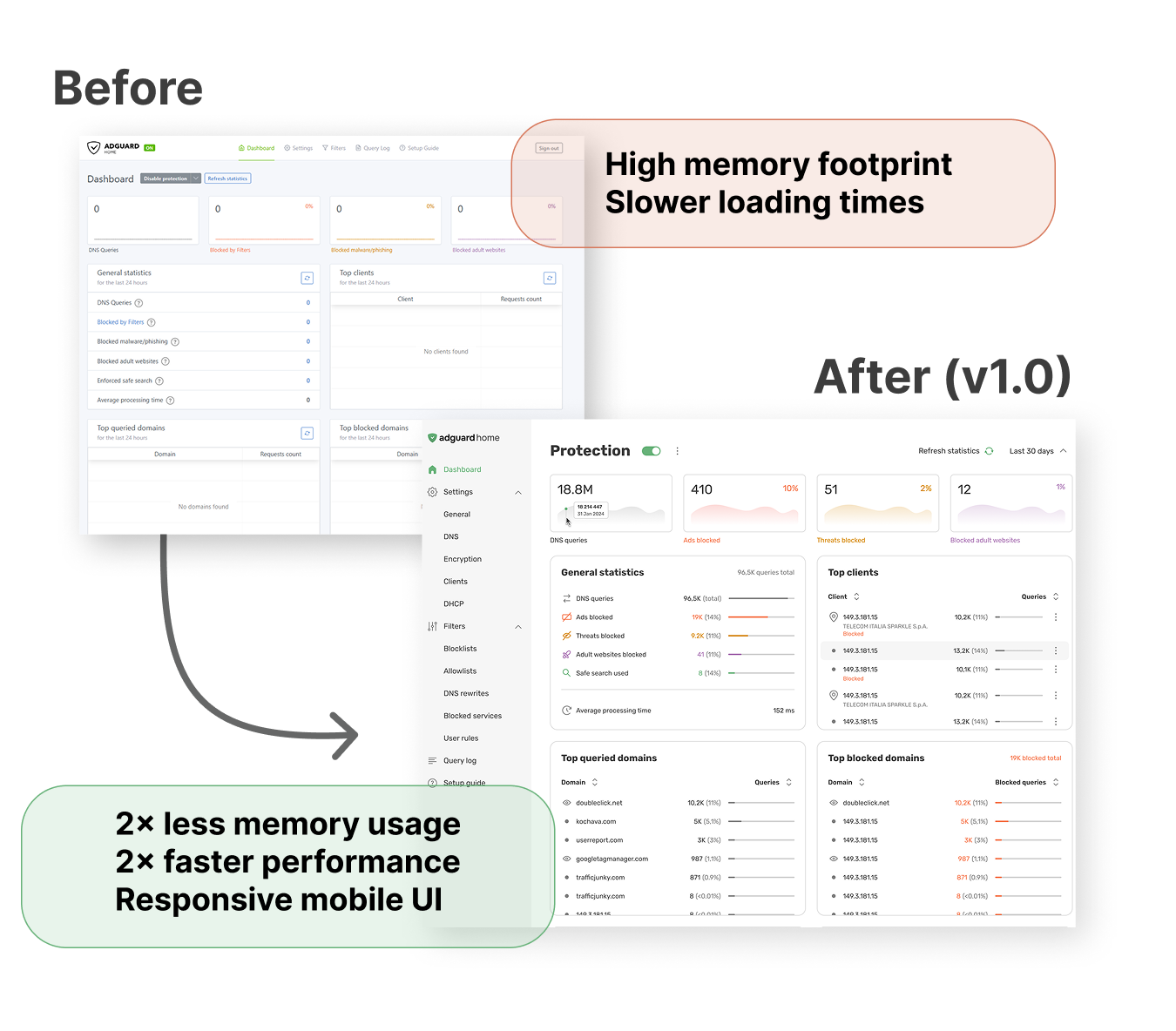
Three screens changed more than their looks: client settings now assign profiles and rules per device, the query log shows more details on each card and adds sorting and filtering, and the filters section gathers blocklists, allowlists, DNS rewrites, and user rules in one place with configurable update intervals. The rest of the interface is the same logic in a new skin — a restyled dashboard included.
For the full walkthrough with screenshots, see our beta article — the interface described there is the one shipping today.
What changed since the last beta
While the first beta of v1.0 introduced a globally changed interface, the second beta was all about stability. We will highlight the most important changes here, while the full list can be found in the version history.
- DHCP: IPv4 settings can now be saved alongside an IPv6-compatible interface, DHCP starts with a DHCPv6-only configuration, and subnet validation works as expected.
- Clients and ClientIDs: IPv6 CIDRs with an embedded IPv4 address are accepted, malformed MAC addresses with leading-zero octets are rejected, and per-client schedules survive saving.
- Interface: long values no longer overflow dialogs, encrypted DNS addresses appear in the Setup Guide right away, and emoji passwords work in the wizard.
- DNS: DDR returns a valid SVCB record with empty DoH routes, schedules no longer shift on clock changes, and command-line updates work with private reverse DNS enabled.
- Everything else:
--check-configbehaves correctly on first launch, andlog.enabled: falsenow disables the legacy logger.
One change deserves special mention. Client settings are now more granular: Use global settings covers Protection only, blocked services have their own switch, and upstream and cache settings stay editable. You can apply global settings when you want many clients to share the same configuration, or set things up per-client when you want an individual approach.
In summary, v1.0.0 brings 22 stability improvements and one behavioral change over v0.107.80. The redesign itself was the headline feature. The beta version was the major rework took place.
Our plans for future releases
AdGuard Home v1.0 won’t be the last version to bring major changes — we plan to keep improving it until it reaches its full potential. A self-diagnostics page, mass-importing of filtering lists, a built-in search tool for the interface and the ability to automatically issue and renew TLS certificates are currently in the works. We intend to move the product forward at a faster pace from now on.
How to update or switch to v1.0
Heads-up: the default DNS provider has changed
New installations now use Cloudflare DNS as their default upstream and bootstrap instead of Quad9. Quad9 remains available as a manual choice.
Existing installations keep their current settings — we don’t rewrite configurations automatically. If you never changed the old defaults and your traffic goes through France, switch both the upstream and the bootstrap before November 24: Quad9 stops serving users there on that date. The exact addresses are in the release notes.
We have several update channels for AdGuard Home, each with its own specificity. Here’s a quick reminder on how to proceed:
If you are using the beta or edge channel: You don’t need to do anything. The update will go through automatically via the built-in updater.
If you are on the stable version: Follow the UI prompt to update.
If you prefer using CLI: Run the command ./AdGuardHome --update -v
If you are updating through Docker: Set the image tag to :latest, then recreate and restart the container.
Sharing your feedback
Thank you for the reports you have sent while helping us test the beta! We caught and promptly fixed bugs brought to our attention. If you have any suggestions, or see something that’s not working as it should, let us know on GitHub.
Quick tip: use the search bar first to check if someone else has already reported the issue. If it’s a new one, open a ticket, and we’ll dive right into it.
AdGuard Home was built for you and shaped by your needs. This project grew in sync with the community, and we value this experience, relying on mutual communication and trust.