AdGuard 2025 year recap
It’s time for one of our favorite traditions. Every year, right before the New Year, someone from the Content team sits down at their laptop, stretches their fingers, dives into memories, and gets ready for some detailed storytelling. This year, that someone is me.
2025 was a big year for us. We launched four (well, three actually, but it feels like four — more on it later) brand-new products, and we’re not stopping there — the AdGuard lineup is still growing. We updated all our long-time favorite products to make them even better, and welcomed guests to our hometown of Limassol for a brand-new Ad-Filtering Dev Summit. We also wrote plenty of insightful articles for you — and so much more.
So get comfortable. This is AdGuard’s year recap ✨
New products
As always, let’s kick the recap off with the most exciting news: new AdGuard products! We always strive to move forward, to not just improve our existing software, but also to broaden our product line. This year, the AdGuard product family welcomes quite a few newcomers: AdGuard Ad Blocker for Linux, AdGuard Mini for Mac, AdGuard DNS mobile app, and AdGuard Mail!
Linux users don’t like ads, too!
Last year, we released AdGuard VPN CLI — a command-line interface to run AdGuard VPN on Linux. So naturally we had to take the next step and protect our Linux users from ads, too. And we did! AdGuard v1.0 for Linux also runs in the command line and offers a wide range of tools to fight back against ads and trackers.
If you have experience with AdGuard ad blocking apps for other platforms, you’ll find a lot of the features of AdGuard for Linux familiar: app filtering, app exclusions, custom user rules and custom filters, differential filter updates. These are all essential tools for efficient ad blocking and tracker protection, and they are all available at your fingertips now. Try it out!
Mini in its name, maximum protection
AdGuard Mini for Mac is our new app to block ads in Safari browser. It is technically a new product, but it is a direct successor to AdGuard for Safari — if you’ve been using the latter, the app will update automatically (or has done so already). But why the new name? First of all, we introduced several new features: real-time filter updates, so you would always have the latest filters at your disposal, and a new advanced tool called AdGuard Extra to deal with the more stubborn ads that regular filters couldn’t normally block. It felt like a big enough improvement to justify the rebranding.
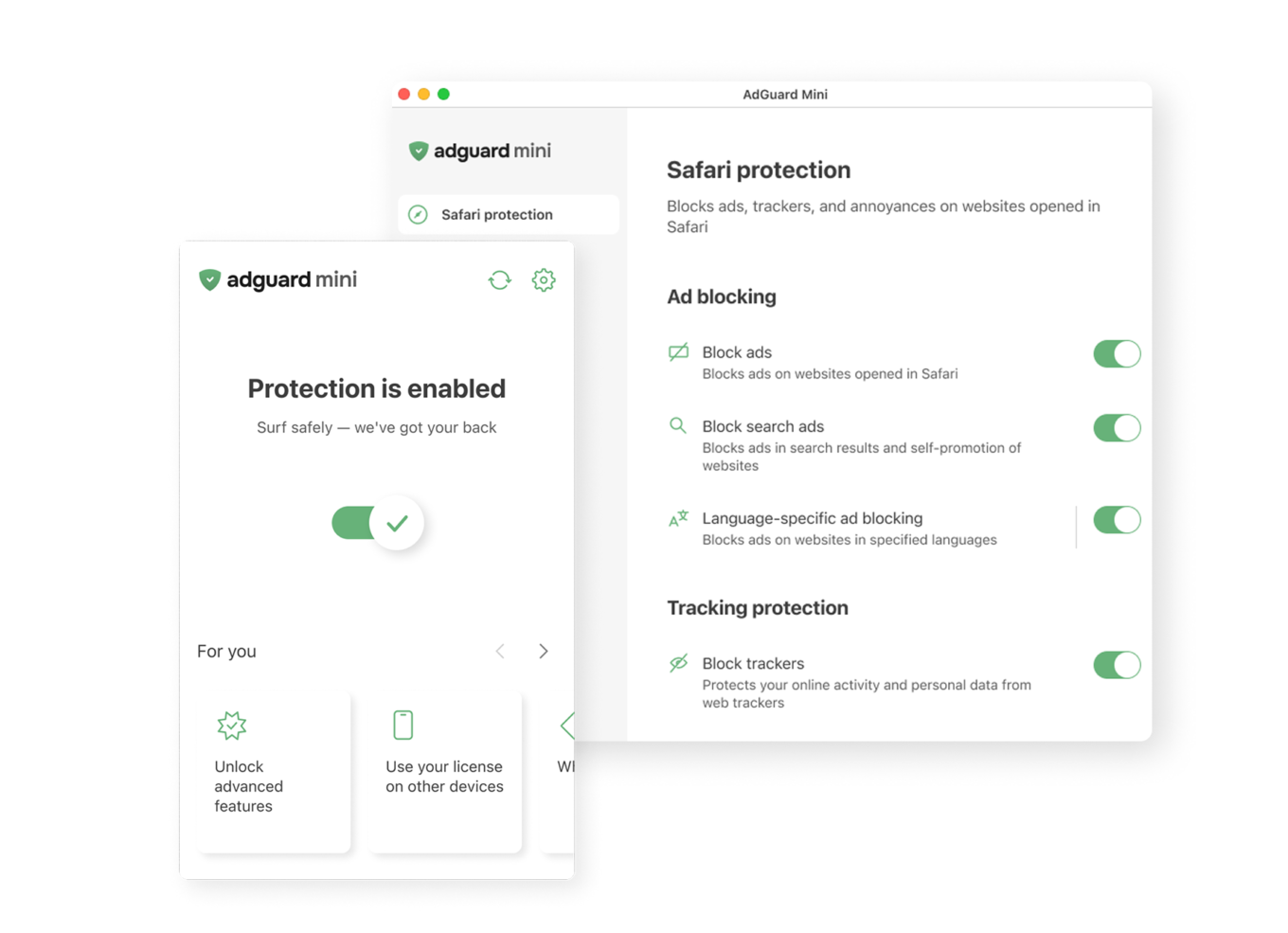
There was another reason — we wanted to emphasize that this product is a lighter version of its bigger brother, AdGuard for Mac app. While AdGuard for Mac has a larger arsenal and offers system-wide filtering, AdGuard Mini is a perfectly valid choice for many users who want to protect their Safari browser first and foremost.
DNS protection on the go
This new product is supplementary to AdGuard DNS. AdGuard DNS mobile app serves as a quick and easy way to configure AdGuard DNS on your mobile device and to manage protection on the fly.
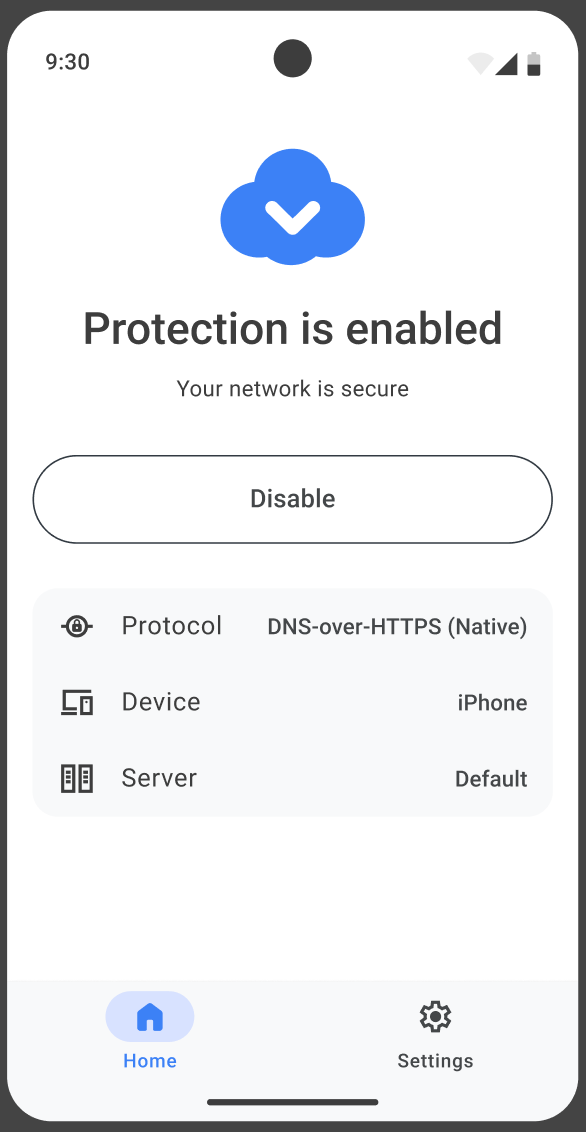
It is lightweight, trivially easy to set up, and helps you to enable and disable protection, select the preferred protocol, and switch to the desired DNS server in seconds. A great choice for anyone looking for an all-round protection for their Android or iOS device.
Powering up your email
Technically, AdGuard Mail isn’t a new product — we even wrote about it in the previous year’s recap. But it didn’t feel right to just ignore a huge milestone like the release of the version 1.0. It introduced many must-have features like email replies, multiple alias domains, and reply stats, so we’d say it deserves a place in the ‘new products’ section of the recap.

Over this year, we’ve updated AdGuard Mail a few more times, no least thanks to your feedback. Try out AdGuard Mail for yourself to see what cool new features the latest version, v1.3, has to offer today, or check out the version history if you want to know everything about even the smallest of changes.
Block around the clock
With AdGuard Ad Blocker, we always strive to block more and better — within reason, of course. There are many AdGuard products for various platforms, and all of them received updates, often more than one. It won’t be possible to talk about all of them within this recap, so we’ll have to draw a line somewhere. For every product, we will arbitrarily choose one most prominent change and highlight it. The more inquisitive readers will find other big changes listed under the dropdown, and for the true changelog detectives we will link each product’s version history.
AdGuard for Windows
Our Windows devs have been quite busy this year and churned out a number of updates. So many banger features to choose from, but ultimately we stopped our choice on this one:
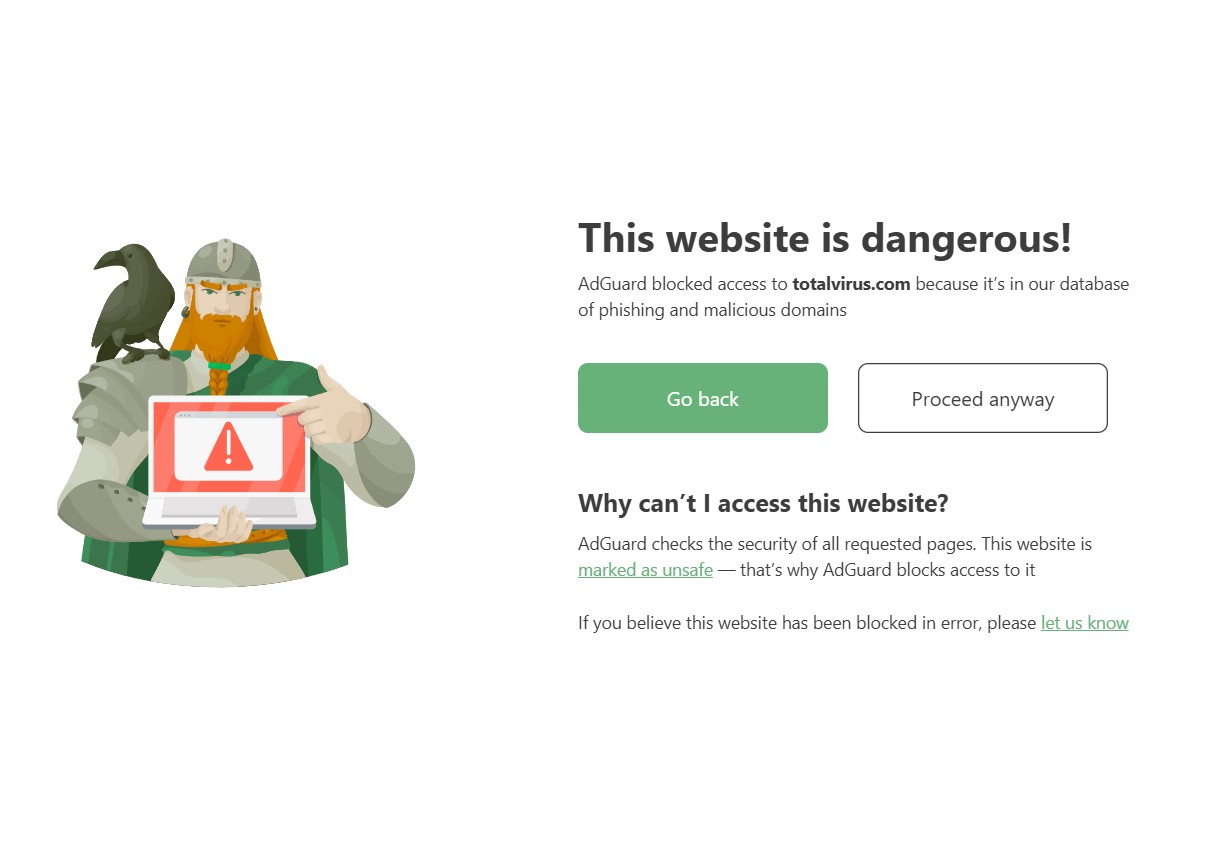
Interactive blocking pages. Previously, these pages felt like roadblocks — now they’re more like intersections where you have options: return to the previous page, learn more about the blocking, report a false positive, and for the most daring — proceed to the website anyway.
Other big changes:
Differential filter updates. Now AdGuard downloads only changes to filter lists instead of the entire list — it's much faster and easier on the server.
Option to disable Windows Recall. You can read about the Windows Recall feature and why it’s a threat to privacy in our blog.
Improved userscript compatibility. AdGuard is now even more flexible in customization and supports more userscripts.
Option to install AdGuard from Windows Store. Definitely check it out if that’s your preferred way of getting apps for Windows.
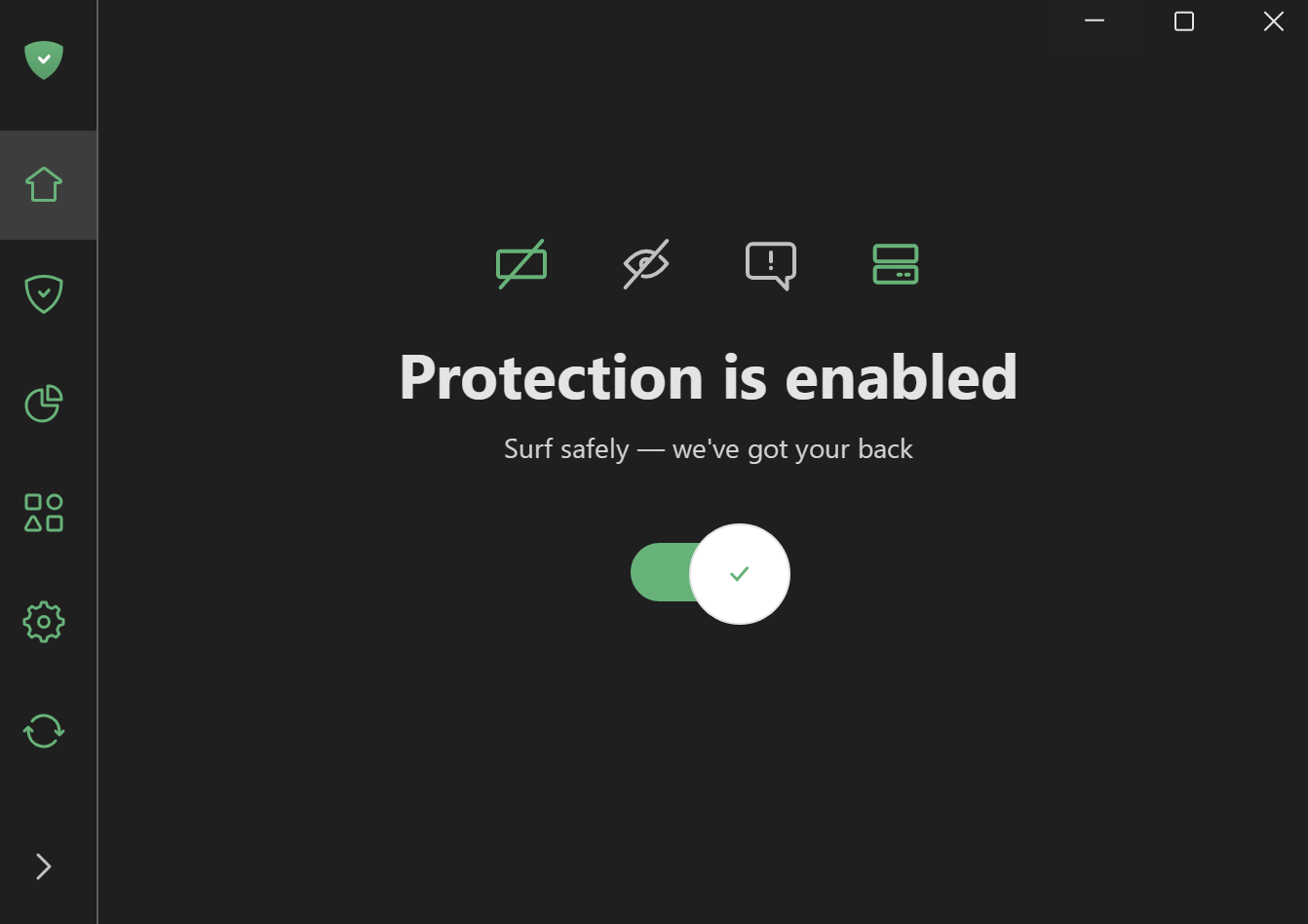
And we saved the best for last! We’ve released the beta version of AdGuard for Windows v8.0! Faster startup, more reliable filtering, quiet background performance, improvements to Statistics, Extensions (previously Userscripts), and App Management modules — it’s all in there. If you can’t wait for the official release, definitely give it a go!
If you want a more comprehensive and granular list of changes, visit the version history page.
AdGuard for Mac
For AdGuard for Mac, it was a slower year in comparison, so no singling out of any one particular change here. AdGuard for Mac now features the same interactive blocking pages that you could see in AdGuard for Windows. We added support for post-quantum cryptography, meaning that if the filtered app or browser uses the latest encryption methods, AdGuard will do the same. This way even a quantum computer won’t be able to decrypt your traffic! We won’t forget the added support for three new AI-powered browsers: ChatGPT Atlas, Perplexity Comet, and Dia.
Aside from that, most of the changes were under the hood and impacted the performance, stability, and compatibility (all in a positive way, of course). Again, you can find all the changelogs on the version history page.
AdGuard for iOS
AdGuard for iOS had quite a big update on December 30, 2024 — literally the last update of the previous year among all the AdGuard products! It was so late it didn’t even get to the last year’s recap, so we’d say it is an honorary 2025 update and should be included here. With that in mind, what was new for AdGuard for iOS in 2025?
Major improvement to filter update speed. Major here starts with a capital ‘M’: we’re talking 30 times faster than it used to be. The updates that used to take 10-30 seconds now take only one or two, or sometimes even less. It sounds like magic, but it’s real — here’s some proof if you don’t believe us.
Other big changes:
Improvements to the filtering process. This includes a complex of measures that lead to better compatibility with AdGuard filtering rules, faster and more stable application of those rules, optimized performance of the Advanced Blocking extension, and other net positives.
Faster application of Safari rules. We managed to achieve about 5 times faster rules loading — and there is quite a story behind this improvement. Definitely check it out if you are curious about how a tiny inaccuracy in a couple of regular expressions ended up costing the world more than 50 million hours of CPU time on iOS devices.
You can find out more about AdGuard for iOS changes from the version history.
AdGuard for Android
On the way to v5.0 (we promise, it’s coming!) our Android team released a number of big updates. I know, we’re not even through the ad blocker products, but I am going to break my own rule and highlight two changes here (but keep it short):
Landscape mode. This was one of the most requested features for quite some time, and we finally delivered. Now using AdGuard on a tablet is much more convenient.
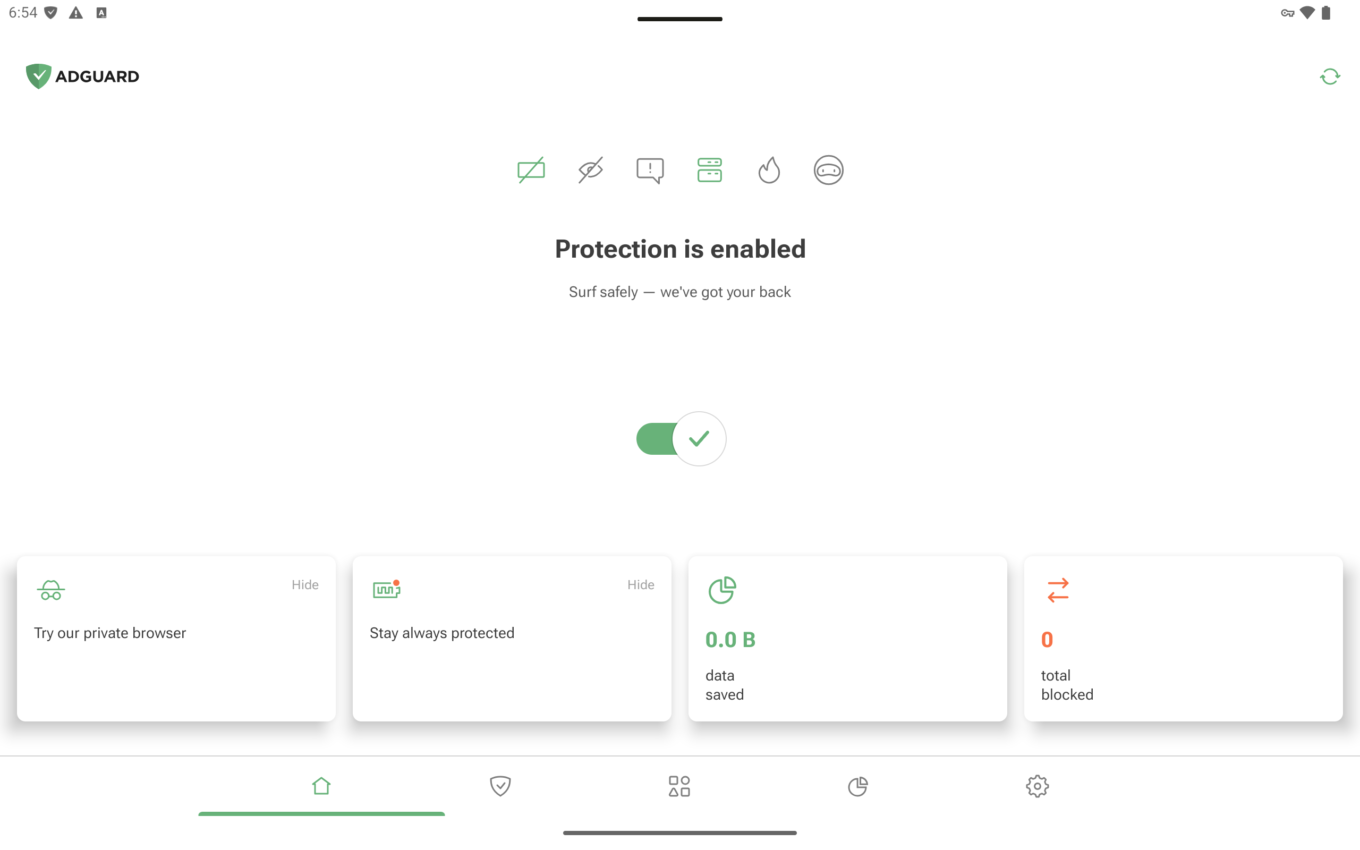
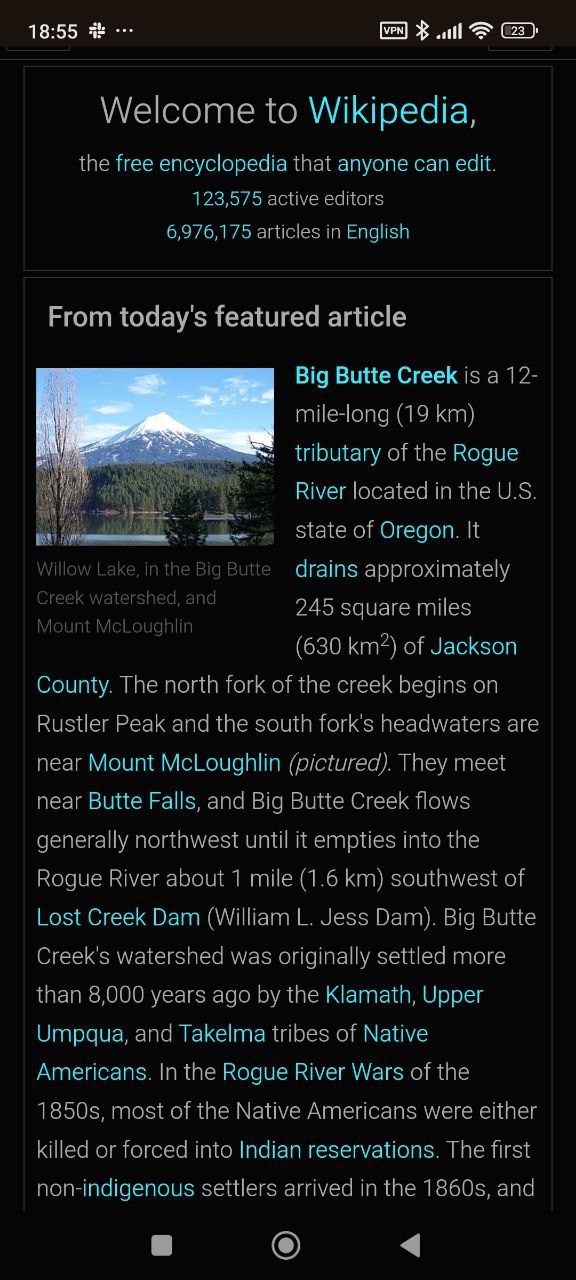
Native support for userstyles. The feature that has been available in our Windows and Mac products now finds its way onto Android! Userstyles are similar to userscripts, but they only focus on changing the appearance of websites, without getting into their code.
Other big changes:
Code base unification. This is a fancy way of saying that updates now will be more stable and new features will be added faster.
Improvements to the HTTPS certificate installation process. The HTTPS certificate plays a key role in ensuring effective ad filtering in browsers — without it, filtering quality is significantly reduced. So we added in-app guides for the most common Android devices with adjustments based on Android OS version and user locale.
Find out even more about new features in AdGuard for Android by visiting the version history page.
AdGuard Browser Extension
The changelog for AdGuard Browser Extension this year was, perhaps, the most busy-looking among all products. However, large chunks of it are various under-the-hood improvements and minor fixes. Still, there were a few big things worthy of a highlight, and I chose this one:
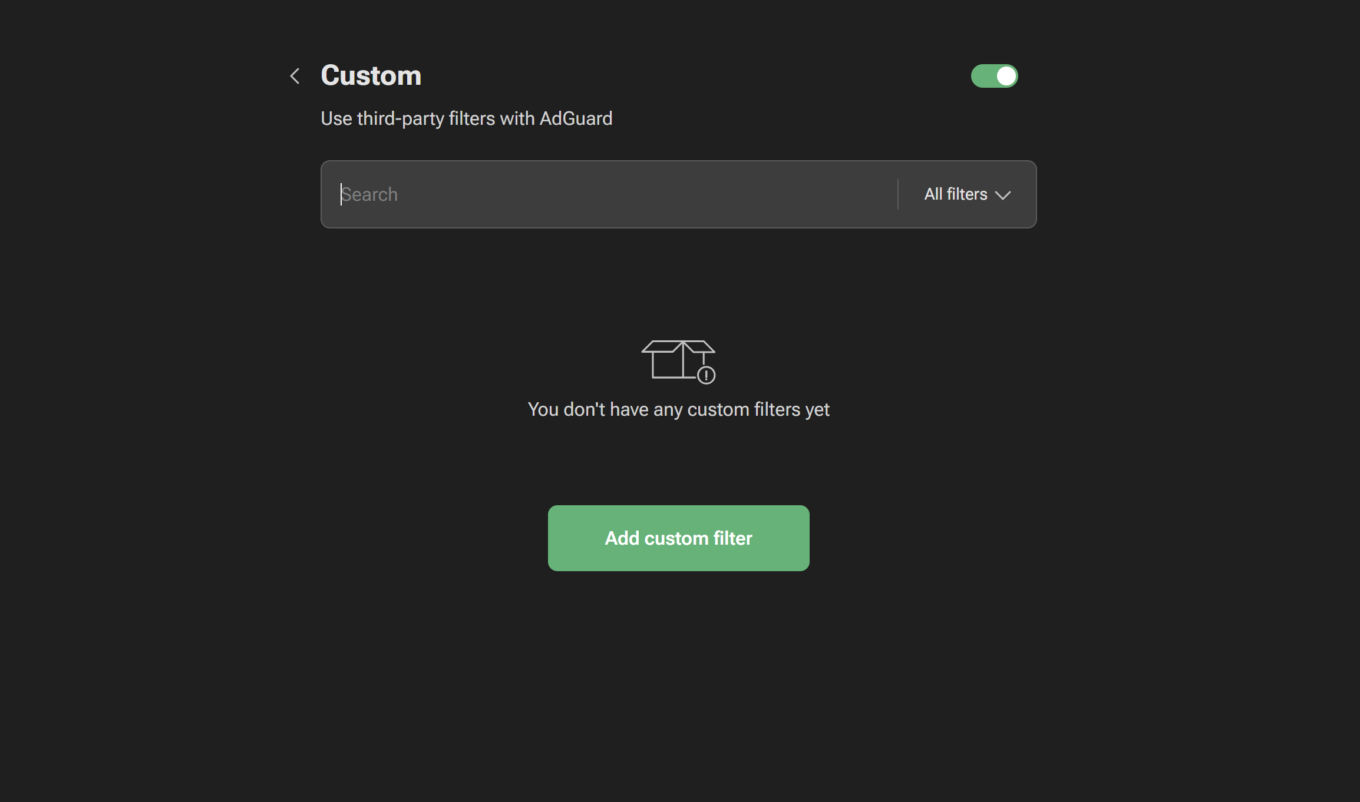
Custom filters in the MV3 extension. We had to give this feature a break after our migration to MV3 because of API limitations, but now it’s back, and it’s just as good as it used to be.
Other big changes:
Update sync for Manifest V2 and Manifest V3 versions. In case you missed all the buzz around Chrome’s new Manifest V3 API, you can catch up here. Essentially, we had to create a new browser extension specifically for MV3, but starting with version 5.1 and onwards both extensions will be in perfect sync, with their versions updated at the same time.
Faster filter updates in the MV3 extension. In MV3, filters are updated together with the extension itself. These updates used to take a long time sometimes, but now we found a way to speed things up significantly. We also added a Check for updates button!
Interactive blocking pages. You’ve already heard about it from the other products’ recaps — it is more of the same. When a page gets blocked by AdGuard, rather than facing a roadblock you will see an explanation of what happened along with some options of how to proceed.
As usual, the complete changelog is available on the version history page for the more curious readers.
One more cool thing we’d like to mention about AdGuard Browser Extension before we move on: it is now featured in Edge for Android! It even was among the very first ad blockers to get into the Edge for Android extensions store. So if you are an Edge desktop user and rock an AdGuard Browser Extension there, you might want to try it out on Android as well.
Server at the end of the tunnel
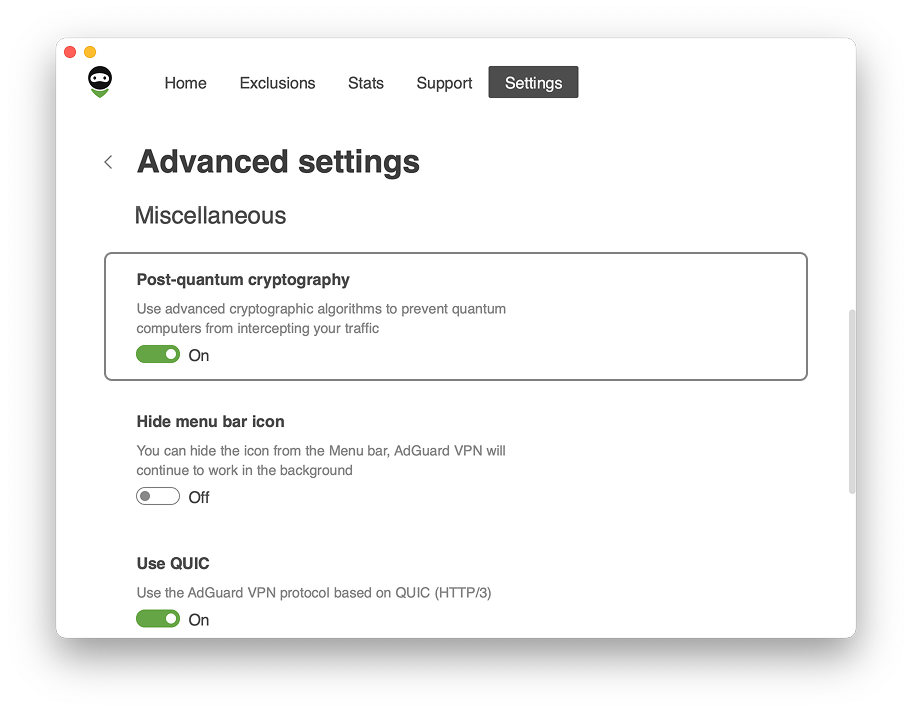
Moving on to AdGuard VPN! Before we go over all the new exciting features product by product, let’s talk about one major overlapping change: all AdGuard VPN apps now support post-quantum cryptography! This sounds like something straight out of a sci-fi movie, but it’s quite real.
Quantum computers are on course to break current encryption methods as soon as in 2029, but it’s worse: hackers are already collecting encrypted data, planning to decrypt it later when quantum computers become more widely available. So we didn’t want to wait until quantum computing became widespread and took action now. You will find the option to enable post-quantum cryptography in Advanced settings of all AdGuard VPN apps — and our advice is to do so. The drop in performance is negligible, and it's a more than fair trade-off for significantly improved security that could save you a lot of headache in the future.
And now back to our regularly-scheduled programming.
AdGuard VPN desktop apps
Some of the major new features in our apps for Mac and Windows are, in fact, quite similar, so we’ll cover them together. Let’s start with the biggest one:
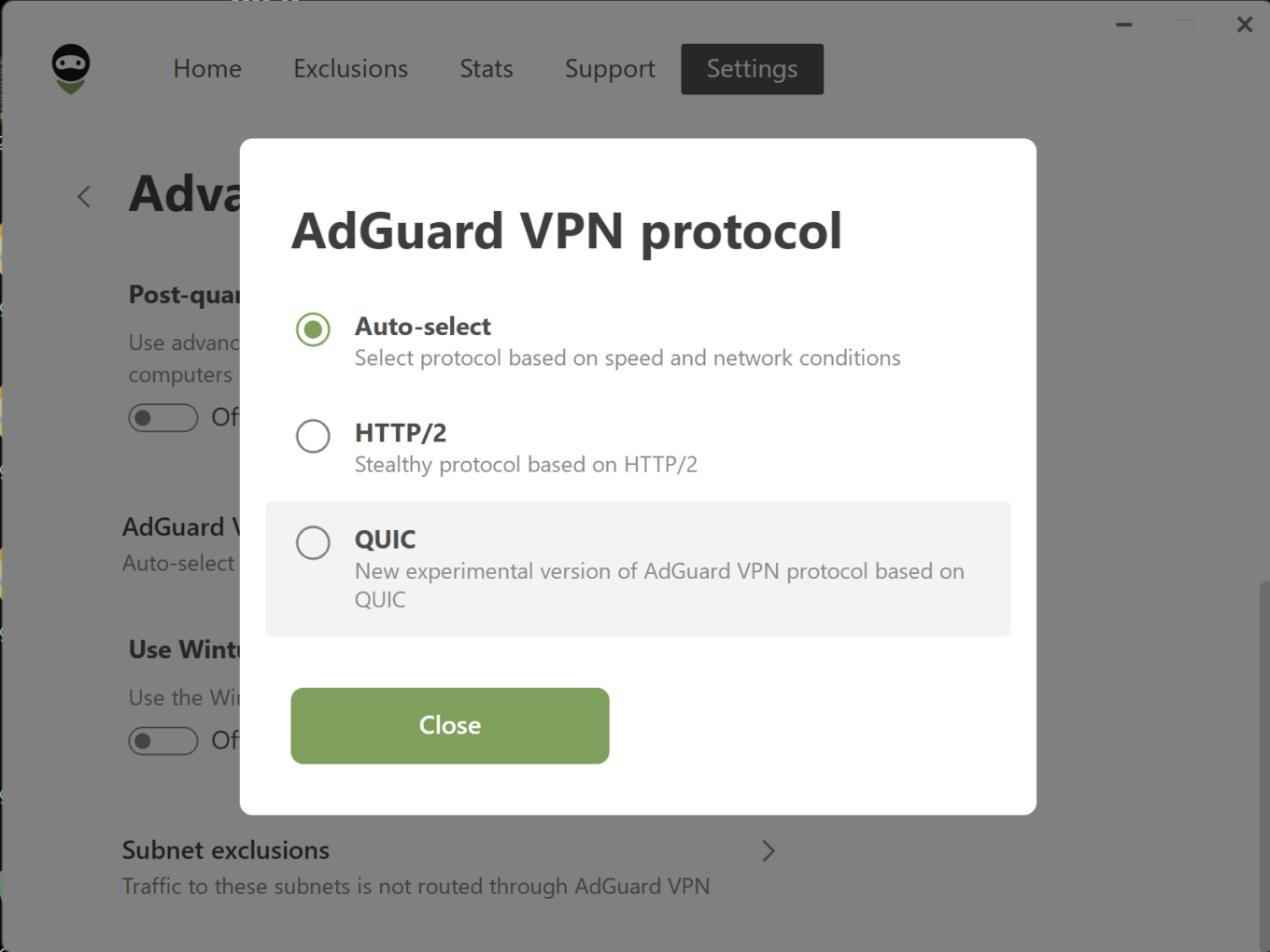
Dynamic VPN protocol selection. If you’re not quite sure if HTTP/2 or QUIC protocol is better, or you don’t want to waste time switching it back and forth time and again, just use the Auto-select option. It will automatically pick whichever protocol is faster and more stable under the current conditions.
Other big changes:
New toggle for startup behavior. In addition to Launch at startup, AdGuard VPN now also features Open main window at system startup toggle.
A couple more things which are important to highlight but are exclusive to AdGuard VPN for Windows app:
Reopen time optimization. We lowered the time it takes to open the AdGuard VPN app from the desktop icon from 2-2.5 seconds down to just 0.2-0.3 seconds. It may not seem like much, but it adds up over time.
Better accessibility support. We continue to make AdGuard VPN more inclusive — you can now rely on screen readers for clear descriptions of icons, buttons, and dynamic elements on the home, authorization, and onboarding screens.
You can find more details about the changelog on the version history page: AdGuard VPN for Windows and AdGuard VPN for Mac.
AdGuard VPN mobile apps
Similarly to the desktop apps, we’ll cover AdGuard VPN for iOS and AdGuard VPN for Android together. So what’s new in the mobile department?
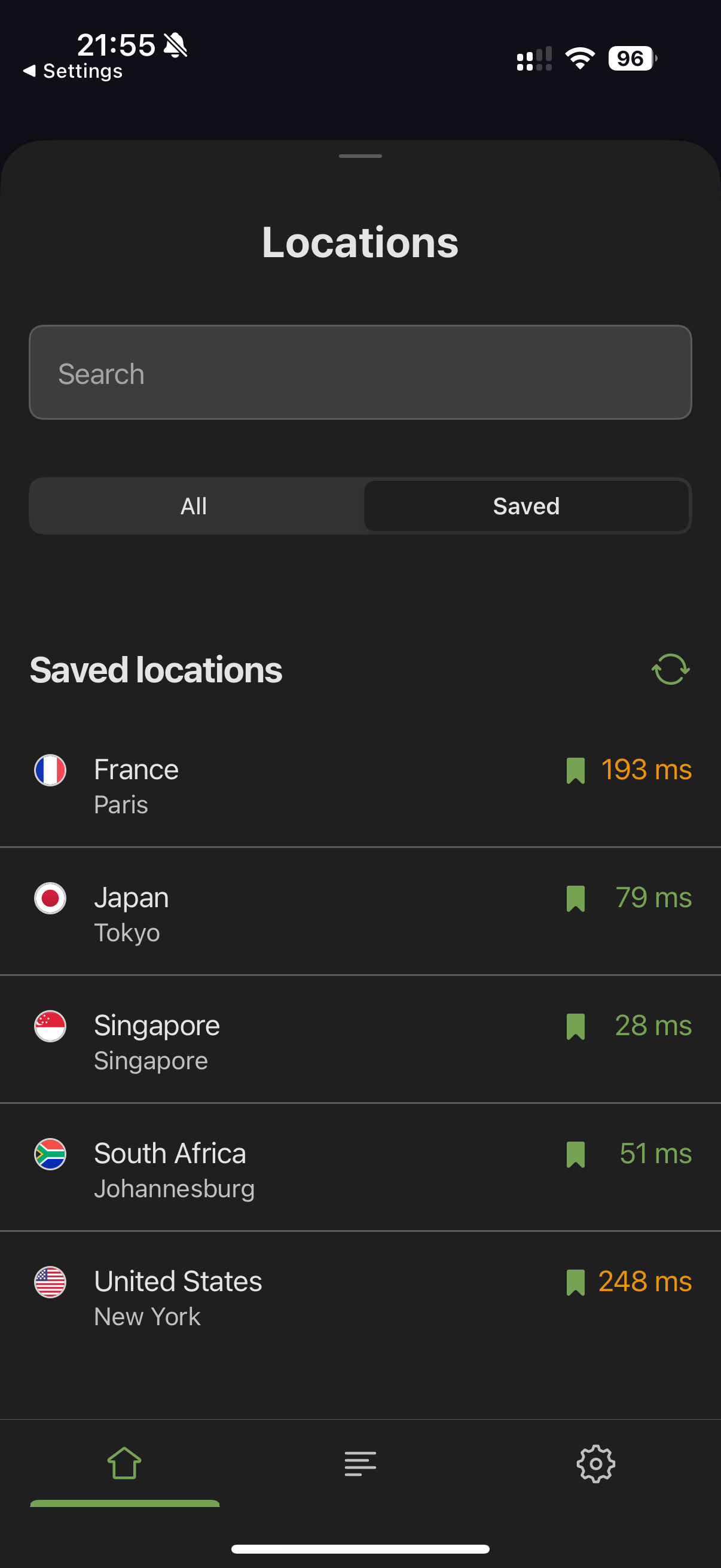
Saved locations. Another change that we made to the desktop apps at the tail end of the last year and that finally made its way to the mobile apps in 2025. This is a must-have quality-of-life feature that you need to try once to immediately realize just how handy it is in everyday use.
Other big changes:
Web-based authorization. Now, whenever you log in or create an account, you’ll be taken to a browser page where you can access your AdGuard account and log in seamlessly. It allows for the use of various password managers, makes maintaining the service for us easier, and the entire authorization process for you more consistent — we made the same change for our desktops apps last year.
Dynamic VPN protocol selection. Same as with desktop apps, choose the Auto-select option for AdGuard VPN protocol to always have the fastest and the most stable connection possible.
By the way, AdGuard VPN for Android has passed an independent security review and received a verification badge on Google Play! It guarantees that the app doesn’t share any data with third-parties, encrypts data in transit, and that you can request your data to be deleted.
Visit the version history page for more information on the changes we made to AdGuard VPN for Android and AdGuard VPN for iOS.
AdGuard VPN browser extension
Some of the changes that AdGuard VPN browser extension has undergone we’ve already mentioned when talking about other platforms: saved locations, web-based authorization. Let’s stop by the ones unique to it:
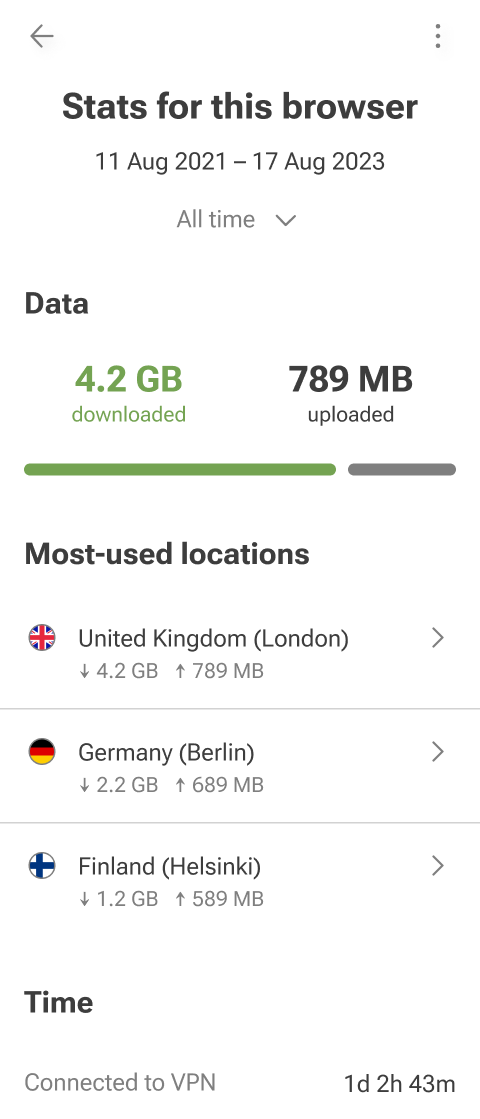
New Stats section. It’s a simple way to keep track of how much data passes through your VPN connection. Note that all statistics are stored locally on your device and can be disabled if you don’t need them. This feature is part of AdGuard VPN Unlimited and is available to all users on the paid plan.
Other big changes:
AdGuard VPN extension for Edge is now MV3-compatible. Microsoft Edge is following Google’s lead in adopting Manifest V3 for extensions, so we had to do the same song and dance in preparation for it as we did for Chrome.
And to top it off, similarly to AdGuard Ad Blocker, AdGuard VPN extension has become one the first VPN extensions available on Edge for Android!
It’s impossible to cover everything, so if you want more, check out the version history.
Three steps ahead of the ‘bad’ domains
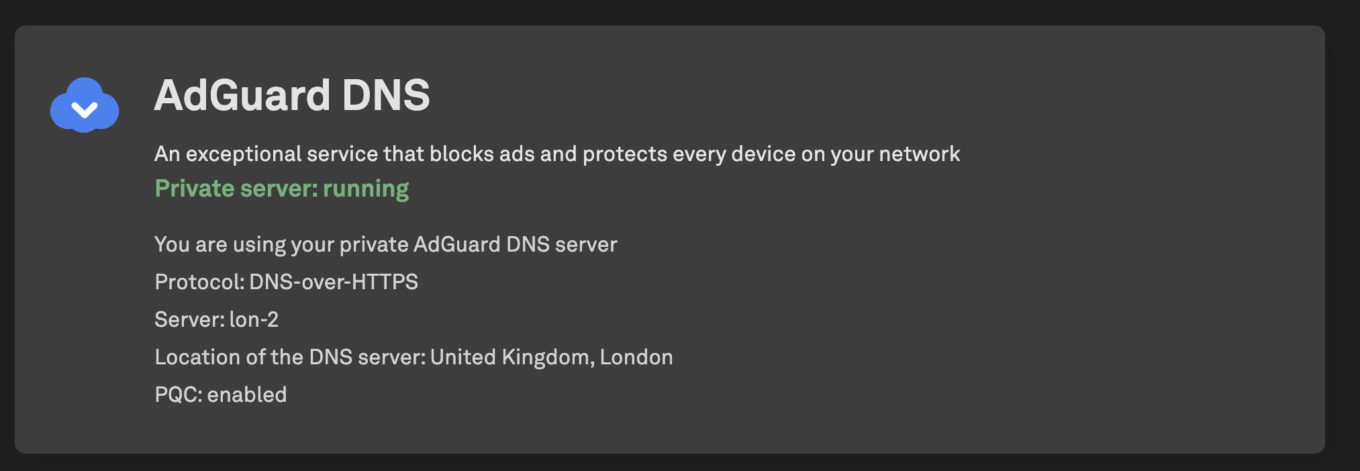
It’s time to talk about AdGuard DNS! And what an eventful year it was for our DNS product. You already know about the mobile app, but that’s only the tip of the iceberg. For starters, AdGuard DNS now also supports post-quantum cryptography! But honestly, that’s underselling it. It is the first DNS service to offer client-side post-quantum cryptography, and it is now on a very short list of early adopters of the technology — just behind Google and Cloudflare. Definitely read the article if you are interested in how this technology is implemented in AdGuard DNS. But the best part is: you can start using it right now. For that, you would need one of the Nightly builds of AdGuard Ad Blocker, but other than that, it is quite simple.
We can’t help but share with you our joy at the growing adoption of AdGuard DNS. First, back in January, ASUS, a leading router manufacturer, has integrated AdGuard DNS as a built-in feature in all of its Wi-Fi 7-compatible models. It truly felt like a milestone and a confirmation that our efforts to improve AdGuard DNS and make the Internet safer for everyone pay off.
How about another feel-good story about AdGuard DNS? In October, one of the Japanese schools officially adopted AdGuard DNS, launching it across all teacher devices and preparing to roll it out to student devices as well.

We are very proud to help make the learning experience for kids at the Shotoku Gakuen school safer and more enjoyable. We believe this is just the beginning of a broader movement — we’re already working toward a larger-scale adoption of AdGuard DNS across Japan (and possibly around the world!) in the coming years.
But what about AdGuard DNS itself? Has it become better? Did it get any new features? Yes it did, and quite a lot, but we have to highlight one, so here it goes:
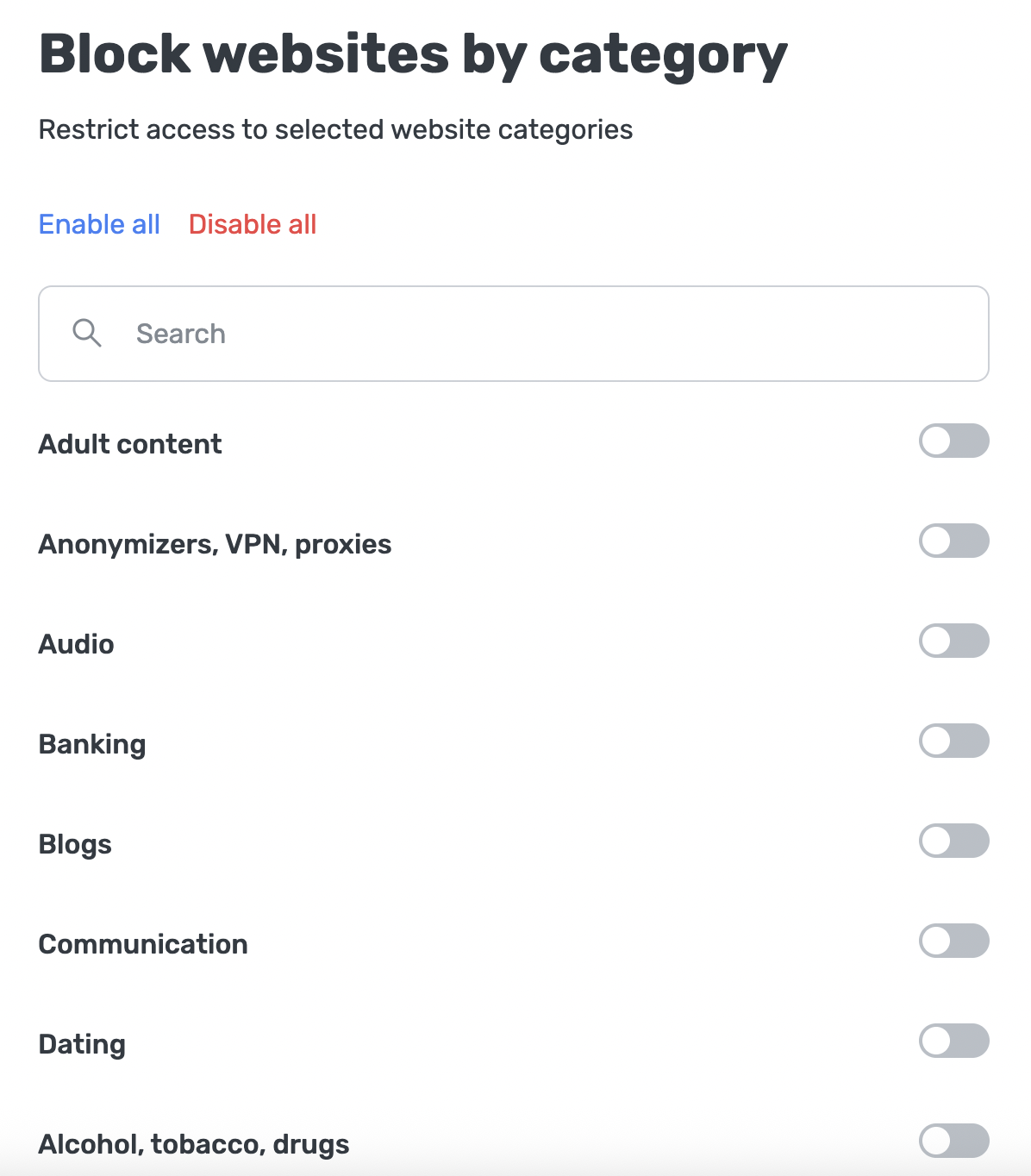
Category-based service blocking. Now Parental control features more than 20 blocking categories (such as Adult content, Games, Alcohol & tobacco), so you have a more convenient way to control access.
Other big changes:
Free trials on all plans. For home use, after you sign up, we’ll immediately offer you a 30-day trial of the Personal plan. But even if you’re after the Team or Enterprise plan, submit a request, and after a short dialog with our support team we’ll send a 30-day trial your way.
Role-based access. For more secure and convenient DNS management, we added the option to invite members with individual roles (Admin or Viewer).
Custom block pages. You can now display your own custom page for phishing or adult websites instead of the standard AdGuard DNS block page.
Custom domains. Be it for branding, compliance, or internal IT purposes, if your company needs to use a custom domain name over the default one, the option is now available to you.
Believe us when we say there are even more cool features, we physically can’t list them all here. Find out more about what AdGuard DNS has to offer by going to the version history page.
Beyond 1s and 0s
The backbone of AdGuard is its products — Ad Blocker, VPN, DNS, Mail. But we don’t just operate with code and release cycles. Over the last year, we’ve written a lot of articles on topics such as ad blocking, privacy, AI even. Some of them covered hot news happening in the world of ad blocking and privacy protection, others were based on our own research. Let’s take a minute or two to refresh in our memories some of them — the most newsworthy ones, but also the ones that maybe made us chuckle a bit or even go ‘Wait, what?’
The age of age verification laws
Throughout the year there wasn’t any shortage of news about this or that thing threatening people’s privacy. However, if we had to choose one topic that overshadowed the rest by its future implications for privacy, it would be age verification laws and adjacent legislative initiatives. And the news was coming from where we expected it the least. With GDPR and other privacy-protecting laws, we grew accustomed to Europe being the privacy stronghold of the world. But first UK has introduced mandatory age checks for porn sites and services like Reddit or Discord, and then Italy followed suit by passing the law that made age verification a requirement to visit any websites with adult content.
This is very concerning for privacy in and of itself. The more data websites and services collect, the easier it is for it to get leaked or breached. The perfect example is the very same Discord getting hacked for government-ID images used for age verification. But there is another, perhaps even more alarming consequence of this trend. Seeing how more and more people opt for VPNs to circumvent governmental bans, the lawmakers in UK and parts of the US started toying with the idea of restricting or outright banning VPNs altogether. These bills may not have become laws yet, but the fact that the idea itself is now on the table is scary. And it’s not like there are no real examples of VPNs getting under legal pressure. It wasn’t too long ago when France ordered a number of VPN services to block over 200 domains associated with piracy, officially labelling them as “technical intermediaries,” meaning they’re being treated more like broadcasters or platforms rather than neutral privacy tools.
Ad blockers under fire
It wasn’t just VPNs who felt pressure in the last year. Ad-blocking and, more generally, content-filtering tools faced their own share of problems. When covering this topic, it’s impossible to avoid talking about Manifest V3. This new Chrome’s API presented browser extension developers with a whole new, much harsher set of rules to follow, and the question we asked ourselves in the beginning of the year was: will ad-blocking extensions be able to adapt?. We started working on the MV3-compatible version of AdGuard Browser Extension early and managed to release it well in advance, in 2024. However, not all developers were able or willing to adapt to the new reality. The most prominent example was, of course, uBlock Origin, whose developer refused to change the code to satisfy the MV3 requirements, and so it was disabled in Chrome forever.
While Google switching to Manifest V3 did impede the functionality of ad blockers, the same API changes that caused these limitations helped improve users’ privacy. So there is a silver lining in this cloud. But while we successfully dealt with the challenge that MV3 presented, more are still looming, including those that pose a threat to the very idea of ad blocking itself. In August we were reminded of how fragile the entire concept of blocking ads is. German Federal Court of Justice has revived the case of Axel Springer vs. Adblock Plus. If you are not in the loop, Axel Springer is a German media company that tries to prove in court that ad blocking is illegal. Their legal battle against AdBlock Plus goes on for over 10 years now, and after the last case dismissal two years ago many had assumed that it was over and the good guys won. Turns out, it’s never over until it’s over. And while nothing is lost yet, the entire community is watching the situation very closely, as the consequences of the court making a ruling in favor of Axel Springer may be enormous.
But there are enough things to worry about even outside the court rooms. The International Advertising Bureau, an organization that sets standards and provides support for the online advertising industry, has introduced a new open-source initiative called Trusted Server that’s aimed, among other things, at bypassing ad blockers and minimizing the revenue loss that comes with them. It is highly unlikely that Trusted Server will prove to be some kind of an unbeatable challenge, but it is yet another reminder that there are plenty of those who would like to get rid of ad blockers altogether.
It’s not all doom and gloom
A very important skill in life is to be able to laugh even when the world throws at you some bad news or yet another challenge to overcome. Because if you can’t laugh at that, what else are you going to do when your $1800 smart fridge (using ‘smart’ very loosely here) shows you ads instead of weather or some stand-by picture? People online have been joking about soon-to-come Fridge+ subscriptions to disable pre-roll ads that would otherwise pop up before you can even open the door. Actually, forget the fridges, how about watching ads to be able to get a ration of toilet paper in a public restroom? Talk about crappy situations to find yourself in.

Speaking of not-so-good laughs. It certainly felt like a bad joke when we found out about websites who would break after trying to reinsert blocked ads, and then lie and blame the ad blockers for it. We have to admit, it takes some gall to mess up your own website trying to outsmart an ad blocker and then to blame the very same ad blocker after you fail.
To finish off this section, a couple of stories that are more amusing than outright funny. For example, we all were quite excited when out came an episode of Black Mirror about a person getting an ad-supported subscription to her brain chip. Her life-saving surgery came at a cheap price, but with a serious catch: the heroine becomes a literal vehicle for ad delivery, interrupting her own conversations to voice ads without even realizing it. The parallels with the ever more aggressive ad-supported subscription tiers of streaming services are uncanny. And finally, let’s give a shoutout to Stijn Spanhove, a Belgian programmer who single-handedly built an app for AR glasses that blocks ads in real life.

It may not achieve the desired effect yet, but we love the spirit!
AdGuard article medley
Every time we do a recap, there are a couple of articles left that we have to mention, but no matter how you twist and turn them, they don’t fit into any specific section. So let’s out them in the limelight here, in no particular order.
Google’s announced the end of Privacy Sandbox. This initiative, originally launched in 2019 and supposed to make online tracking for targeted advertising “more private,” has been struggling through the entirety of its existence. Many privacy experts claimed that it attempted to achieve unachievable, and judging by the eventual outcome, they may have been correct.
AdGuard’s investigation into the suspicious pressure on the Archive.today web snapshot archive. To be honest, we won’t be surprised if one day someone from Hollywood will decide to make a movie based on this story. It has everything: mystery, drama, blackmail, deception. Just read the article — it will be worth your time.
Ad blockers save more time and bandwidth than you think, says AdGuard research. We analyzed how ad blockers interact with over 100 news websites, and the results came out quite surprising: after we’d finished all the calculations, we were able to estimate that not using an ad blocker costs you about 80GB of data and 52 hours of time every year!
Celebrating the 50th issue of our privacy-focused newsletter AdGuardian. We first came up with the idea in 2023 when we decided that we wanted to bring our vision of the most important news and events from the worlds of ad blocking and privacy closer to you. This year marked both the 2-year anniversary and the 50th issue of AdGuardian, and we are already well on our way to the 100th!
To receive AdGuardian newsletter, make sure that Language for emails in your AdGuard account language is switched to English and that AdGuardian Privacy Guide is ticked off in your Opt-out preferences!
Ad-Filtering Dev Summit 2025
There is a tradition in the ad-blocking community: since 2018, once a year the developers of ad blockers and browsers, filter maintainers, and privacy researchers all gather together at the Ad-Filtering Dev Summit (or AFDS for short) to discuss hot topics and share thoughts on the current happenings. In October 2025, we (along with Ghostery and eyeo) organized the event on our home turf of Limassol, Cyprus, on the picturesque beachfront next to the warm Mediterranean sea.
And we’re happy to say that the event was a total success! We talked about everything, from new browsers functionalities and how they affect content filtering to avenues for employing AI in ad blocking, from automating filter rules creation to how we communicate complex privacy concepts to users.
The summit was not without speakers representing AdGuard!
Andrey Meshkov, Founder, Owner and CTO of AdGuard, scrutinized Apple’s new privacy-preserving system-wide URL filtering framework and how AdGuard has already implemented it.
Sofia Orlova, UX writer at AdGuard, outlined how AdGuard approaches UX writing and interface design to make privacy accessible.
Dávid Tóta, main developer of AGLint, and Elizaveta Egorova, developer, filter list maintainer, and AG Lint contributor, told us about the evolution of AGLint, a powerful tool designed specifically to assist the maintainers of filter lists.
Maxim Topciu, Browser Extensions Team Lead at AdGuard, explored how large language models (LLMs) can change our approach to blocking ads.
There were, of course, dozens of other speakers, raising all kinds of great topics and sometimes even sparking heated discussions with their talks! You can watch all of them in their entirety on YouTube.
Here’s to another wonderful summit next year!
Helping folk with TechTok
Just like that iOS update, TechTok is another example of a topic technically from 2024 that wasn’t mentioned in last year’s recap, and that’s why we will consider it a 2025 thing. So, what is TechTok? It’s a place where you ask us anything about technology — preferrably, within our areas of expertise like ad blocking or privacy protection, but honestly anything goes — and we answer the most interesting and popular questions. It’s been almost exactly a year and 11 TechTok issues since we started, so quite a few questions have been answered over that time. Here are some of our favorites:
What is a VPN tunnel and how does it work? This is where it all started, issue #1, and to this day one of the most commonly asked questions. If you use a VPN, or plan to, this is a must-read.
What is DNS? What is the difference between various DNS protocols? Another absolute classic of a question, which we cover in issue #4. Honestly, useful to have some idea about even if you’re not running any DNS-level protection (which you should!).
What is fingerprinting and how to minimize your digital footprint? This is issue #6, where we discuss everything fingerprinting-related. Privacy is essential, and knowing how to make sure your devices and software don’t spill more about yourself than necessary is very important.
Which one is better for your privacy — iOS or Android? With a question like this, there is always a risk of setting something on fire — the discussions may become that hot. But we tried our best to give an unbiased answer in issue #10.
Let’s hope that TechTok remains strong next year! You can help us by sending your questions:
Signing off for 2026
And that’s it — the entire year jammed into one article. You might have noticed that this recap turned out to be on the longer side. This year has genuinely been so, so tightly packed with new product releases, updates, researches, articles, and events that we can’t help but feel proud about what we have achieved. But the truth is, we wouldn’t be able to achieve this much without you! Thank you to everyone who helped translate our products, test apps, report bugs, improve filters. Without them, AdGuard would not be what it is. And we don’t say this lightly, we really mean it: we’re sending a few AdGuard goodies to the most active and prominent contributors of the year.

And with that let’s wave 2025 goodbye, and see you again in 2026 — we promise that it will be just as exciting and eventful, if not more! Happy New Year!